Skip to content
-
Subscribe to our newsletter & never miss our best posts. Subscribe Now!
Work Management Hub Work Management Hub

Expert Reviews, Comparisons & Guides for Smartsheet, Monday.com, Asana, ClickUp & More

Work Management Hub Work Management Hub

Expert Reviews, Comparisons & Guides for Smartsheet, Monday.com, Asana, ClickUp & More

  • Airtable
  • Asana
  • ClickUp
  • Jira
  • Monday.com
  • Notion
  • Smartsheet
  • Wrike
  • About
  • Contact
  • Airtable
  • Asana
  • ClickUp
  • Jira
  • Monday.com
  • Notion
  • Smartsheet
  • Wrike
  • About
  • Contact
Close

Search

  • https://www.facebook.com/
  • https://twitter.com/
  • https://t.me/
  • https://www.instagram.com/
  • https://youtube.com/
AsanaProject ManagementTool Comparisons

Linear vs Asana 2026: Which Is Better for Engineering Teams?

By Shaik KB
May 23, 2026 23 Min Read
0

Linear vs Asana 2026: Which Is Better for Engineering Teams?

Published May 2026  |  Category: Work Management  |  Tools: Linear, Asana

⚡ Key Takeaways

  • Linear wins for pure engineering teams: its bidirectional GitHub integration, auto-rolling Cycles, and keyboard-driven UI directly reduce time-to-ship and sprint friction in ways Asana simply cannot match.
  • Asana wins for cross-functional organizations: 200+ integrations, portfolios, OKR tracking, and workload management on the Advanced plan ($24.99/user/month) make it the superior org-wide operating system.
  • Linear’s free plan includes cycles, roadmaps, and GitHub/GitLab integration for unlimited members — Asana’s free plan has no native sprint or cycle feature and no auto-rollover of incomplete work.
  • For a 50-person team, Linear Basic ($10/user/month annually) saves approximately $3,300 per year versus Asana Starter ($10.99/user/month annually) — and the engineering workflow experience is meaningfully better.
  • The decision rule: if your team is a dedicated software engineering team, choose Linear. If you are rolling out a single tool across engineering, marketing, design, and operations, Asana’s ecosystem breadth and portfolio reporting justify the premium.

Quick Answer:

For engineering teams in 2026, Linear is the clear winner. Its purpose-built sprint cycles, real-time GitHub sync that closes issues on PR merge, and near-instant keyboard-driven interface deliver measurably better developer experience than Asana. Asana is the right choice only when engineering is one of several departments sharing a single cross-functional work management platform.

Table of Contents

  1. Tool Overview: Two Fundamentally Different Products
  2. Developer Experience: UI Speed and Keyboard Workflow
  3. Sprints and Cycles: Where Linear Separates Itself
  4. GitHub Integration: Bidirectional vs Bolted On
  5. Roadmaps and Project Planning
  6. Cross-Functional Teams: Asana’s Structural Advantage
  7. Side-by-Side Comparison Table
  8. Pricing Breakdown 2026
  9. Which Tool Wins for Your Team Size and Structure
  10. Verdict
  11. FAQ

Tool Overview: Two Fundamentally Different Products

The Linear vs Asana comparison is one that comes up constantly in 2026 — and it is almost always framed incorrectly. Most engineering leaders approach this as a feature comparison between two work management tools. It is not. It is a choice between a precision instrument and a general-purpose platform, and getting that distinction wrong will cost your engineering team months of friction.

Linear was built by ex-Figma and Coinbase engineers with a single obsession: making issue tracking for software teams fast, opinionated, and free of enterprise bloat. The product is not trying to serve HR, marketing, or operations. It is not trying to replace Confluence, Notion, or your OKR platform. Linear does one thing — manage engineering work from issue to deployment — and it does it better than anything else in the market. The 2026 version of Linear has expanded meaningfully with the addition of the Linear AI Agent for automated triage and the new Linear Releases feature for CI/CD deployment tracking, but the core product philosophy remains unchanged: clarity over comprehensiveness.

Asana was built on a fundamentally different conviction. Founded by Dustin Moskovitz and Justin Rosenstein — both early Facebook engineers — Asana was designed to be the operating system for work across the entire organization. In 2026, Asana serves marketing teams running campaign calendars, operations teams managing vendor onboarding, HR teams tracking hiring pipelines, and engineering teams managing sprints — all from the same platform. The Advanced plan ($24.99/user/month) includes portfolios, OKR-style goals tracking, workload management, and advanced reporting that go well beyond what any pure engineering tool offers. For details on Asana’s OKR functionality specifically, see our guide to Asana Goals and OKR tracking in 2026.

The fundamental question for your decision is not “which tool has more features?” — Asana wins that easily. The question is: does my engineering team need to share a tool with the rest of the company, or do they need the best possible engineering workflow? If the answer is the latter, the comparison ends quickly. If the answer is the former, the picture is more nuanced and the analysis below will help you build the case either way.

Developer Experience: UI Speed and Keyboard Workflow

Put a senior software engineer in front of both tools and the reaction is consistent. Linear feels like it was built by engineers, for engineers. Asana feels like it was built for everyone — which means it was not optimized for any specific workflow in particular.

This is not subjective preference. It is a measurable consequence of architectural choices Linear made at the product’s founding. Linear uses a local-first sync model: your data is cached locally so that every UI interaction responds against local state before syncing to the server in the background. The result is that creating an issue, changing a status, assigning a team member, or linking a PR all happen with effectively zero latency. There are no loading spinners. There are no skeleton screens. There are no page-level reloads when you navigate between projects. The interface is genuinely instant in a way that no other work management tool in 2026 has fully replicated.

Keyboard shortcuts that engineers actually use

Linear’s keyboard shortcut system is one of its most underappreciated engineering-specific features. The full command palette is accessible at any point with Cmd/Ctrl + K. Common actions have single-key shortcuts: C to create a new issue, P to set priority, S to set status, A to assign, G I to jump to the inbox, G M to go to My Issues. Engineers who prefer their hands on the keyboard — which is most of them — can operate Linear for hours without touching a mouse. According to Linear’s official documentation, the shortcut system was designed specifically to support high-frequency daily workflows: triaging the inbox, updating cycle status, and moving issues through review.

Asana has keyboard shortcuts, but the product’s feature breadth means navigating between sections, views, and projects requires significantly more mouse interaction. The interface is clean and well-designed by any standard, but it was not architected for keyboard-first power users. For engineers running 30-50 issue updates per day, this compounds into meaningful time lost over a week — and into a tool that engineers actively resist using because it slows them down relative to their native workflows.

Linear’s minimalist dark-mode UI: a deliberate product decision

Linear’s dark-mode interface is not a cosmetic preference — it is a signal about the product’s intended user. The interface is dense with information without being cluttered, uses monospace fonts in key areas, and surfaces development-relevant metadata (PR status, branch names, cycle state) in contexts where non-engineering tools would surface due dates and assignee avatars. Engineers report spending less cognitive load managing the tool and more time working because Linear removes the decisions that do not matter to the engineering workflow.

Asana’s interface is polished and increasingly customizable, but it carries the visual weight of a tool designed for a broad non-technical audience. For a marketing manager or HR business partner, those design choices are features. For an engineering team that just wants to see what is in the current sprint, they are noise.

Winner: Linear. For engineering teams where developer experience and UI speed are decision criteria, Linear’s advantage is large and consistent across team sizes and experience levels.

Sprints and Cycles: Where Linear Separates Itself

The sprint management comparison between Linear and Asana is not close — and for an engineering team evaluating these tools, it may be the single most important data point in the entire analysis.

Linear Cycles: purpose-built sprint management

Linear Cycles are the sprint primitive in Linear, and they are built with engineering workflows as the primary design constraint. Creating a new Cycle takes seconds: set a start date, an end date, and add issues. The Cycle view shows every issue in the current sprint with its status, priority, assignee, and linked PRs in a single uncluttered list. As the sprint progresses, Linear tracks velocity — the number of issues completed versus total issues in the cycle — and displays a burndown chart automatically. No dashboard configuration required. No widget setup. No report scheduling. The data is there because it is always being tracked in the background.

The standout feature is automatic rollover. When a Cycle ends, any incomplete issues are automatically moved to the next Cycle. This sounds like a small operational detail, but it is a significant workflow improvement over tools that require manual triage at sprint end. In practice, engineering teams using tools without auto-rollover spend 30-60 minutes per sprint boundary deciding which incomplete issues carry forward, which get de-prioritized, and which need to be re-estimated. Linear eliminates that meeting by making rollover the default behavior.

Over time, Linear’s Cycles generate velocity data that informs planning in concrete ways. Teams can see their average completion rate across the last 10 cycles, identify sprints where scope was chronically underestimated, and calibrate their capacity planning accordingly. This is not a reporting add-on — it is a natural output of the Cycle model that requires no additional configuration.

Asana’s sprint workaround reality

Asana has no native sprint or cycle feature at any plan tier. This is not a gap at the free tier that upgrades resolve — it is an architectural product decision that reflects Asana’s positioning as a general-purpose work platform rather than an agile engineering tool.

Engineering teams on Asana have found workable approaches. The most common pattern is using Sections within a project to represent sprint periods (e.g., “Sprint 22 — May 12-25”), combined with Asana Rules on the Starter plan and above to move tasks between sections based on due dates or completion triggers. On Starter and above, Timeline view — see our Asana Timeline setup guide for the detailed configuration process — provides a Gantt-style view of task sequencing that can approximate sprint planning visually. But these are workarounds built on top of a general task management system, not a sprint system. They require setup, maintenance, and team discipline that Linear’s opinionated Cycles model eliminates.

The auto-rollover gap is particularly impactful. When a sprint ends in Asana, incomplete work stays where it is. Someone — typically the engineering manager or a scrum master — needs to manually review all incomplete tasks, decide which carry forward to the next sprint, move them to the appropriate section, and update due dates. For a 10-person engineering team running 2-week sprints, this is 30-60 minutes of administrative work every two weeks. Annualized, that is 13-26 hours of engineering management time spent on task housekeeping that Linear automates entirely.

Winner: Linear, decisively. If sprint management is a primary use case for your engineering team, Asana requires significant workaround engineering to reach parity with what Linear provides out of the box — and still cannot match Linear’s automatic rollover and native velocity tracking, even with extensive configuration.

GitHub Integration: Bidirectional vs Bolted On

The GitHub integration story is where Linear’s purpose-built focus generates its most concrete competitive advantage over Asana. This is also the area where the gap is most likely to widen over time, as Linear continues to invest in developer tool integrations while Asana prioritizes its broader integration ecosystem.

How Linear’s GitHub integration actually works

Linear’s GitHub and GitLab integration is native, bidirectional, and designed to require zero manual work from engineers once it is set up. The integration is available on every plan tier, including the free plan. Here is what it does automatically:

  • Branch naming: When an engineer starts work on a Linear issue, they can create a branch directly from the issue view. Linear generates a branch name in a consistent format — for example, eng/ENG-342-implement-payment-webhook — keeping your repository branch names organized and queryable without requiring any naming conventions documentation or manual enforcement.
  • PR auto-linking: When a PR is opened with a branch name that references a Linear issue ID, Linear automatically links the PR to the issue. The PR status — open, review requested, approved, merged — appears in the Linear issue timeline in real time without any action from the engineer.
  • Status auto-updates: As a PR moves through the review process, the linked Linear issue updates its status automatically. When the PR is merged, Linear can close the issue entirely — completing the loop between code repository and issue tracker without a single manual update from the engineer.
  • Commit references: Commit messages referencing Linear issue IDs (e.g., Fixes ENG-342) surface in the issue timeline, providing a complete audit trail from issue creation through code merge.

The net effect is that engineers do not have to context-switch between GitHub and Linear to keep the issue tracker current. The tracker updates itself based on what actually happens in the code repository. For engineering managers, this means the sprint board reflects actual development state rather than whatever engineers remembered to update at standup. This is the kind of integration that removes “update your tickets” as a recurring sprint retrospective action item — because the tickets update themselves.

For teams also using Linear’s new Releases feature for CI/CD deployment tracking, the GitHub integration extends further: deployments can be linked to Linear issues, providing end-to-end visibility from issue creation through code merge through production deployment in a single tool.

Asana’s GitHub integration approach

Asana does integrate with GitHub, but the architecture is different. Asana’s GitHub integration works through its automation rules engine and requires explicit configuration to map GitHub events — PR opened, PR merged, PR closed — to Asana task state changes. The integration is available through Asana’s native rules on Starter and above, or via third-party middleware like Zapier or Make for more complex workflows. According to Asana’s official support documentation, the integration supports linking PRs to tasks and triggering rule-based task updates, but automatic branch naming and the bidirectional real-time sync that Linear provides require additional configuration work to approximate.

More importantly, Asana’s GitHub integration was not architected as a core product feature — it was built as part of a broad integration ecosystem designed to serve teams across industries. The difference in integration depth reflects the difference in product philosophy: Linear builds GitHub integration as a primary engineering workflow that shapes how the product works; Asana builds it as one of 200+ connectors for one of many user types.

Winner: Linear. For teams where the GitHub to issue tracker loop is a daily workflow — which describes effectively every software engineering team — Linear’s native bidirectional integration is a meaningful productivity advantage that compounds across the sprint.

Roadmaps and Project Planning

Both Linear and Asana offer roadmap and timeline functionality, but they serve different planning audiences and integrate with their respective workflows in meaningfully different ways.

Linear Roadmaps

Linear Roadmaps provide a timeline view across multiple projects and teams, showing issue milestones, project start and target dates, and progress indicators. For engineering and product managers working closely together, the Linear planning workflow is coherent: individual issues live in Cycles for sprint-level execution, grouped into Projects for milestone-level tracking, and surfaced in Roadmaps for strategic visibility. Each layer maps naturally to a planning horizon — sprints at the two-week level, projects at the milestone level, roadmaps at the quarterly level — without requiring a separate tool for each layer or manual data synchronization between them.

Linear Roadmaps are available on paid plans. The view is primarily designed for engineering and product audiences — it surfaces technical milestones, team dependencies, and project completion status rather than budget tracking, resource allocation, or cross-departmental portfolio management. For teams that need a roadmap to communicate shipping plans to a technical organization or a product-savvy board, Linear’s Roadmaps are well-suited and require minimal configuration to be useful.

Asana Timeline and Portfolios

Asana Timeline is available from the Starter plan upward and provides a Gantt-style view with dependency mapping and date-driven task scheduling. For engineering teams using Asana, Timeline is the primary planning view — it shows task sequences, identifies scheduling bottlenecks, and supports what-if planning by dragging tasks to adjust timelines and watching downstream dependencies shift automatically. The Asana Timeline setup guide covers the configuration steps required to get the most out of this view, including dependency setup and milestone management.

Where Asana significantly surpasses Linear in planning capability is the Advanced plan’s Portfolios feature. Asana Portfolios aggregate multiple projects into a single executive dashboard showing status, progress, and health across an entire portfolio of work — engineering projects, marketing campaigns, product launches, operational initiatives, and hiring plans in a single view. For organizations where the engineering roadmap needs to be visible alongside the rest of the company’s strategic work for leadership reporting, Asana Portfolios offer a capability that Linear has no equivalent to at any plan tier. For a detailed look at how OKR-style goal tracking connects to this portfolio view, our Asana Goals and OKR guide covers the configuration in depth.

Winner: Depends on audience. For engineering-focused roadmaps used by technical teams, Linear’s integrated Cycles to Projects to Roadmaps workflow is more coherent and requires less setup. For org-wide portfolio visibility that needs to serve executives, finance, and cross-functional stakeholders, Asana’s Advanced plan is in a different category entirely.

Cross-Functional Teams: Asana’s Structural Advantage

This section is where the analysis shifts in Asana’s favor — and where many engineering leaders find their tool decision is made by factors outside their team’s direct control.

Asana serves 200+ integrations spanning marketing automation platforms, design tools, CRM systems, financial reporting tools, HR systems, and customer support platforms. This integration breadth reflects Asana’s core value proposition as an org-wide operating system. When a VP of Operations or Chief of Staff evaluates work management tools for the company, Asana’s ability to connect every team’s workflow in a single platform is a compelling argument. Engineering frequently gets Asana not because it is the best engineering tool, but because Finance, Marketing, and Customer Success are already on Asana and the business case for a unified platform is strong.

Linear, by contrast, integrates deeply with a focused set of developer tools — GitHub, GitLab, Figma, Slack, and Linear’s own AI features — and does not attempt to serve non-engineering use cases. You will not find Linear integrations for HubSpot, Salesforce, NetSuite, Workday, or Zendesk. That is a deliberate product decision, not a roadmap gap. Linear’s founders have been explicit that they do not want Linear to become a general-purpose project management tool. This is the right call for the product they have built, but it is a real constraint for organizations evaluating a single tool for company-wide deployment.

Workload management and capacity planning at scale

Asana’s Advanced plan includes Workload management — a view showing each team member’s task load against their available capacity. For engineering managers overseeing large teams with complex cross-functional dependencies — engineers supporting multiple product lines, shared infrastructure teams, or on-call rotations overlapping with sprint work — Workload provides capacity visibility that Linear does not offer. Linear tracks who owns each issue and whether cycles are on track, but it does not have a per-contributor capacity planning view.

For organizations where engineering capacity is a shared resource managed across multiple stakeholders — a common situation in 100+ person engineering organizations with matrix reporting structures — Asana’s Workload view is meaningful in sprint planning and resource allocation conversations. It allows program managers and engineering directors to visualize when individuals are over-committed before sprint planning locks in commitments, rather than discovering the conflict at standup.

When to choose Asana for engineering

There are specific scenarios where Asana is the correct choice even for teams with strong engineering workflow requirements:

  • The company has already standardized on Asana across departments, and requiring engineering to use a separate tool creates data silos and context fragmentation for cross-functional programs.
  • Engineering leadership reports sprint progress and milestone status directly into the same platform where company OKRs and portfolio health are tracked by the executive team.
  • The engineering organization is embedded within a larger product development function that includes UX researchers, technical writers, data analysts, and program managers who are not power users of code-centric tooling.
  • The organization runs the Advanced plan and genuinely needs Portfolios, Goals, and Workload management to operate effectively — typically 150+ person organizations with complex cross-functional programs and executive-level portfolio reporting requirements.

Side-by-Side Comparison Table

CategoryLinearAsanaWinner
Pricing (annual)Free; Basic $10/user/mo; Business $16/user/moFree; Starter $10.99/user/mo; Advanced $24.99/user/moLinear
Free PlanUnlimited members; 250 issue limit; 2 teams; includes cycles, roadmaps, GitHub/GitLabUnlimited tasks/projects; up to 10 users; no sprint/cycle feature; no auto-rolloverLinear
Sprints / CyclesNative Cycles with auto-rollover, velocity tracking, burndown — no config neededNo native sprint feature; requires Sections + Rules workarounds; no auto-rolloverLinear
GitHub IntegrationBidirectional; PRs auto-update issue status; merge closes issue; auto branch namingRules-based; requires explicit configuration; not a core product featureLinear
RoadmapsTimeline-based project roadmaps integrated with Cycles; engineering-focusedTimeline view (Starter+); Portfolios on Advanced; cross-org strategic visibilityTie / Context-dependent
ReportingCycle velocity, completion rates, burndown; built-in and always-onAdvanced reporting + portfolios + workload management on Advanced plan ($24.99/user/mo)Asana (Advanced)
IntegrationsDeep dev-tool integrations (GitHub, GitLab, Figma, Slack, Linear AI Agent)200+ integrations spanning marketing, ops, design, engineering, HR, CRMAsana (breadth)
OKR / GoalsNo native OKR or goals featureGoals feature on Advanced plan; structured OKR-style objective and key result trackingAsana
UI / Dev ExperienceKeyboard-driven; near-instant load times; minimalist dark-mode UI; local-first syncPolished and clean; designed for broad audience; more mouse-dependent navigationLinear
Best ForDedicated software engineering teams; dev-centric orgs; startup to mid-sizeCross-functional orgs; enterprise; teams needing org-wide portfolio and OKR visibilityContext-dependent

Pricing Breakdown 2026

Pricing for both tools is close at the entry level but diverges significantly as you move up the plan tiers. Understanding the full cost picture before committing is essential, particularly for organizations that will need portfolio and reporting features that only exist on Asana’s Advanced plan.

Linear pricing (2026)

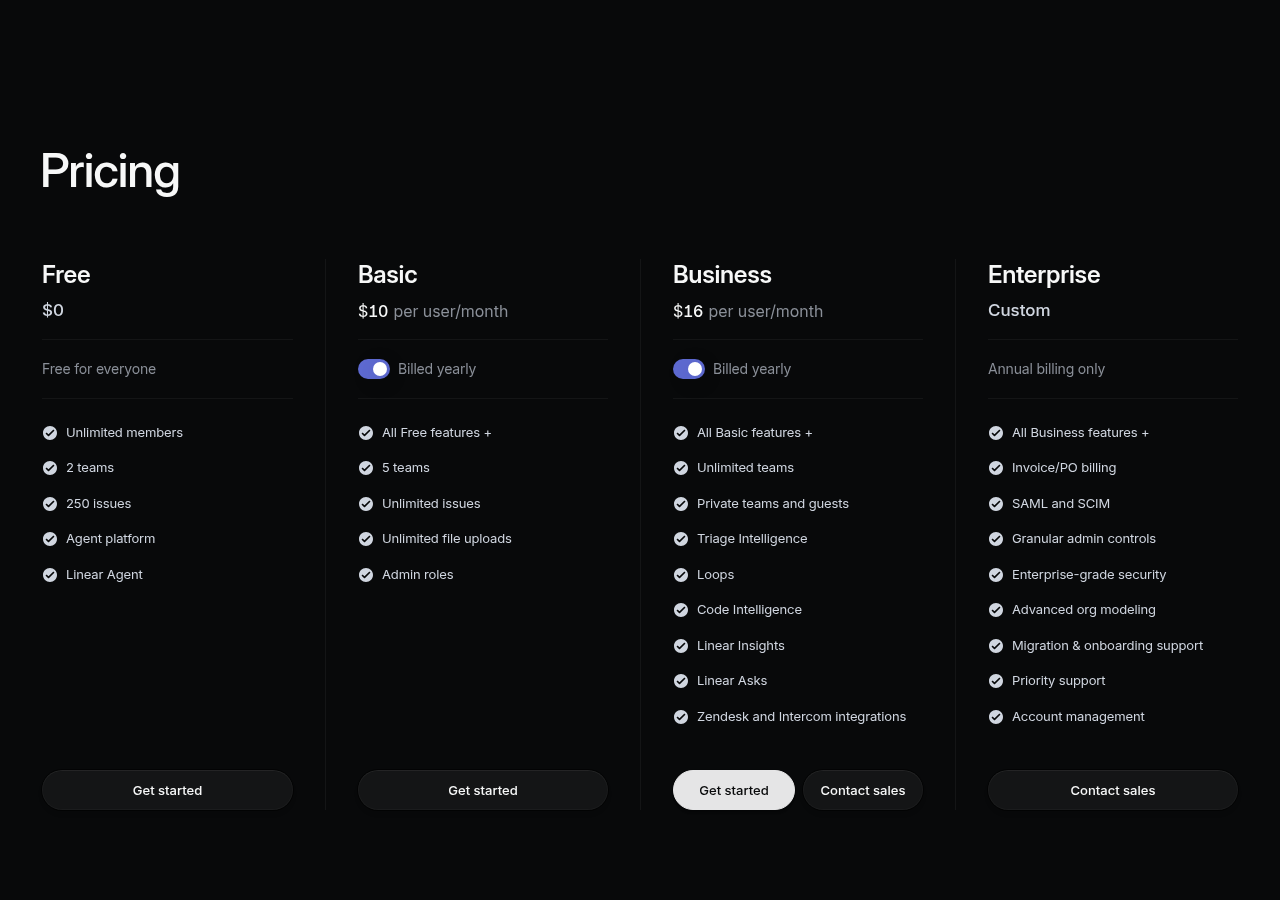
  • Free: Unlimited members; capped at 250 non-archived issues and 2 teams; includes cycles, roadmaps, and GitHub/GitLab integration. For small engineering teams prototyping their workflow, this is a genuinely functional free tier — not a stripped-down demo designed to force an upgrade.
  • Basic: $10/user/month (billed annually). Removes the issue and team limits; adds unlimited issue history, public roadmaps, and priority support. This is the plan most small-to-mid-size engineering teams will run on.
  • Business: $16/user/month (billed annually). Adds SAML SSO, audit logs, advanced security controls, and enterprise-grade admin features for larger organizations with compliance requirements.

Asana pricing (2026)

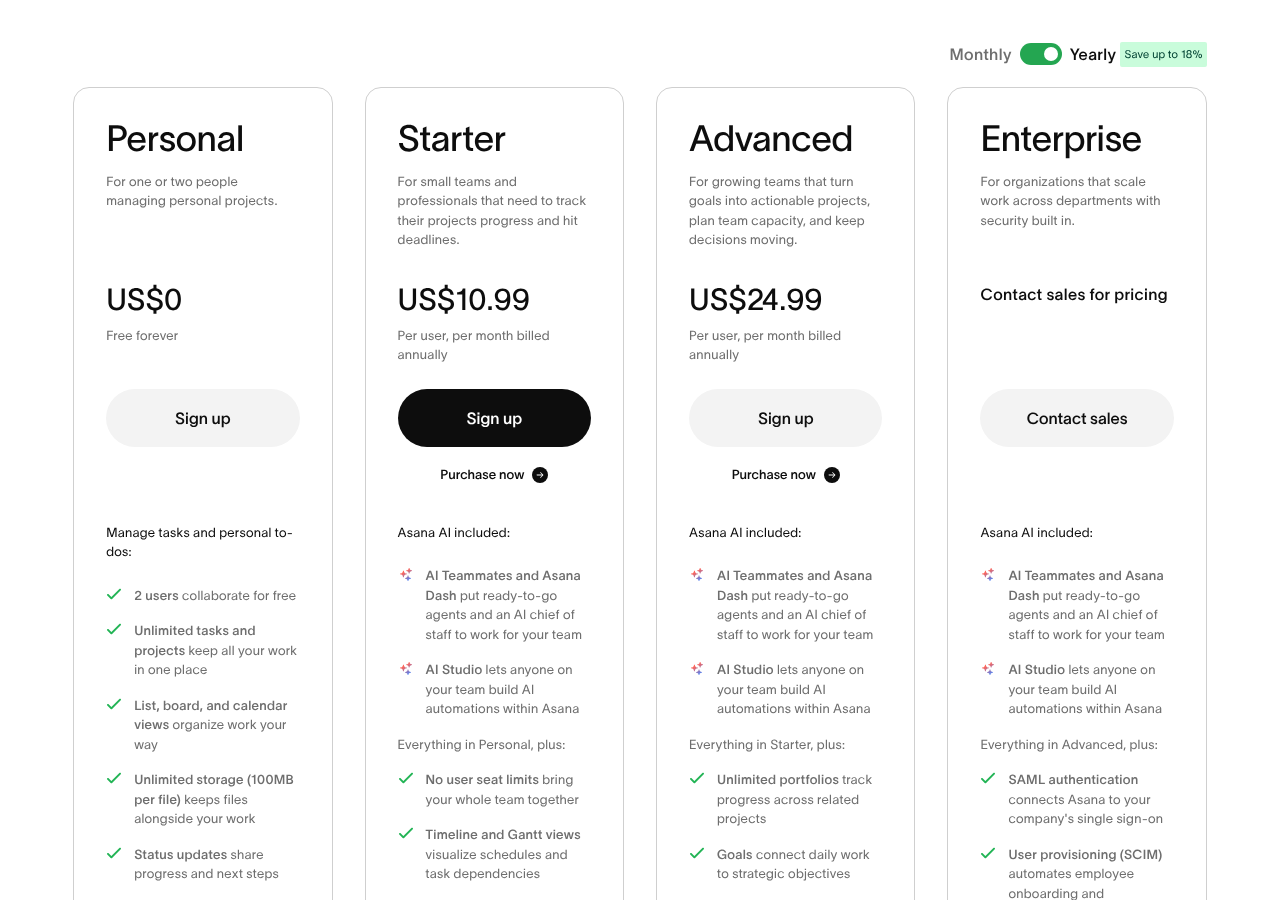
  • Free: Unlimited tasks and projects; up to 10 team members; no sprint/cycle feature, no Timeline view, no advanced reporting. The free tier is useful for very small teams with simple task tracking needs, but insufficient for engineering sprint management.
  • Starter: $10.99/user/month (billed annually). Adds Timeline view, Rules automation, custom fields, forms, and reporting. This is Asana’s most common entry point for engineering teams being onboarded from a company-wide platform decision.
  • Advanced: $24.99/user/month (billed annually). Adds Portfolios, Goals (OKR tracking), Workload management, and advanced reporting dashboards. This is where Asana’s cross-functional value proposition fully materializes — and where the cost premium over Linear becomes operationally significant.

The real cost calculation for a 50-person team

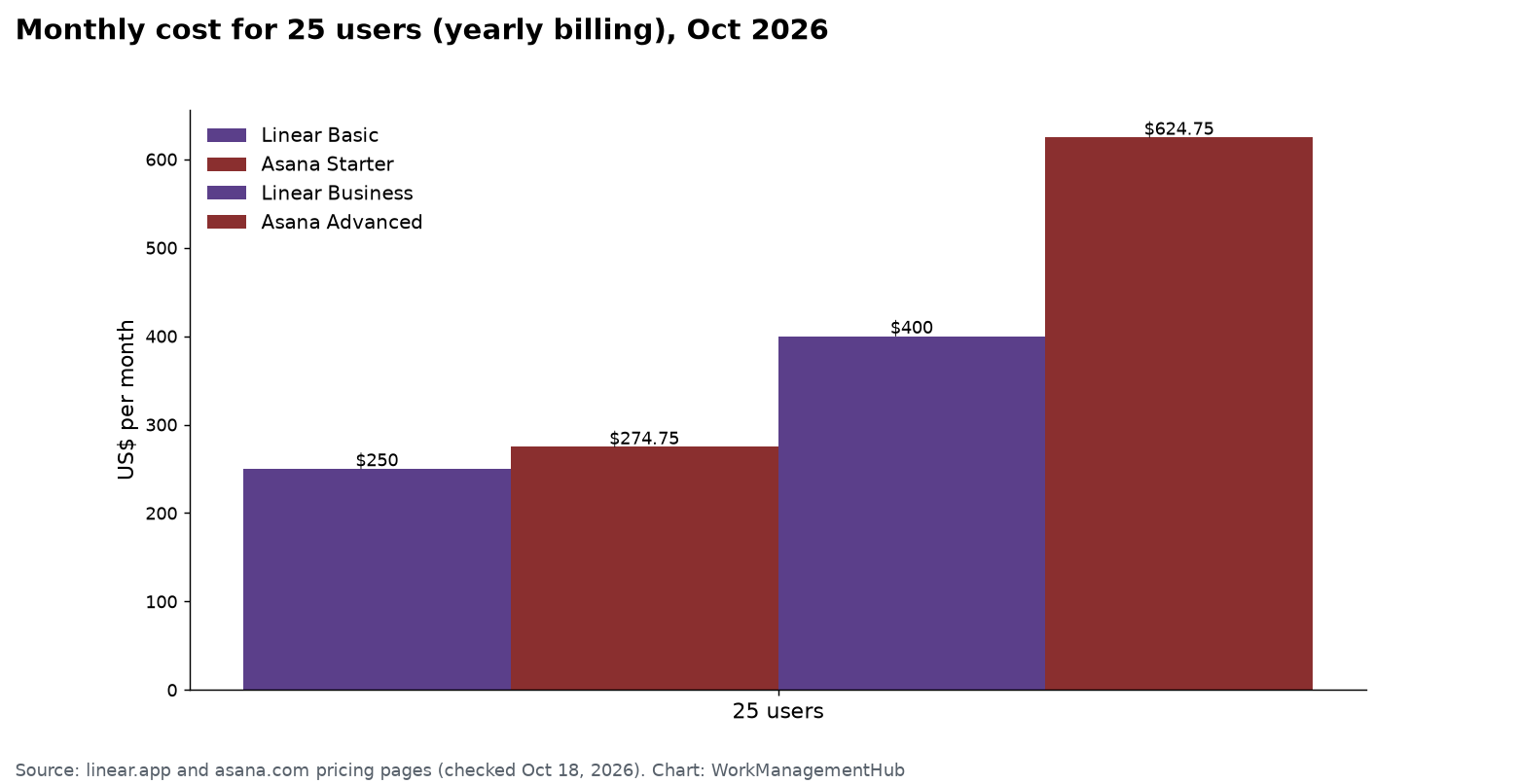
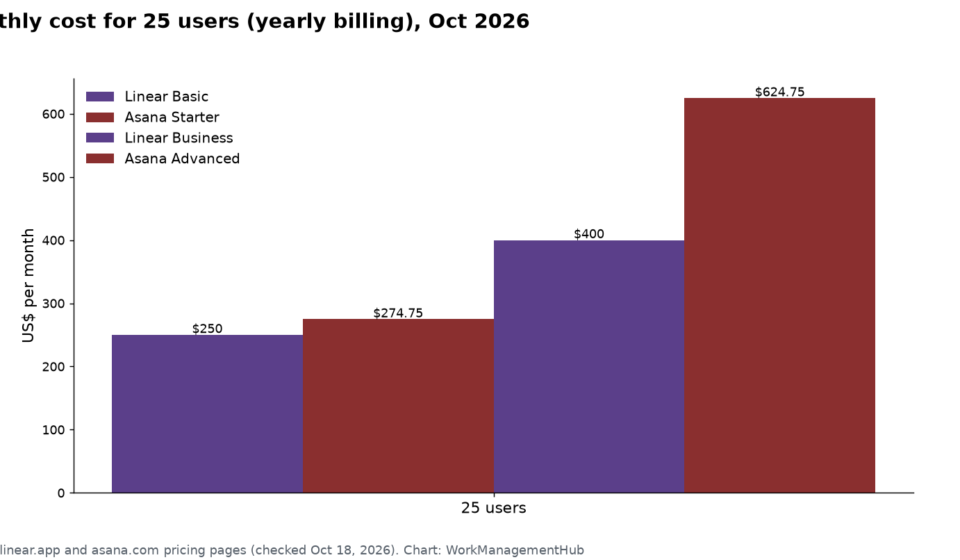
At 50 engineers billed annually, Linear Basic costs $6,000 per year. Asana Starter costs $6,594 per year — a difference of $594, or roughly one day of engineering salary for a mid-level US engineer. At that scale, the pricing delta alone is not a meaningful decision factor.

The gap widens significantly at the Advanced plan tier. Asana Advanced at $24.99/user/month for 50 people costs $14,994 per year. Linear Business at $16/user/month for the same team costs $9,600 per year — a gap of $5,394 annually. For organizations considering Asana Advanced, the question is whether Portfolios, Goals, and Workload management generate enough operational value to justify that $5,394 premium over Linear Business. For purely engineering teams, the answer is almost certainly no. For cross-functional organizations where those features replace separate OKR software, portfolio management tools, and resource planning spreadsheets, the answer may well be yes — and the consolidation savings from eliminating those separate tools may exceed the Asana premium.

At the entry level (Starter vs Basic), the $3,300 annual difference for a 50-person team cited frequently in tool comparison articles deserves some context: it is real money, but it is not the primary driver of the decision. Developer experience, sprint tooling quality, and GitHub integration depth are more important to long-term engineering productivity than a 9-cent-per-user-per-month price difference. The pricing comparison matters more when comparing Asana Advanced to Linear Business, where the gap is substantial and clearly significant.

For teams also considering Jira in this evaluation, our Jira vs Linear 2026 comparison covers a different set of trade-offs relevant to teams coming from or considering enterprise issue tracking at scale.

Which Tool Wins for Your Team Size and Structure

The right answer depends on where your organization sits across two dimensions: team composition and organizational structure. Here is a direct framework based on implementations across teams ranging from 5-person startups to 300-person engineering organizations.

5-person startup engineering team

Choose Linear. The free plan supports unlimited members with cycles and GitHub integration — you will not outgrow it until you hit 250 issues, at which point upgrading to Basic at $10/user/month is a $600 annual decision. The minimal setup, keyboard-driven workflow, and instant GitHub sync will materially reduce issue management overhead from week one. Asana’s free plan supports 10 users but lacks the sprint tooling an engineering team needs, and the Starter plan at $10.99/user/month offers sprint workarounds that still require configuration and still cannot auto-rollover incomplete work.

20-30 person dedicated engineering team at a scaling startup

Choose Linear Basic. At this size, cycle velocity tracking, multi-team support, and roadmap tooling are actively useful for sprint planning and stakeholder communication. The GitHub integration will handle dozens of concurrent PRs across multiple feature branches simultaneously, and the keyboard-driven workflow pays compounding dividends as engineers build muscle memory with the tool. The total cost for a 25-person team is $3,000 per year — less than two days of senior engineer salary for a US-based team.

50-person engineering team at a mid-size company with cross-functional tool requirements

This is the decision point where organizational dynamics often override pure tool quality. If the rest of the company is already on Asana and engineering needs to share portfolio and OKR visibility in a single platform, Asana Starter — or Advanced for the portfolio features — is often the practical choice. If engineering can operate independently with a clear data boundary, Linear Basic is the better engineering tool. If you have influence over the company-wide tool decision, the strongest argument is: give engineering Linear for execution workflow and use Asana for cross-functional program management at the portfolio level. The API integration overhead is manageable with modest internal tooling resources.

200-person organization with multiple engineering squads and cross-functional programs

The answer is likely Asana Advanced for the organization, but not primarily for engineering workflow reasons. At this scale, Portfolio visibility — seeing the health of 15-20 active projects across engineering, product, design, and operations in a single view — is a genuine leadership need. Asana’s Workload management becomes useful for program managers overseeing shared resources across squads. The Goals and OKR feature provides the connective tissue between quarterly planning and day-to-day task work that keeps a 200-person organization coherent. That said: if your engineering organization is large enough to have a strong Head of Engineering who can advocate for developer tooling autonomy, a hybrid approach (Linear for engineering execution, Asana for cross-functional program management) is worth serious evaluation. The Linear API documentation covers integration capabilities in detail — connecting Linear issue data into Asana’s portfolio view is technically feasible for teams with internal tooling resources, and some 200+ person organizations run exactly this hybrid model.

🏆 Verdict

Linear wins for engineering teams in 2026, and it is not close. The combination of auto-rolling Cycles with native velocity tracking, bidirectional GitHub integration that closes issues on PR merge, local-first near-instant UI, and a keyboard shortcut system built for engineering power users delivers a developer experience that Asana — a tool architected for everyone — cannot replicate. For a 50-person engineering team, Linear Basic costs approximately $3,300 less per year than Asana Starter and produces a meaningfully better engineering workflow. The only scenario where Asana is the correct choice for engineering teams is when organizational requirements mandate a single cross-functional platform with portfolio and OKR visibility — and even in that scenario, a hybrid approach with Linear handling execution and Asana handling portfolio reporting should be evaluated before defaulting to Asana for all engineering work. If you are an engineering leader with the authority to choose your team’s tools, the answer is Linear.

Frequently Asked Questions

Can Asana be used for sprint management without a native sprint feature?

Yes, but it requires deliberate setup and ongoing maintenance. The most common approach is using Sections within an Asana project to represent sprint periods — for example, “Sprint 22: May 12-25” — combined with Asana Rules on the Starter plan and above to automatically move tasks between sections based on due dates or completion triggers. Some engineering teams on Starter and above use Timeline view to plan sprint sequencing visually and track task dependencies. The critical limitation is that Asana has no auto-rollover of incomplete work. When a sprint period ends, incomplete tasks stay where they are. An engineering manager or scrum master needs to manually review all incomplete tasks, decide which carry forward, move them to the next sprint section, and update their dates. This is typically 30-60 minutes of administrative work per sprint boundary that Linear’s Cycles eliminate entirely through automatic rollover. For teams where sprint discipline and velocity tracking are critical operational metrics, this gap is significant enough to drive teams to Linear regardless of other platform considerations.

Is the Linear free plan good enough for a small engineering team?

Linear’s free plan is genuinely functional for small engineering teams, which distinguishes it from most enterprise tool free tiers that are designed primarily to drive upgrade conversions. The free plan supports unlimited members, includes Cycles with velocity tracking, provides roadmap views, and offers full GitHub and GitLab integration. The primary constraint is the 250 non-archived issue limit and the cap of 2 teams. For a 3-8 person engineering team building an early-stage product, the free plan is typically sufficient for 3-6 months of active development before the issue limit becomes relevant. When you hit the limit, archiving completed issues restores capacity, or upgrading to Basic at $10/user/month is a practical option. Compare this to Asana’s free plan, which caps at 10 users, provides no sprint feature, no Timeline view, and no native GitHub integration — Linear’s free tier is the more useful starting point for engineering teams that need to move fast without committing to paid tooling immediately.

Does Linear integrate with tools outside the developer ecosystem?

Linear integrates deeply with developer-adjacent tools — GitHub, GitLab, Figma, Slack, and Linear’s own AI Agent — but it does not attempt to serve the broader enterprise integration ecosystem that Asana covers with 200+ integrations. You will not find native Linear integrations for Salesforce, HubSpot, NetSuite, Workday, or Zendesk. That is a deliberate product decision rather than a roadmap gap. For engineering teams whose primary tool relationships are with code repositories, design tools, and communication platforms, this is not a limitation. For organizations evaluating a single tool to integrate across engineering, sales, marketing, and operations simultaneously, Asana’s integration breadth is a decisive advantage. Linear does provide a public API that allows custom integrations to be built, and tools like Zapier and Make can connect Linear to a wider ecosystem — but these require development and maintenance resources that Asana’s native integrations do not, which adds real cost and complexity for organizations without dedicated internal tooling teams.

Can engineering teams use both Linear and Asana together?

Yes, and this hybrid approach is more common than most tool comparison articles acknowledge. The typical pattern: engineering teams use Linear for day-to-day issue tracking, sprint management, and GitHub workflow; program managers and leadership use Asana for cross-functional project tracking, portfolio visibility, and OKR tracking. The overlap is managed through periodic syncs where key milestones from Linear roadmaps are reflected in Asana portfolio updates — either manually or through API-based automation. This approach requires discipline to prevent data duplication and context fragmentation across the two tools, but it gives engineering teams the purpose-built tooling they need while giving the rest of the organization the broad platform they need. The primary cost is running two subscriptions: for a 50-person engineering team on Linear Basic plus a company-wide Asana Starter deployment, budget for approximately $6,000-$14,994 per year in engineering tool cost depending on Asana plan tier and total headcount. For organizations where developer productivity is a meaningful competitive differentiator, that cost is typically well justified.

How does Linear’s AI Agent compare to Asana’s AI features in 2026?

Linear’s AI Agent, launched in early 2026, is purpose-built for engineering workflows: it automatically triages incoming issues, suggests priority levels based on historical patterns, identifies duplicate issues, and can create new issues directly from Slack messages or customer feedback with appropriate metadata pre-filled. For a detailed breakdown of its capabilities, see our Linear AI Agent deep dive. Asana’s AI features in 2026 are broader but less engineering-specific: AI can draft task descriptions from prompts, suggest project templates for new initiatives, generate weekly status update summaries across projects, and surface smart task recommendations based on deadlines and dependencies. Asana’s AI serves the full breadth of its user base — marketing, operations, HR, and engineering — which means it is optimized for general task management workflows rather than the code-centric, GitHub-connected workflows that engineering teams run daily. For an engineering team specifically, Linear’s AI Agent addresses higher-frequency, higher-impact problems: triage backlog, duplicate detection, and context-aware categorization of incoming bug reports are problems that compound daily across the sprint cycle in ways that generic task AI does not address.


Author

Shaik KB

Follow Me
Other Articles
Previous

How to Use ClickUp Whiteboards for Visual Project Planning in 2026

Next

Smartsheet Data Shuttle 2026: Automate Data Import and Export Between Any Source

No Comment! Be the first one.

    Leave a Reply Cancel reply

    Your email address will not be published. Required fields are marked *

    Sponsored Smartsheet Expert Services – Implementation, Automation, Training
    Sponsored Power BI & Tableau Analytics – Dashboards, Reporting, Insights
    Sponsored AI Agents for Work Management – Automate Tasks, Integrate Tools

    Categories

    • Airtable (10)
    • Alternatives (12)
    • Asana (32)
    • ClickUp (38)
    • How-To Guides (125)
    • Integrations (16)
    • Jira (25)
    • Monday.com (37)
    • Notion (24)
    • Pricing Guides (11)
    • Project Management (73)
    • Smartsheet (27)
    • Tool Comparisons (42)
    • Wrike (10)

    Recent Post

    • ClickUp Notifications Not Working? 7 Fixes for the Most Common Issues in 2026
    • Notion Charts 2026: How to Add Charts to Any Database View and Visualize Your Data
    • Linear vs ClickUp 2026: Which Is Better for Product and Dev Teams?
    • How to Use Smartsheet Dynamic View in 2026: Secure Data Sharing Without Exposing Your Sheet
    • How to Use Asana Forms for Project Intake in 2026: Complete Setup Guide
    Work Management Hub

    Independent expert reviews & comparisons of work management tools — helping 50,000+ teams choose the right software.

    Tools We Cover

    • Smartsheet
    • Monday.com
    • ClickUp
    • Asana
    • Notion
    • Jira
    • Wrike
    • Airtable

    Company

    • About Us
    • Contact Us
    • Privacy Policy
    Copyright 2026 — Work Management Hub. All rights reserved. Blogsy WordPress Theme