Smartsheet Gantt Chart Setup 2026: Dependencies, Working Days, and Critical Path

To set up a Gantt chart in Smartsheet: add Start Date and End Date columns, open Gantt View, then turn on dependencies in project/sheet settings so Predecessor and Duration columns drive the schedule. Typing every date by hand is how Gantts go stale in week two.
I verified the flow against Smartsheet’s articles on enabling dependencies, project settings, and critical path on October 13, 2026. Owners and Admins enable dependencies; Gantt appears on paid plans (Pro+).
What the sheet needs first
| Column / setting | Why |
|---|---|
| Task name (primary) | Hierarchy for summary rows |
| Start Date + End Date (date columns) | Bars need both ends |
| Dependencies enabled | Creates Predecessor + Duration if missing |
| Working days + holidays | Duration math matches your calendar |
| Optional % Complete | Progress on bars |
Contact List columns used for resource management cannot hold formulas — plan assignments separately from calculated fields (formulas guide).
Setup in the order that works
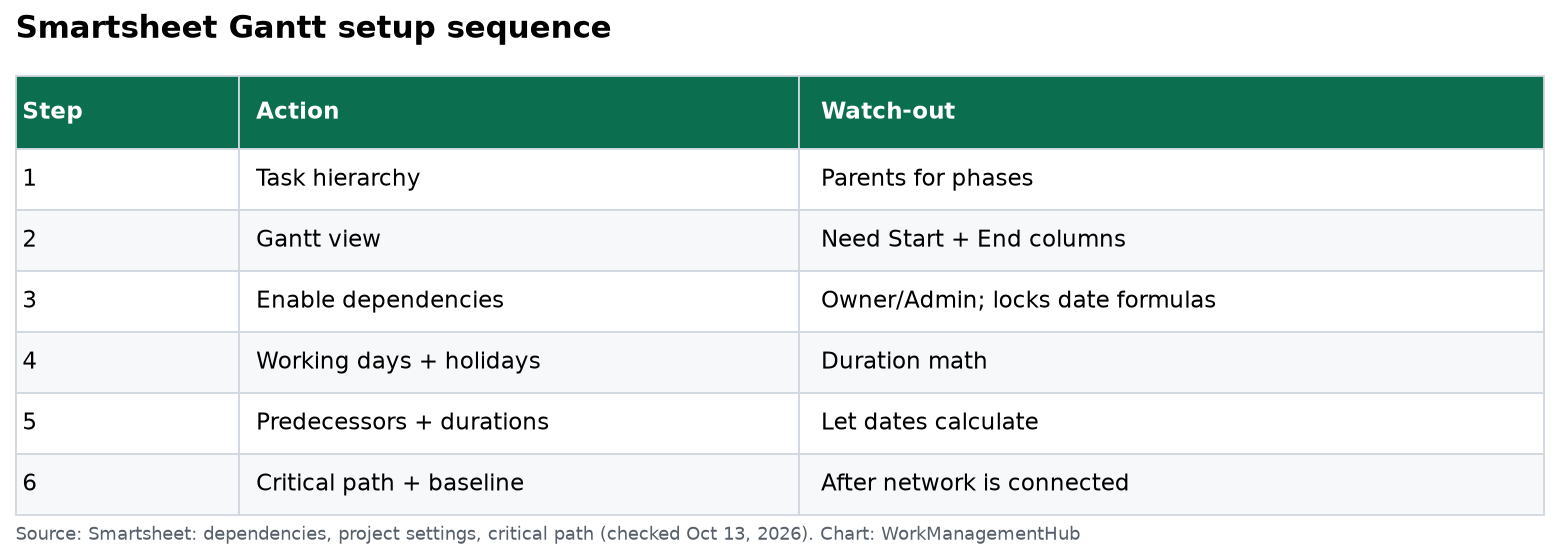
- Build the task list with parent/child hierarchy for phases.
- Switch to Gantt View from the toolbar views.
- Open Project Settings / Sheet settings (right-click a column header or the settings control in Gantt).
- Enable Dependencies. Pick or auto-create Predecessor and Duration columns. Optionally map % Complete.
- Set working days, hours per day, and non-working dates (holidays).
- Enter Duration + Predecessors on child rows. Use
3d,1.5d, or other units Smartsheet accepts; start/end calculate from working days. - Mark milestones with
0duration (diamond markers). - Turn on Critical Path (Gantt toolbar) once the network is connected — critical tasks highlight.
- Set a baseline before execution starts so slip is visible later.
- Share the sheet or publish a view for stakeholders who should not edit.
Predecessor examples: 3 (FS from row 3), 3SS, 3+2d for lag. Multiple predecessors are comma-separated.
Why dependencies first
When dependencies are on:
- Changing a predecessor’s dates shifts dependents.
- Duration and working-day settings drive end dates.
- You cannot place formulas in the dependency-managed date columns.
That last point is the usual fight with Excel immigrants. Put RAG flags in a separate Text/Symbols column with formulas; leave the schedule columns to Smartsheet.
Gantt vs Timeline view
| Gantt | Timeline | |
|---|---|---|
| Best for | Task networks, critical path, baselines | Stakeholder storytelling, fewer bars |
| Dependencies | First-class | Available via sheet settings in newer models |
| Critical path | Yes | Not the same visual tool |
| Typical user | PM owning the schedule | Leadership readout |
Use Gantt to run the job; paste a Timeline screenshot into the Monday update if executives glaze over at predecessors.
Baselines and critical path
Critical path highlights tasks that drive the project end date. Toggle Show Critical Path in Gantt; it recalculates as you edit. Only a connected network produces a useful path — orphan rows with no predecessors never look “critical.”
Baselines snapshot start/end so you can show variance. Set them when the plan is approved, not three weeks into execution.
Plan and permission notes
- Enabling dependencies: Owner or Admin.
- Pro includes Gantt among its views; Business adds workload and unlimited automations useful for schedule alerts (pricing).
- For engineering detail in Jira with PMO Gantt in Smartsheet, use the Jira Connector instead of duplicating every story as a bar.
Common questions
Why don’t my bars appear?
Missing Start or End date, or you’re still in Grid view. Switch to Gantt and confirm both date columns are mapped in settings.
Can I type Start and End and skip Duration?
With dependencies off, yes — and the schedule will not auto-shift. With dependencies on, enter Duration (and predecessors); let Smartsheet compute ends.
Who can turn on dependencies?
Sheet Owner or Admin on a paid plan that includes project settings.
Does critical path require Enterprise?
No. Critical path is a Gantt visualization feature documented for sheets with dependencies enabled; it is not an Enterprise-only add-on in Smartsheet’s help articles.
Verified against Smartsheet Learning Center dependency, project settings, and critical path articles on October 13, 2026.
Sponsored

Related guides