Skip to content
-
Subscribe to our newsletter & never miss our best posts. Subscribe Now!
Work Management Hub Work Management Hub

Expert Reviews, Comparisons & Guides for Smartsheet, Monday.com, Asana, ClickUp & More

Work Management Hub Work Management Hub

Expert Reviews, Comparisons & Guides for Smartsheet, Monday.com, Asana, ClickUp & More

  • Airtable
  • Asana
  • ClickUp
  • Jira
  • Monday.com
  • Notion
  • Smartsheet
  • Wrike
  • About
  • Contact
  • Airtable
  • Asana
  • ClickUp
  • Jira
  • Monday.com
  • Notion
  • Smartsheet
  • Wrike
  • About
  • Contact
Close

Search

  • https://www.facebook.com/
  • https://twitter.com/
  • https://t.me/
  • https://www.instagram.com/
  • https://youtube.com/
NotionSmartsheetTool Comparisons

Smartsheet vs Notion 2026: Which Is Better for Your Team?

By Shaik KB
May 31, 2026 19 Min Read
0
⚡ Key Takeaways

  • Smartsheet starts at $7/user/month (Pro) vs Notion at $10/user/month (Plus) — but Smartsheet’s enterprise-grade PM depth justifies the investment for structured delivery teams.
  • Smartsheet includes native time tracking and dedicated resource management (Smartsheet Resource Management, formerly 10,000ft); Notion has zero native time tracking — a critical gap for agencies and professional services firms billing by the hour.
  • Notion replaces notes, wikis, databases, and project boards in one block-based workspace — unmatched for knowledge workers who want a single source of truth for information and work.
  • Both tools offer Gantt charts, kanban, calendar, automation, and AI in 2026 — the real differentiator is execution depth (Smartsheet) versus structural flexibility (Notion).
  • Most comparison pages offer feature checkboxes without a verdict. This guide gives a decisive recommendation for four specific buyer personas — so you can stop comparing and start deploying.
Quick Answer:

Smartsheet wins for structured project delivery, resource management, and compliance-heavy teams — especially those migrating from Excel. Notion wins for knowledge workers, agile product teams, and organizations that need a unified workspace for documentation, databases, and lightweight project tracking. If your team bills by the hour or runs multi-project portfolios, Smartsheet is the clear choice in 2026.

Table of Contents

  1. Smartsheet vs Notion: The Core Difference in One Sentence
  2. Pricing Comparison: Smartsheet vs Notion 2026
  3. Project Management Features: Depth vs Flexibility
  4. Database and Knowledge Management
  5. Time Tracking and Resource Management
  6. Collaboration and Teamwork
  7. AI Features in 2026
  8. Integrations
  9. Who Should Choose Smartsheet (4 Buyer Personas)
  10. Who Should Choose Notion (4 Buyer Personas)
  11. Verdict
  12. Frequently Asked Questions

Smartsheet vs Notion 2026: Which Is Better for Your Team?

The Smartsheet vs Notion debate is one of the more misunderstood comparisons in work management software, because these two tools are not actually competing for the same buyer. Smartsheet was built by a former Microsoft Excel product manager who wanted a collaborative spreadsheet for structured project execution. Notion was built by a design-focused team that wanted to replace every writing and knowledge tool with a single flexible canvas. They overlap in Gantt charts and kanban boards, which is why comparison pages list the same feature checkboxes — but the overlap is superficial. The architecture, the workflow assumptions, and the teams that thrive on each platform are fundamentally different.

This guide cuts through the surface-level comparisons. I have deployed both tools for mid-market and enterprise clients — Smartsheet for a 200-person construction management firm running multi-project portfolios, Notion for a 60-person product-led SaaS company treating their workspace as a living knowledge graph. The decision almost never comes down to features. It comes down to whether your team’s primary operating mode is structured execution or flexible knowledge work.

Smartsheet vs Notion: The Core Difference in One Sentence

Smartsheet is a structured project execution engine built for teams who think in rows and columns; Notion is a flexible knowledge workspace built for teams who think in pages and databases.

That single sentence determines the right answer for roughly 80 percent of teams reading this comparison. Smartsheet’s interface looks and behaves like a supercharged Excel spreadsheet — columns have defined types, rows represent tasks or records, and the system enforces structure by design. That structure is a feature, not a limitation. It means that a 500-row project plan created by a project manager in Chicago will look identical and behave identically when a contractor in Dublin opens it. Consistency at scale is what Smartsheet was designed to deliver.

Notion’s block-based editor works in the opposite direction. There is no enforced structure — a page can contain a paragraph, a database, an embedded video, a checklist, and a calendar view, all on the same canvas. That flexibility is intoxicating for knowledge workers and infuriating for project managers who need reliable reporting. A Notion workspace built without deliberate information architecture can become a beautiful, completely unusable mess within six months.

If you want the full picture on each tool independently, see our full Smartsheet review for 2026 and our full Notion review for 2026.

Pricing Comparison: Smartsheet vs Notion 2026

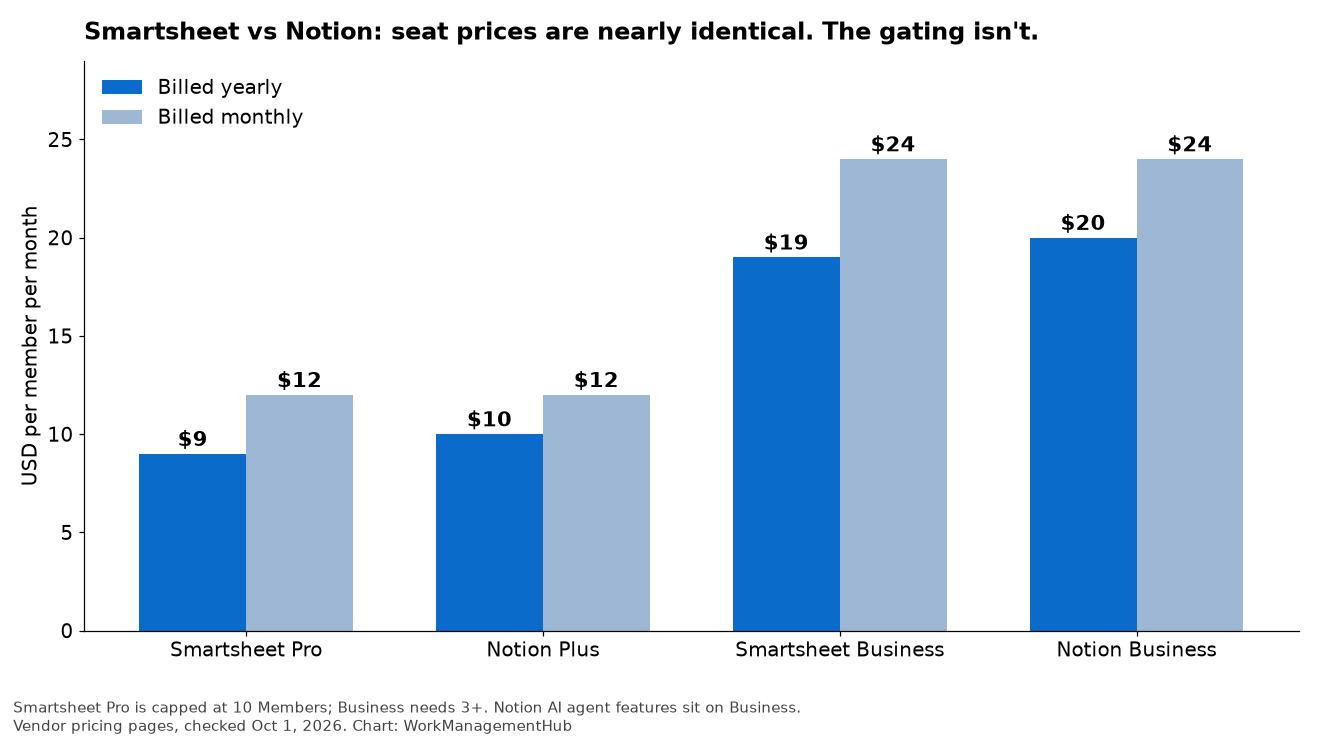
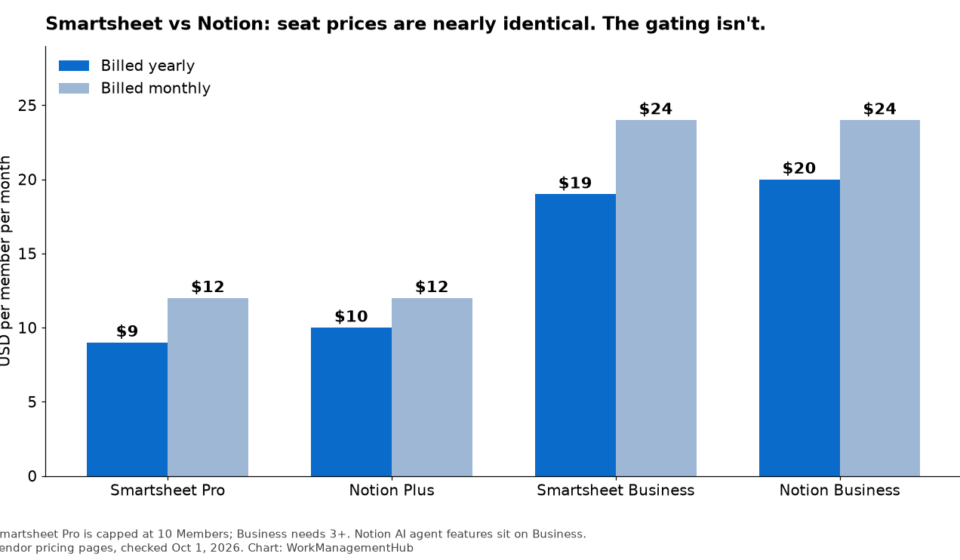
Both tools offer free plans with meaningful limitations. Smartsheet’s free plan caps at one user and two sheets — it is useful for exploration but not for team deployment. Notion’s free plan is more generous in scope but restricts page history and guest access. For any team deploying seriously, paid plans are the relevant comparison.

Plan TierSmartsheetNotion
FreeFree — 1 user, 2 sheetsFree — unlimited pages, limited guests & history
Entry PaidPro — $7/user/monthPlus — $10/user/month
BusinessBusiness — $25/user/monthBusiness — $20/user/month
EnterpriseEnterprise — custom/quote-onlyEnterprise — custom/quote-only
Resource ManagementSmartsheet Resource Management — add-on (custom pricing)Not available natively
Native Time TrackingIncluded at Business+Not available — requires third-party integration

The pricing picture is more nuanced than a raw per-seat comparison suggests. Smartsheet is cheaper at the entry tier ($7 vs $10), but Notion undercuts it at the Business tier ($20 vs $25). The crossover point depends on which features your team actually needs. For detailed plan-by-plan breakdowns, see our dedicated Smartsheet pricing guide for 2026 and Notion pricing guide for 2026.

One pricing factor that rarely appears in comparisons: Smartsheet Resource Management (formerly 10,000ft) is priced separately as an enterprise add-on, which can significantly increase total cost of ownership for teams that need capacity planning. If resource management is a core requirement, build that cost into your evaluation before the sales conversation — it has surprised more than one procurement team after the initial demo.

Project Management Features: Depth vs Flexibility

Both tools support Gantt charts, kanban boards, calendar views, and basic automation. The comparison list stops being useful at that point. What matters is what each tool can do that the other cannot, and how those gaps affect your team’s day-to-day execution.

Smartsheet’s PM Depth

Smartsheet’s project management capabilities have been refined over a decade of enterprise deployments, and it shows. The Gantt chart implementation supports full dependency management — finish-to-start, start-to-start, finish-to-finish, and lead/lag time — which makes it suitable for genuine critical path analysis. Notion’s timeline view (added in 2024) does not support task dependencies at all. For any project where tasks need to cascade when a predecessor slips, Notion’s Gantt is cosmetic.

Smartsheet’s portfolio dashboards allow real-time roll-up reporting across multiple project sheets with live widgets — status charts, Gantt overviews, metric summaries — all pulling from underlying sheets automatically. For a program manager overseeing eight concurrent projects, this single capability justifies the Smartsheet investment. Notion has no equivalent portfolio or cross-database rollup dashboard built for this use case.

Baseline snapshots in Smartsheet let teams capture a project plan at kickoff and track schedule variance against the original baseline throughout execution. This is a standard requirement for any team doing formal project reporting to clients or executives. Getting this capability out of Notion requires significant custom database configuration and still produces inferior output.

For teams already running Smartsheet Gantt charts, the learning curve to unlock these advanced features is low — the interface is deliberately familiar to Excel users, which reduces training friction significantly in organizations where Excel has been the de facto PM tool.

Notion’s PM Flexibility

Notion’s project management strength is adaptability. A Notion database can be viewed as a table, board, gallery, calendar, timeline, or list — and teams can switch between views without any data restructuring. A single Projects database can serve as the kanban for the engineering team, the calendar for the marketing team, and the table view for the operations manager, all simultaneously.

The block-based structure also means that project context lives alongside project tasks in a way that Smartsheet cannot replicate. A Smartsheet row contains structured fields. A Notion database entry can contain structured fields plus embedded documents, linked databases, meeting notes, design assets, and AI-generated summaries — all in the same page. For product teams running dual-track agile (discovery and delivery in parallel), this context density is genuinely valuable.

Notion’s Relations and Rollups allow teams to build relational data models — linking a Projects database to a Tasks database to a People database — that produce sophisticated views across the workspace. The flexibility ceiling is high, and teams willing to invest in information architecture will find Notion’s database layer more powerful than its surface appearance suggests.

Feature Comparison Table

FeatureSmartsheetNotion
Gantt Chart✓ Full dependencies, baselines, critical path✓ Timeline view — no dependencies
Kanban Board✓ Card view✓ Board view — highly customizable
Task Dependencies✓ Full — FS, SS, FF, SF + lead/lag✗ Not supported
Portfolio Dashboards✓ Live cross-sheet rollup widgets✗ No native portfolio dashboard
Baseline Snapshots✓ Native baseline tracking✗ Manual workaround only
Resource Management✓ Smartsheet Resource Management (add-on)✗ Not available
Native Time Tracking✓ Built-in at Business+✗ Requires third-party integration
Knowledge Base / Wiki✗ Not a primary use case✓ Core feature — block-based docs + linked databases
Relational DatabasesCell linking — not true relational✓ Full relations + rollups across databases
Automation✓ Rule-based, triggers + actions✓ Rule-based + Notion Workers (2026)
Forms / Intake✓ Smartsheet Forms — conditional logic✓ Notion Forms — basic
Control Center (Program Templates)✓ Auto-provision projects from templates✗ No equivalent

Database and Knowledge Management

Notion’s database model is the most differentiating capability it has, and it is frequently underestimated by teams evaluating the tool purely through a project management lens. A Notion database is not a spreadsheet — it is a structured content type where each row is a full page with rich text, embedded media, and linked records. The practical effect is that a Notion Projects database entry for “Q3 Website Redesign” can contain the project brief, the stakeholder list, the meeting notes from every kickoff call, a design brief linked from a Designs database, and a filtered view of all open tasks — all in a single record.

This is qualitatively different from Smartsheet, where a row is a row. Smartsheet does allow attaching files and adding comments to rows, but the ergonomics are not built for document-heavy workflows. Smartsheet is optimized for teams that have their documents in SharePoint or Google Drive and their project data in Smartsheet — two separate systems that integrate through connectors. That separation is not a flaw if your team is already disciplined about where documents live. It becomes a flaw when teams want a unified context layer where documentation and task execution coexist.

For knowledge management specifically — onboarding wikis, product specs, runbooks, SOPs — Notion has no credible competitor among project management tools. Its block editor rivals Confluence in depth and surpasses it in flexibility. For companies paying for both Confluence and a project management tool, Notion’s ability to consolidate those functions into a single platform is a legitimate budget argument.

Time Tracking and Resource Management

This section is where the Smartsheet vs Notion debate becomes a non-debate for specific team types. Notion has no native time tracking. Full stop. There is no built-in timer, no timesheet view, no billable hours tracking, no integration with invoicing built into the platform itself. Teams that need time tracking in Notion must integrate with Toggl, Harvest, Clockify, or another third-party tool — adding cost, adding integration complexity, and splitting the data between two systems.

Smartsheet’s native time tracking, available at the Business tier and above, allows team members to log time directly against tasks on a sheet. Combined with Smartsheet Resource Management (formerly 10,000ft), program managers can see real-time capacity utilization across the team, forecast allocation against upcoming project demand, and identify overallocation before it becomes a burnout or delivery risk. For any organization running professional services, consulting, agency work, or internal IT project delivery with chargeback accounting, Smartsheet Resource Management is the most defensible reason to choose Smartsheet over any tool in this category — including competitors with more modern interfaces.

The absence of native time tracking in Notion is a critical gap, not a minor inconvenience. If your team leads use time data to approve invoices, justify headcount requests, or generate utilization reports for leadership, you cannot run that workflow in Notion without building a parallel system. For teams where this matters, the decision is made before you open the feature comparison table.

Collaboration and Teamwork

Both tools handle team collaboration competently, but their collaboration models reflect their underlying philosophies. Smartsheet’s collaboration model is permission-based and structured: sheets have owners, editors, commenters, and viewers. Automation rules can assign tasks, send notifications, and request approvals through defined workflow steps. The Smartsheet Forms feature with conditional logic is particularly strong for intake workflows — a PMO can build a project request form that routes submissions to the right team based on project type, triggers an approval workflow, and auto-creates a project sheet from a Control Center template, all without any manual intervention.

Notion’s collaboration model is looser and more contextual. Page-level comments, inline mentions, and the ability to tag team members within any block make it feel closer to a document collaboration tool than a project management system. This works well for asynchronous teams that iterate on documents and decisions together. It works less well when you need an auditable record of approval steps or formal status transitions.

Smartsheet’s guest and external collaborator access is notably strong for client-facing teams — you can share a project view with a client that shows only what they need to see, without giving them access to internal notes or cost data. Notion’s permission model is improving but remains less granular at the block or property level, which can complicate external sharing for sensitive projects.

AI Features in 2026

Both Smartsheet and Notion have deployed meaningful AI capabilities in 2026, and neither has a decisive advantage across the board — but the AI feature sets serve different use cases.

Smartsheet AI, integrated at the Business tier, focuses on structured data: AI can generate formulas, summarize row-level data, suggest next steps for tasks, and surface anomalies in project schedules. The most practical AI feature for project managers is automated risk identification — Smartsheet AI can flag tasks trending toward delay based on update patterns and predecessor status, surfacing risks before they become issues. For teams running complex multi-project portfolios, this passive risk monitoring delivers real operational value.

Notion AI takes a broader approach consistent with the platform’s knowledge focus. It can summarize entire pages, generate first drafts of documents, answer questions by searching across your entire workspace, and translate pages. In 2026, Notion’s AI is deeply integrated into the editing experience — you can highlight any block and ask AI to rewrite it, expand it, or convert it into a different format. For knowledge workers who spend significant time writing and synthesizing information, Notion AI removes meaningful friction from daily workflow.

The AI comparison underscores the broader positioning: Smartsheet AI helps you execute projects more efficiently; Notion AI helps you manage and create knowledge more efficiently. If your primary pain point is scheduling and delivery, Smartsheet AI is more directly applicable. If your primary pain point is information overload and documentation quality, Notion AI wins.

Integrations

Smartsheet’s integration catalog is extensive and enterprise-focused. Its native connectors include Salesforce, Jira, Microsoft Teams, Google Workspace, ServiceNow, and Tableau. The Smartsheet integrations library includes purpose-built connectors for enterprise systems that most project management tools cannot match. Data Shuttle, Smartsheet’s ETL tool, allows automated data imports and exports between Smartsheet and external data sources on a schedule — enabling Smartsheet to act as the project reporting layer on top of data that lives in finance systems, CRMs, or data warehouses.

Notion’s integrations are more consumer and startup-oriented: GitHub, Slack, Figma, Linear, Zapier, and Google Calendar are among the most used. The Notion API is well-documented and actively used by developers to build custom integrations. For engineering-forward teams that prefer to build their own integrations, Notion’s API is actually more developer-friendly than Smartsheet’s. For teams that need certified enterprise system connectors without custom development, Smartsheet wins on integration breadth.

Both platforms connect to Zapier, Make, and Workato, which effectively equalizes integration access for teams willing to use middleware. The native connector quality gap matters most when teams have strict IT security requirements that prohibit third-party middleware access to enterprise data systems.

Who Should Choose Smartsheet (4 Buyer Personas)

1. The PMO Running Multi-Project Portfolios

Pick Smartsheet if: you are managing five or more concurrent projects, need real-time cross-project status dashboards, and report schedule variance to senior leadership on a regular cadence. Smartsheet’s portfolio dashboards, baseline tracking, and Control Center — which auto-provisions standardized project sheets from templates at the click of a button — are purpose-built for PMO operations. No other tool in this comparison delivers this combination out of the box. Notion has no portfolio dashboard equivalent, and building one from scratch requires a level of database engineering that most PMOs should not have to invest in. See our guide to Smartsheet Control Center setup for a walkthrough of this capability.

2. The Agency or Professional Services Firm Billing by the Hour

Pick Smartsheet if: time tracking, utilization reporting, and resource allocation are operational requirements — not nice-to-haves. Agencies that bill clients based on logged hours, or professional services firms that need capacity planning to prevent team burnout, have no credible path to Notion without building a parallel time-tracking system. Smartsheet’s native time tracking plus Resource Management covers this end-to-end: log time on tasks, see utilization by person and project, forecast capacity, and feed time data directly into billing workflows. The total cost of Smartsheet with Resource Management is higher than Notion plus Harvest or Toggl, but the operational consolidation almost always wins on total cost of ownership when you factor in integration maintenance.

3. The Enterprise IT or Operations Team Migrating from Excel

Pick Smartsheet if: your current workflow is a spreadsheet passed around via email and you need to move to a collaborative platform without retraining everyone on a completely new paradigm. Smartsheet’s spreadsheet-first interface means an Excel user can be productive within hours. The formula syntax is familiar, the row-and-column structure is identical, and the transition from a shared Excel workbook to a Smartsheet with real-time collaboration, version history, and workflow automation is the lowest-friction upgrade path available. Notion’s block-based interface has a meaningful learning curve for non-technical users who expect a spreadsheet, not a blank canvas.

4. The Construction, Manufacturing, or Field Operations Team

Pick Smartsheet if: your projects have formal phase gates, regulatory sign-offs, or physical dependencies that require precise schedule management. Construction project managers, plant turnaround planners, and field service operations teams all operate with project schedules where dependency management is not optional — a task starting before its predecessor is complete can have safety or compliance implications. Smartsheet’s dependency engine handles this rigorously. Its forms-based data collection also supports field data entry in a way that integrates directly into the project schedule, without requiring field workers to navigate a knowledge workspace to find their tasks.

Who Should Choose Notion (4 Buyer Personas)

1. The Product Team Running Dual-Track Agile

Pick Notion if: your team runs discovery and delivery in parallel and needs the context from research, specs, and decisions to live next to the tasks that implement them. A Notion workspace where product specs link to sprint tasks, sprint tasks link to a design database, and the design database links back to customer research pages is a genuinely different experience from having all of that in separate tools. The context density that Notion’s block-and-database model enables accelerates onboarding, reduces context-switching, and makes retrospectives more useful because the full history of decisions is always one click away.

2. The Startup or Scale-Up Replacing Multiple Tools

Pick Notion if: you are currently paying for a wiki, a project tracker, a note-taking app, and a team knowledge base separately — and the maintenance overhead of keeping four tools synchronized is becoming a tax on your team. Notion can credibly replace all four. A 50-person startup that consolidates from Confluence plus Asana plus Google Docs into Notion can simplify their toolstack meaningfully, and at $10 per user per month for the Plus plan, the cost case is straightforward. The consolidation trade-off is reduced depth in structured project execution compared to a purpose-built PM tool, which is acceptable for most startups until they reach a scale where formal portfolio management becomes necessary.

3. The Content, Marketing, or Creative Team

Pick Notion if: your team’s primary deliverable is content — articles, campaigns, creative briefs, brand guidelines, launch plans — and your workflow is built around documents with structured metadata rather than tasks with structured fields. A content database in Notion where each article has a status, an author, a publication date, a linked editorial brief, and a comments thread is more natural than a Smartsheet task row with the same data. Notion’s editorial experience, combined with its AI writing tools, makes it the strongest choice for content operations teams that use their work management tool to write, not just track.

4. The Knowledge-Intensive Organization Building an Internal Wiki

Pick Notion if: a significant part of your team’s time is spent finding, creating, and maintaining documentation — onboarding guides, SOPs, runbooks, product documentation, client knowledge bases. Notion’s wiki capabilities are the best in the work management category. Its hierarchical page structure, bidirectional linking, and database-powered dynamic views make it the only tool on this list that can serve simultaneously as your project tracker and your organization’s institutional memory. For teams where the cost of knowledge loss is high, Notion’s knowledge management depth delivers measurable risk reduction. For a broader view of how Notion fits into your overall PM stack, see our best project management software roundup for 2026.

🏆 Verdict

For PMOs, agencies, and operations teams: Choose Smartsheet. Its dependency management, portfolio dashboards, baseline tracking, native time tracking, and resource management capabilities are not replicated in Notion. If structured project execution and reporting are your primary requirements, Smartsheet is the professional-grade tool for the job — and its Excel-familiar interface makes enterprise adoption realistic without a six-month change management program.

For product teams, startups, and knowledge-intensive organizations: Choose Notion. Its block-based workspace, relational databases, and AI writing tools create a unified context layer that structured PM tools cannot match. If your team’s operating mode is knowledge work first and lightweight-to-moderate project tracking second, Notion eliminates tool sprawl and pays for itself in consolidation savings.

The tiebreaker: Does your team bill by the hour, or does your leadership need portfolio-level Gantt and resource reports? If yes to either, the decision is Smartsheet. Full stop. Notion’s absence of native time tracking and portfolio dashboards is not a gap that can be patched with integrations for teams where these are daily operational requirements.

Frequently Asked Questions

Can Notion replace Smartsheet for a project management office?

For most PMOs managing structured delivery with formal reporting requirements, Notion cannot fully replace Smartsheet. Notion lacks task dependencies, baseline snapshots, native time tracking, and portfolio dashboards — all of which are table-stakes features for a mature PMO. That said, Notion can support lighter PMO functions in agile or startup environments where formal schedule variance reporting is not required. If your PMO’s primary output is a Gantt chart with critical path analysis and a weekly portfolio health report to the executive team, Notion is the wrong tool.

Is Smartsheet worth the price compared to Notion?

The value question depends entirely on team type. At the Pro tier, Smartsheet at $7/user/month is cheaper than Notion Plus at $10. At the Business tier, Notion is cheaper ($20 vs $25). But price per seat is the wrong comparison metric. The right question is: what would you pay in third-party integrations, workarounds, or manual process to replicate the missing features in the tool you did not choose? For agencies that need time tracking, adding Harvest to Notion brings the true cost above Smartsheet with native tracking. Evaluate total cost of workflow, not seat price alone.

Does Smartsheet have a knowledge base or wiki like Notion?

No. Smartsheet does not have a wiki or knowledge base feature. Smartsheet WorkApps allows building lightweight portals on top of sheet data, but it is not a document-creation or knowledge-management tool. If your team needs a place to write, store, and link institutional knowledge — onboarding guides, SOPs, product specs — you will need a separate tool alongside Smartsheet. Many Smartsheet customers use Confluence, SharePoint, or Google Sites for this purpose. Notion is the only work management tool that credibly combines knowledge management and project tracking in a single platform.

Which tool is better for small teams — Smartsheet or Notion?

For small teams of under 15 people, Notion’s Plus plan at $10/user/month is typically the better starting point. Its free plan is generous enough for solo users and small teams to test the full feature set, and the Plus tier unlocks everything most small teams need. Smartsheet’s free tier is so limited (one user, two sheets) that small teams cannot properly evaluate it without paying. The exception is small teams doing client-facing project delivery — an agency of 8 people billing hours to clients needs time tracking and Gantt reports that Smartsheet handles natively, making Smartsheet the better investment even at small scale.

How do Smartsheet and Notion compare for enterprise security and compliance?

Both tools offer enterprise-grade security at their Enterprise tiers — SSO, SAML, SOC 2 Type II compliance, advanced audit logs, and data residency options. Smartsheet has a longer history of enterprise security certifications and is more commonly cleared for regulated industries such as healthcare (HIPAA BAA available), financial services, and government contracting. Notion’s Enterprise plan also offers HIPAA compliance and advanced DLP controls as of 2026, narrowing the gap. For organizations in highly regulated industries, verify current compliance certifications directly with both vendors via the Smartsheet Trust Center and Notion Security page.

Sponsored Smartsheet Expert Services – Implementation, Automation, Training
Sponsored Power BI & Tableau Analytics – Dashboards, Reporting, Insights
Sponsored AI Agents for Work Management – Automate Tasks, Integrate Tools

Categories

  • Airtable (16)
  • Alternatives (12)
  • Asana (36)
  • ClickUp (42)
  • How-To Guides (157)
  • Integrations (16)
  • Jira (31)
  • Monday.com (41)
  • Notion (29)
  • Pricing Guides (11)
  • Project Management (76)
  • Smartsheet (33)
  • Tool Comparisons (50)
  • Wrike (15)

Recent Post

  • ClickUp Brain Not Working? 7 Fixes for Super Agent & AI Errors in 2026
  • Smartsheet vs Linear 2026: Which Is Better for Your Team?
  • Notion Workers for Agents 2026: Complete Setup Guide to Code-Powered Automations
  • How to Use the Smartsheet AI Dashboard Builder in 2026: Complete Step-by-Step Guide
  • How to Set Up Asana Timesheets and Budgets in 2026: Complete Add-On Setup Guide
Work Management Hub

Independent expert reviews & comparisons of work management tools — helping 50,000+ teams choose the right software.

Tools We Cover

  • Smartsheet
  • Monday.com
  • ClickUp
  • Asana
  • Notion
  • Jira
  • Wrike
  • Airtable

Company

  • About Us
  • Contact Us
  • Privacy Policy
Copyright 2026 — Work Management Hub. All rights reserved. Blogsy WordPress Theme