Skip to content
Wm logo graphic Work Management Hub

Expert Reviews, Comparisons & Guides for Smartsheet, Monday.com, Asana, ClickUp & More

Wm logo graphic Work Management Hub

Expert Reviews, Comparisons & Guides for Smartsheet, Monday.com, Asana, ClickUp & More

  • Comparisons
  • Pricing
  • Alternatives
  • How-To Guides
  • Tools
    • Smartsheet
    • Monday.com
    • Asana
    • ClickUp
    • Notion
    • Jira
    • Wrike
    • Airtable
  • About
  • Comparisons
  • Pricing
  • Alternatives
  • How-To Guides
  • Tools
    • Smartsheet
    • Monday.com
    • Asana
    • ClickUp
    • Notion
    • Jira
    • Wrike
    • Airtable
  • About
Close

Search

Table of Smartsheet Gantt setup steps from hierarchy to critical path
How-To GuidesSmartsheet

Smartsheet Gantt Chart Setup 2026: Dependencies, Working Days, and Critical Path

Photo of Khasim Basha Shaik
By Khasim Basha Shaik
May 31, 2026 3 Min Read
0

Home - How-To Guides - Smartsheet Gantt Chart Setup 2026: Dependencies, Working Days, and Critical Path

To set up a Gantt chart in Smartsheet: add Start Date and End Date columns, open Gantt View, then turn on dependencies in project/sheet settings so Predecessor and Duration columns drive the schedule. Typing every date by hand is how Gantts go stale in week two.

I verified the flow against Smartsheet’s articles on enabling dependencies, project settings, and critical path on October 13, 2026. Owners and Admins enable dependencies; Gantt appears on paid plans (Pro+).

Table of Contents

Toggle
  • What the sheet needs first
  • Setup in the order that works
  • Why dependencies first
  • Gantt vs Timeline view
  • Baselines and critical path
  • Plan and permission notes
  • Common questions
    • Why don’t my bars appear?
    • Can I type Start and End and skip Duration?
    • Who can turn on dependencies?
    • Does critical path require Enterprise?
  • Related guides

What the sheet needs first

Column / settingWhy
Task name (primary)Hierarchy for summary rows
Start Date + End Date (date columns)Bars need both ends
Dependencies enabledCreates Predecessor + Duration if missing
Working days + holidaysDuration math matches your calendar
Optional % CompleteProgress on bars

Contact List columns used for resource management cannot hold formulas — plan assignments separately from calculated fields (formulas guide).

Setup in the order that works
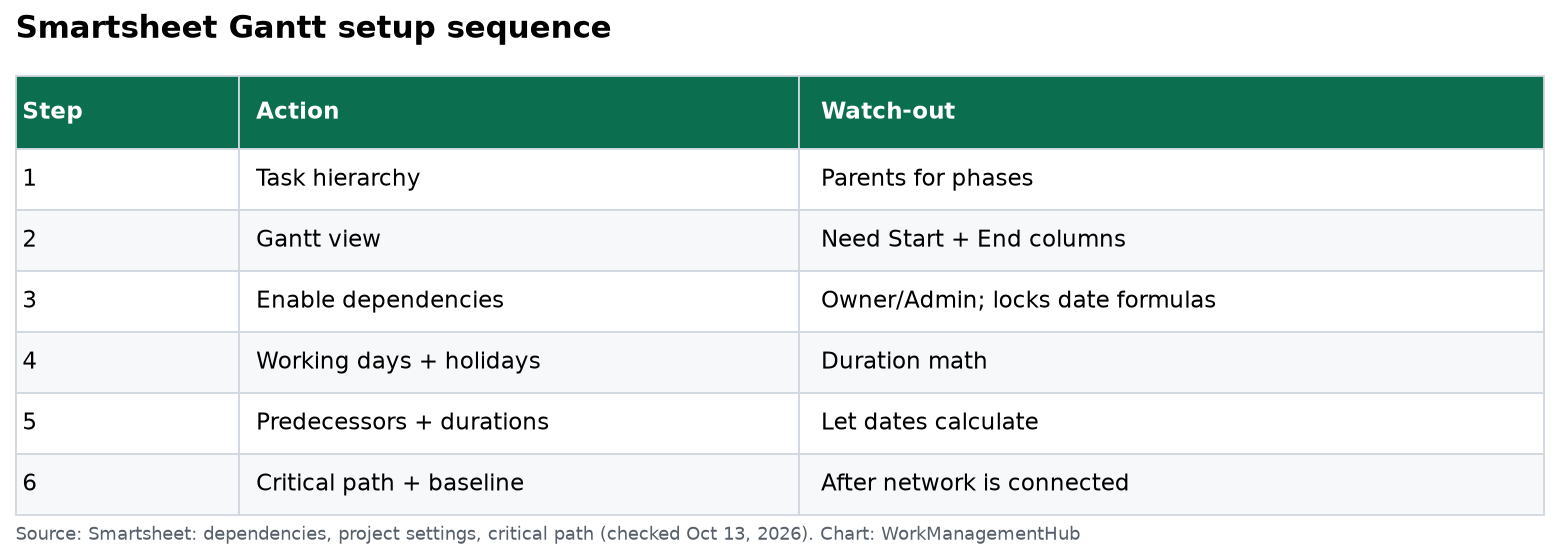
Smartsheet Gantt setup sequence
Dependencies before dates — reverse that order and you will retype the schedule. Chart: WorkManagementHub.
  1. Build the task list with parent/child hierarchy for phases.
  2. Switch to Gantt View from the toolbar views.
  3. Open Project Settings / Sheet settings (right-click a column header or the settings control in Gantt).
  4. Enable Dependencies. Pick or auto-create Predecessor and Duration columns. Optionally map % Complete.
  5. Set working days, hours per day, and non-working dates (holidays).
  6. Enter Duration + Predecessors on child rows. Use 3d, 1.5d, or other units Smartsheet accepts; start/end calculate from working days.
  7. Mark milestones with 0 duration (diamond markers).
  8. Turn on Critical Path (Gantt toolbar) once the network is connected — critical tasks highlight.
  9. Set a baseline before execution starts so slip is visible later.
  10. Share the sheet or publish a view for stakeholders who should not edit.

Predecessor examples: 3 (FS from row 3), 3SS, 3+2d for lag. Multiple predecessors are comma-separated.

Why dependencies first

When dependencies are on:

  • Changing a predecessor’s dates shifts dependents.
  • Duration and working-day settings drive end dates.
  • You cannot place formulas in the dependency-managed date columns.

That last point is the usual fight with Excel immigrants. Put RAG flags in a separate Text/Symbols column with formulas; leave the schedule columns to Smartsheet.

Gantt vs Timeline view

GanttTimeline
Best forTask networks, critical path, baselinesStakeholder storytelling, fewer bars
DependenciesFirst-classAvailable via sheet settings in newer models
Critical pathYesNot the same visual tool
Typical userPM owning the scheduleLeadership readout

Use Gantt to run the job; paste a Timeline screenshot into the Monday update if executives glaze over at predecessors.

Baselines and critical path

Critical path highlights tasks that drive the project end date. Toggle Show Critical Path in Gantt; it recalculates as you edit. Only a connected network produces a useful path — orphan rows with no predecessors never look “critical.”

Baselines snapshot start/end so you can show variance. Set them when the plan is approved, not three weeks into execution.

Plan and permission notes

  • Enabling dependencies: Owner or Admin.
  • Pro includes Gantt among its views; Business adds workload and unlimited automations useful for schedule alerts (pricing).
  • For engineering detail in Jira with PMO Gantt in Smartsheet, use the Jira Connector instead of duplicating every story as a bar.
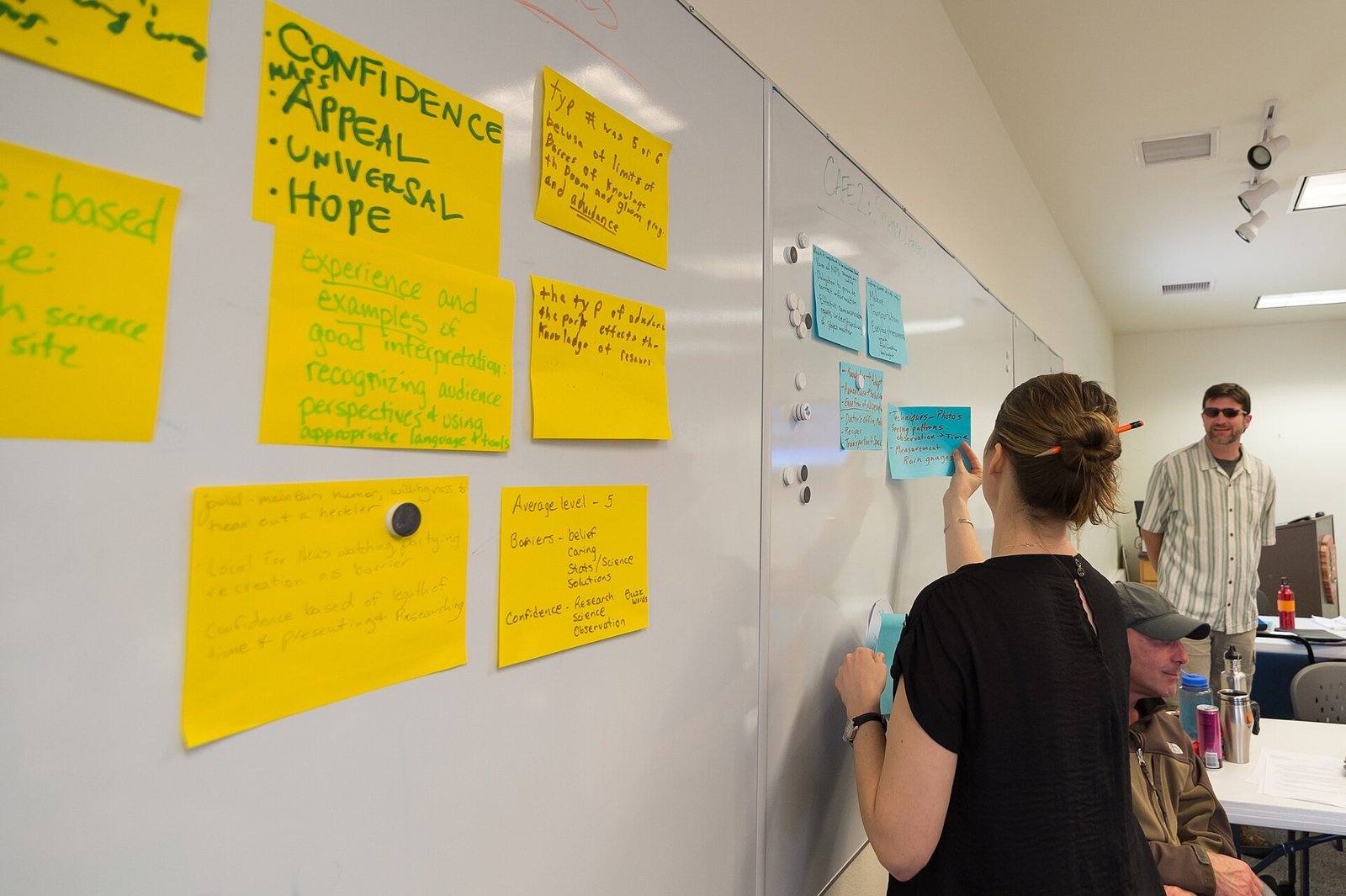
Sticky notes on a whiteboard
Agree predecessors with the team before the Gantt becomes policy.

Common questions

Why don’t my bars appear?

Missing Start or End date, or you’re still in Grid view. Switch to Gantt and confirm both date columns are mapped in settings.

Can I type Start and End and skip Duration?

With dependencies off, yes — and the schedule will not auto-shift. With dependencies on, enter Duration (and predecessors); let Smartsheet compute ends.

Who can turn on dependencies?

Sheet Owner or Admin on a paid plan that includes project settings.

Does critical path require Enterprise?

No. Critical path is a Gantt visualization feature documented for sheets with dependencies enabled; it is not an Enterprise-only add-on in Smartsheet’s help articles.


Verified against Smartsheet Learning Center dependency, project settings, and critical path articles on October 13, 2026.

Sponsored

OneSMAR for Smartsheet Teams - Available on the App Store

Related guides

Smartsheet Form Conditional Logic in 2026: Step-by-Step Setup and the Rules That Trip People Up
Smartsheet
Smartsheet Form Conditional Logic in 2026: Step-by-Step Setup and the Rules That Trip People Up
Smartsheet WorkApps in 2026: How to Build a No-Code App, Set Roles and Publish It
Smartsheet
Smartsheet WorkApps in 2026: How to Build a No-Code App, Set Roles and Publish It
Smartsheet Resource Management in 2026: Workload Tracking vs the Full Add-On, Setup and Costs
Smartsheet
Smartsheet Resource Management in 2026: Workload Tracking vs the Full Add-On, Setup and Costs
Photo of Khasim Basha Shaik
Author

Khasim Basha Shaik

Khasim is a work management expert and entrepreneur with a deep passion for project management tools. He works hands-on with platforms like Smartsheet, Monday.com, Asana, ClickUp, Jira, Notion, Wrike and Airtable every day, and loves automating workflows to save teams and customers a ton of time. On WorkManagementHub he shares practical setup guides, honest tool comparisons, and real-world troubleshooting drawn from daily use.

Follow Me
Other Articles
Table of common Wrike problems and the first fix to try
Previous

Wrike Not Working? 8 Fixes for the Most Common Wrike Problems (2026)

Table of Asana for Slack setup steps
Next

Asana + Slack Integration 2026: Setup, Tasks & Fixes

No Comment! Be the first one.

    Leave a Reply Cancel reply

    Your email address will not be published. Required fields are marked *

    KB
    Khasim Basha Shaik

    Khasim is a work management expert and entrepreneur with a deep passion for project management tools. He works hands-on with platforms like Smartsheet, Monday.com, Asana, ClickUp, Jira, Notion, Wrike and Airtable every day, and loves automating workflows to save teams and customers a ton of time. On WorkManagementHub he shares practical setup guides, honest tool comparisons, and real-world troubleshooting drawn from daily use.

    About Work Management Hub →

    Popular reviews & guides

    • Table matching ten team types to the project management tool to start with, a runner-up and the reasonBest Project Management Software 2026: 10 Tools Compared by Team Type, Real Monthly Cost and the Limits That Matter
    • Team meeting around a long conference table with laptops openJira Pricing 2026: Standard vs Premium, Annual Tiers and the Oct 13 Increase
    • Developer working on a laptop with code on screen while holding a phoneJira Slack Integration 2026: Setup, @Jira Tickets and Channels Without the Noise
    • Laptop covered in developer stickers on a deskLinear vs GitHub Issues (2026): Who Should Track the Work?
    • Person typing on a laptop at a small round tableLinear-GitHub Sync Broken? Fix Every Failure Mode
    • Three people collaborating around a laptop at a meeting tableGitHub Stacked PRs Are GA: What Changed Oct 6, 2026 (and How to Roll Them Out)

    Browse by tool

    • Smartsheet33
    • Monday.com28
    • Asana33
    • ClickUp30
    • Notion29
    • Jira31
    • Wrike16
    • Airtable16
    • Integrations12

    Sponsored OneSMAR – Everything you need for Smartsheet in one place

    Independent reviews, comparisons, and hands-on guides for work management tools — Smartsheet, Monday.com, Asana, ClickUp, Notion, Jira, Wrike, and Airtable — written from daily, real-world use of these platforms.

    Tools We Cover

    • Smartsheet
    • Monday.com
    • ClickUp
    • Asana
    • Notion
    • Jira
    • Wrike
    • Airtable

    Company

    • About Us
    • Contact Us
    • Privacy Policy
    • Terms of Use
    • Disclaimer
    • Affiliate Disclosure
    Copyright 2026 — Work Management Hub. All rights reserved. Blogsy WordPress Theme