
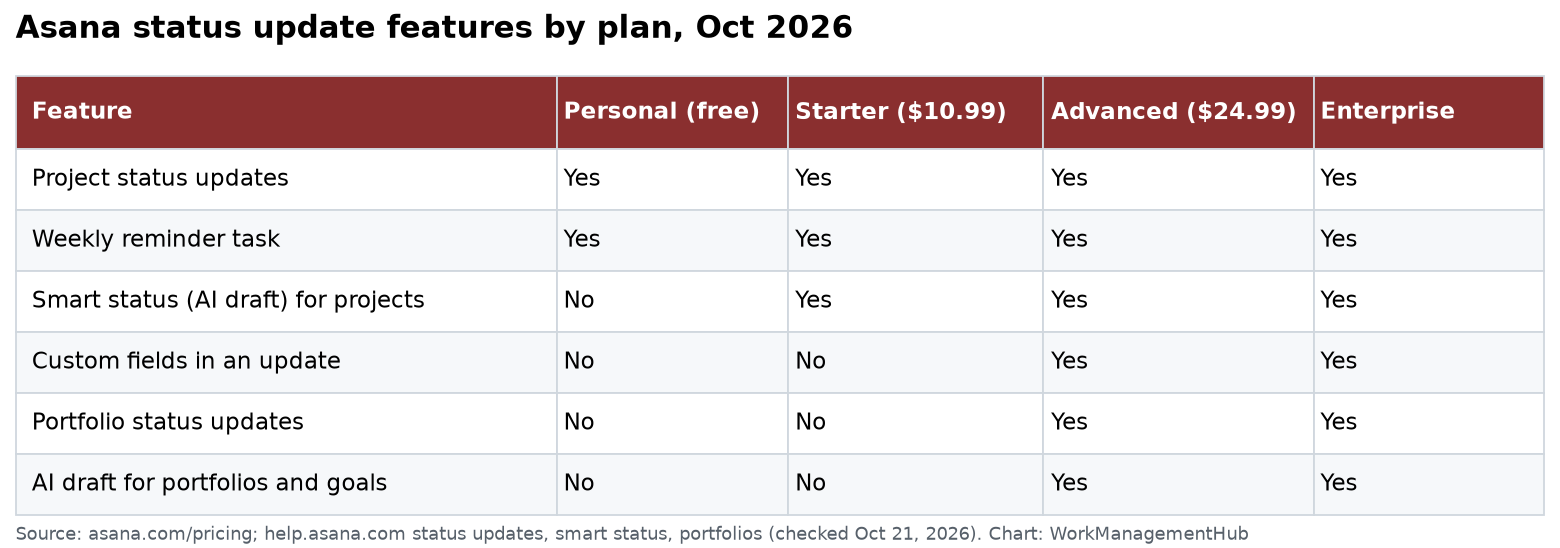
An Asana status update is a short report you post on a project, portfolio or goal. You pick a color (On track, At risk, Off track, On hold or Complete), write a summary, and drag in tasks or charts. Every plan can post project updates, even the free Personal plan. Portfolio updates and custom fields in updates need Advanced at $24.99 per user a month, billed yearly.
I checked Asana’s status update help article, its smart status page and its pricing page on October 21, 2026. Prices are per user per month, billed yearly, in US dollars.
What a status update contains
Think of it as a weekly memo that lives inside the project. Each one has:
- A status color. You must pick one before you can post. The choices are On track, At risk, Off track, On hold and Complete.
- A title and summary. This is the part people actually read. Keep it to three or four lines.
- Sections. The default blocks are Summary, What we’ve accomplished and Next steps. You can drag them into a new order or add your own.
- Highlights. You can drag in finished milestones, overdue tasks or other items from the project.
- Charts. Charts from the project can be added to show progress.
- Custom fields (Advanced and up). You can show values such as budget or region. These come from the custom fields set on the project in a portfolio.
Asana remembers the block order you used. Next week the same structure is ready for you.
How to post a project status update
- Open the project and go to the Overview tab.
- Click Set status if the project has no status yet, or click the current status.
- Pick a color, then add a title.
- Fill in the Summary and Next steps.
- Drag highlights or charts into the update if they help tell the story.
- Click the blue Post button.
Any project member can post an update. You can also start one from the status drop-down next to the project name in any view. Status updates show up in the project Overview and in Messages, and members who follow the project get a notice.
The Friday reminder
Each project owner gets a task every Thursday that is due Friday. It asks them to update the project status. This works on every plan.
If you own a project that does not need weekly updates, you can turn it off. Open the project, go to the status update view and switch off Remind me to update the status every Friday.
My advice: keep the reminder on for client and leadership projects. Turn it off for internal to-do lists. A reminder that people ignore trains them to ignore all Asana tasks.
Smart status: AI drafts
Smart status lets Asana AI write a first draft of your update. It looks at the project’s tasks and activity, then fills in the blocks.
- Projects: available on Starter, Advanced, Enterprise and Enterprise+.
- Portfolios and goals: Advanced, Enterprise and Enterprise+ only.
To use it on a project, choose the current status on the Overview tab and click Draft with AI. Pick the status and the date range. You can click + Add guidance to tell the AI what to include, such as “List blockers first and say where we need help.” Then edit the draft and post it.
What it costs. Asana now sells AI use as requests. Its pricing page lists prepaid AI requests at $0.50 each, or $0.60 each on monthly pay as you go. Check your plan’s AI terms before your whole team starts drafting every update with AI.
My view: smart status is good at listing what changed. It is weak at saying why. Always add one sentence of your own about risk and the next decision. That is the part your boss wants.
Portfolio status updates
A portfolio is a group of projects you track together. Portfolios are on Advanced, Enterprise and Enterprise+.
To post one, click Set status next to the portfolio name, or open the Progress tab and click Update status. You must pick On track, At risk, Off track or On hold, and write at least one block of text. You can drag in projects that are on track or at risk as highlights.
The Progress tab also shows how many projects are on track, at risk or off track. For a team lead with 10 or more projects, this is the main reason to pay for Advanced.
The snapshot gotcha
A status update freezes the data at the moment you post it. Asana’s help article says the project name, custom fields, task names, due dates and assignees all stay as they were.
So if a task’s due date moves after you post, the old date stays in the update. This is on purpose. It gives you a true record of what you said that week. But it also means:
- Never treat an old update as live data. Open the project or a dashboard for current numbers.
- Post a new update when a big date moves. Do not edit last week’s update and hope people see it.
Other limits to know
- You can only delete your own updates. You cannot delete an update someone else posted.
- Access is wider than you think. Anyone added as a collaborator on an update can read all of it, even without access to the project. If they click a task they cannot reach, they see a request access page.
- Public portfolio updates show in full on the Progress tab, even to people who cannot see every project in the portfolio.
- No custom colors. You get the five built-in states.
A format that works
After setting up status reports for many teams, this is the format I give clients:
| Block | What to write | Length |
|---|---|---|
| Summary | Status in one line, then the single biggest risk | 2 to 3 lines |
| What we finished | 3 highlights dragged from the project | 3 items |
| Blocked | What is stuck and who can unblock it | 1 to 3 items |
| Next steps | The 2 or 3 things due before the next update | 3 items |
| Chart | One progress chart, not five | 1 chart |
Post every Friday by noon. Ask leaders to comment on the update, not in a separate email. That keeps the decision history in one place.
Which plan do you need?
| Your need | Lowest plan |
|---|---|
| Weekly updates on a few projects | Personal (free, up to 2 users) |
| AI drafts and a team of more than 2 | Starter ($10.99) |
| Updates across many projects, plus custom fields | Advanced ($24.99) |
| SSO, SCIM and admin controls | Enterprise (quote) |
Who should not upgrade for this: a small team with fewer than five projects. Project updates and the Friday reminder already work on the lower plans. Pay for Advanced when you need portfolios, goals and workload, not just nicer status reports. See our Asana pricing guide for the full plan list.
Related guides
- Asana reporting dashboards setup for live charts that do not freeze.
- Asana goals and OKR tracking for goal status updates.
- Asana automation rules to move tasks so highlights stay accurate.
- Asana AI Studio guide if you want AI to do more than draft updates.
Common questions
Can anyone on a project post a status update?
Yes. Any project member can set a status and post an update. Only the person who posted an update can delete it.
Do status updates change when tasks change?
No. An update is a snapshot. Task names, due dates and assignees stay as they were when you posted.
Can I turn off the weekly status reminder?
Yes. The project owner can switch off “Remind me to update the status every Friday” in the project’s status update view.
Which Asana plan has portfolio status updates?
Advanced, Enterprise and Enterprise+. Advanced costs $24.99 per user a month, billed yearly.
Is Asana smart status free?
It is on Starter and higher plans. Asana bills AI use as requests, listed at $0.50 each prepaid or $0.60 each pay as you go.
Sources
- Asana Help: Project progress and status updates (checked Oct 21, 2026)
- Asana Help: Smart status
- Asana Help: Portfolio progress and reporting
- Asana Help: How to use status updates
- Asana pricing
Sponsored