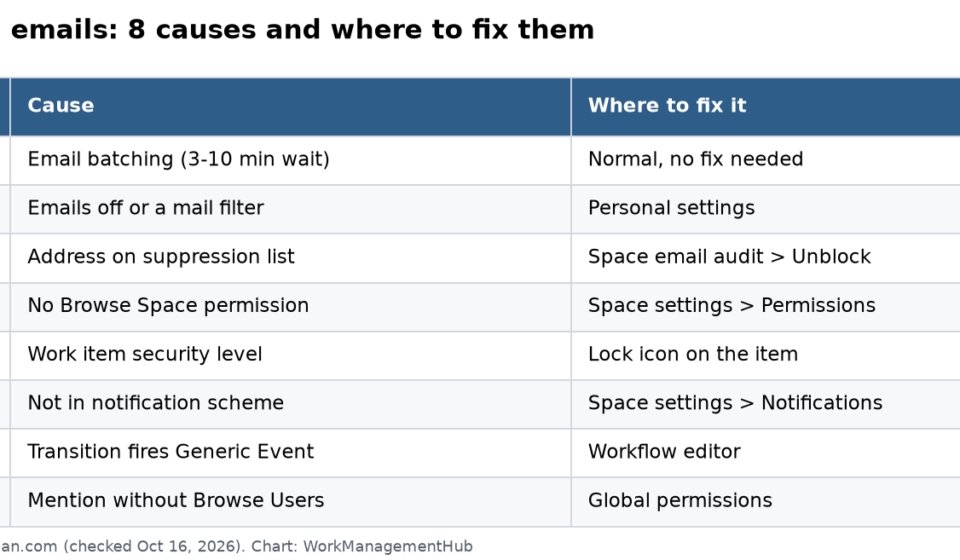

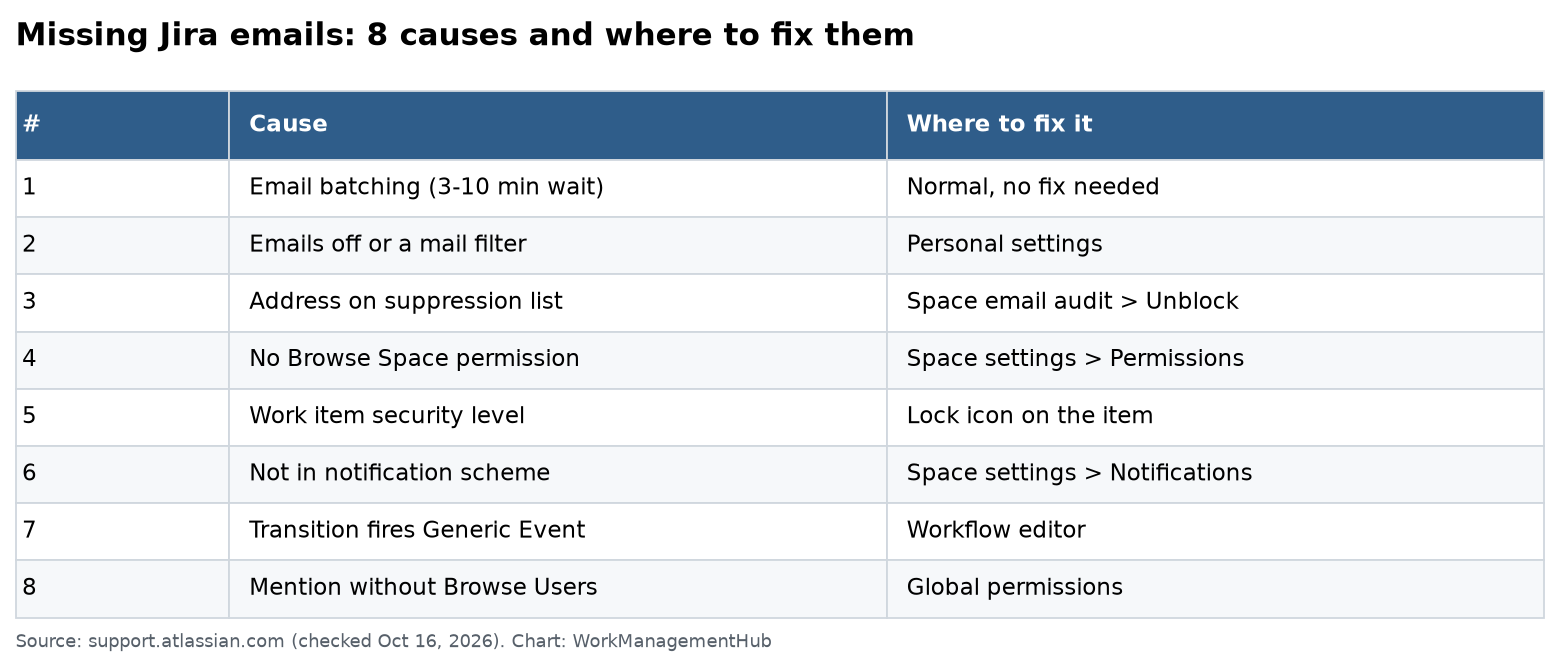
Most missing Jira Cloud emails come from one of eight causes. First, Jira batches emails, so a 3 to 10 minute wait is normal. Second, the person may have turned emails off. Third, their address may be on Atlassian’s suppression list. The rest are permission and scheme problems: no Browse permission, a security level, a missing recipient in the notification scheme, a transition that fires Generic Event, or a mention from someone without the “Browse Users and Groups” permission.
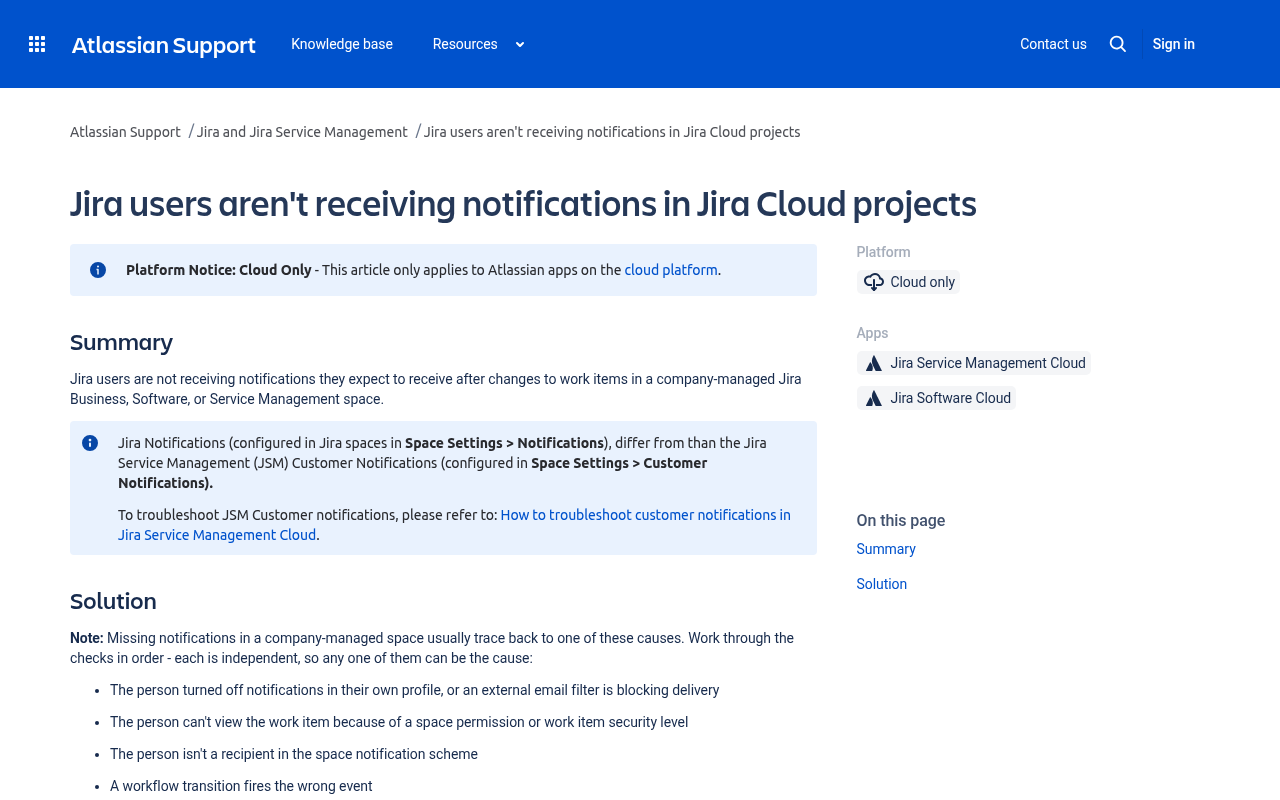
This checklist follows four Atlassian support articles: users not receiving notifications (updated September 18, 2026), missing emails for mentions (updated October 7, 2026), unblocking a suppressed address (updated June 25, 2026) and batched notifications. I checked all of them on October 16, 2026.
Work through the fixes in order. The first three take two minutes each and solve most cases.
Quick checklist
| # | Cause | Who can fix it | Where |
|---|---|---|---|
| 1 | Email batching (3 to 10 min wait) | Nobody needs to | Normal behavior |
| 2 | Emails turned off, or a mail filter | The user | Personal settings |
| 3 | Address on the suppression list | Space admin | Space settings > Notifications > Space email audit |
| 4 | No Browse permission | Jira admin | Space settings > Permissions |
| 5 | Work item security level | Jira admin | The lock icon on the work item |
| 6 | Not a recipient in the scheme | Jira admin | Space settings > Notifications |
| 7 | Transition fires Generic Event | Jira admin | Workflow editor |
| 8 | Mention without Browse Users and Groups | Site or Jira admin | Settings > System > Global permissions |
1. Wait out email batching
Jira Cloud groups several updates on one work item into a single email. Here is how the timer works:
- After a change, Jira waits 3 minutes of quiet time.
- If another change lands in those 3 minutes, the timer starts again.
- The longest Jira will hold an email is 10 minutes.
Atlassian says batching cuts email volume by about 30% on average. So a 3 to 10 minute delay is not a bug.
Two kinds of email skip the batch and go out at once:
- Critical updates, like when you are mentioned or assigned.
- Plain-text emails.
If an email takes longer than 10 minutes, or a mention or assignment is late, move on to the next fixes.
2. Check personal settings and mail filters
People sometimes turn off emails and forget. Ask the person to check:
- Select your profile picture, then Personal settings.
- Pick Spaces and issues in the sidebar.
- Turn on Send me emails for issue activity if it is off.
- Want emails about your own changes too? Tick You make changes to issues.
For mentions, the setting lives under the cog, then Notification settings. Make sure You’re mentioned on a work item is ticked for email.
Then look outside Jira. Check spam, junk and any “Notifications” folder. Check Outlook or Gmail rules. A rule that moves mail from a new domain can hide Jira mail for weeks.
3. Unblock a suppressed address
If a mail server bounces a Jira email, Atlassian may put that address on a suppression list. After that, Jira sends nothing to it.
A space admin can fix this for Jira Software and Jira Business spaces:
- Open the space the person expects emails from.
- Go to Space settings, then Notifications, then Space email audit.
- Filter for the email address.
- Select Unblock Email.
Good to know:
- There is one suppression list for the whole site. Unblocking in one space unblocks it everywhere.
- Emails sent while the address was blocked are not resent.
- If the mail server bounces again, the address goes back on the list. Ask the mail admin to fix the cause first.
- The self-service button only works for verified users (people who have logged in before). For new users, use Resend invite.
- For Jira Service Management, Confluence and admin emails, use the customer notification logs or contact Atlassian Support.
The most common cause of a bounce? A new mailbox that got email before it was fully set up.
4. Confirm the person can see the work item
Jira only emails people who can view the work item. Check the Browse Space permission:
- Open the space, then Space settings, then Permissions.
- Find Browse Space.
- Check that the person is in one of the listed groups or roles.
Our Jira permissions fix guide walks through every permission layer if this gets messy.
5. Check the security level
A single work item can hide behind a security level. Look for the lock icon on the work item. If the lock is closed, the person may not be in that level. They will get no email for that item, even if they watch it.
6. Add the person to the notification scheme
Company-managed spaces use a notification scheme. It says who gets an email for each event. Recipients can be:
- Single users
- Groups
- Space roles
- Jira roles, like current assignee, reporter or watchers
To check it, open Space settings, then Notifications, then Settings. If “Issue Created” only goes to the reporter, a watcher will never hear about new items.
7. Fix transitions that fire Generic Event
This one fools a lot of admins. Say your scheme sends an email on Issue Closed. But your “Close issue” transition fires Generic Event instead. Nobody gets the closed email.
Two ways to fix it:
- Change the event the transition fires to Issue Closed in the workflow editor.
- Or add the right people to Generic Event in the notification scheme.
If you are moving to the new workflow editor, check events as part of the move. Our legacy workflow editor migration guide covers the steps.
8. Fix silent @mentions
Emily mentions Robert, but Robert gets no email. Atlassian lists three causes:
- Robert turned off mention emails (see fix 2).
- Robert’s address is suppressed (see fix 3).
- Emily lacks the “Browse Users and Groups” global permission.
The last one surprises people. The check is on the person who writes the mention, not the person mentioned. To grant it:
- Go to the cog, then System, then Global Permissions.
- Under Add Permission, pick Browse Users and Groups.
- Choose Emily’s group.
Atlassian warns against granting it to “Anyone,” since that includes people who are not logged in.
Service spaces: the “customer” trap
In Jira Service Management spaces, an agent may get no emails from requests. The cause can be that they were added to a customer organization by mistake. Jira then treats them as a customer. Go to the space, open Organizations and remove them.
Watch out for automation overlap
Automation rules can send emails too. If a rule and the scheme both fire, people get two emails, then turn emails off. If a rule replaced a scheme email, a broken rule means silence. Look at the audit log for your email rules. Our Jira automation rules guide shows how to read it.
On the Free plan, automation is capped at 150 automation steps a month for the whole site, per the Jira pricing page. When you hit the cap, rule-based emails stop until the next month. Our Jira pricing guide lists the higher limits on paid plans.
A 10-minute test plan
When a teammate says “I get nothing,” run this:
- Assign them a test work item. Assignment is not batched, so it should arrive within a minute or two.
- No email? Check the space email audit for their address.
- Not listed? Check their personal settings together on a call.
- Still nothing? Use the permission helper to check Browse Space on that item.
- Then open the notification scheme and the workflow event for the action that failed.
Write down what you find. Most teams hit the same cause again later.
Common questions
Why are my Jira emails late by a few minutes?
Jira Cloud batches emails. It waits 3 minutes of quiet time and holds an email for at most 10 minutes. Mentions and assignments skip the wait.
How do I remove an email from the Jira suppression list?
A space admin opens Space settings, then Notifications, then Space email audit, finds the address and selects Unblock Email. It works for verified users in Jira Software and Business spaces.
Will Jira resend emails that were blocked?
No. Emails sent while the address was suppressed are not resent.
Why does an @mention not send an email?
The person who wrote the mention may lack the “Browse Users and Groups” global permission. The mentioned person may also have mention emails off or a suppressed address.
Why do watchers not get an email when an issue closes?
The close transition may fire Generic Event instead of Issue Closed. Change the event, or add watchers to Generic Event in the notification scheme.
Checked against support.atlassian.com (notifications, mentions, email suppression and batching articles) and atlassian.com/software/jira/pricing on October 16, 2026.
Sponsored