Smartsheet vs Linear (2026): Two Tools That Barely Compete, and How to Choose

Smartsheet and Linear solve different problems. Smartsheet is a spreadsheet-style work management platform for PMOs, operations teams and cross-functional programs. Linear is a fast, opinionated issue tracker built for software engineering. If non-technical people own the plan, pick Smartsheet. If engineers own the backlog, pick Linear. Most teams asking this question should run both and connect them lightly.
That’s the short answer. The longer one matters because the two tools get compared for budget reasons, not product reasons, and the wrong call is expensive in a way that doesn’t show up on the invoice.
Why anyone compares these two at all
Smartsheet’s real competitors are Asana, monday.com and Microsoft Project. Linear’s are Jira, Shortcut and GitHub Issues. Putting them side by side is a bit like comparing a project accounting system to a code review tool.
The comparison gets real in three situations, and they’re all procurement situations:
- Consolidation. A 60-person company already runs Linear in engineering. Finance wants fewer subscriptions, and someone notices the ops team’s Smartsheet license could, in theory, cover engineering too.
- The reverse. A company standardized on Smartsheet hires its first serious engineering team, and those engineers refuse to file work in a grid.
- A blank slate. A founder or ops lead building the stack from scratch saw both tools demoed in the same week and hasn’t yet worked out that they sit at different layers.
In all three, my honest recommendation is usually “run both.” That answer costs money, so it’s worth knowing exactly what you give up either way.
What each tool actually is
Smartsheet: a grid with project controls on top
Everything in Smartsheet starts from rows and columns: cell formulas, cross-sheet references, dependencies, conditional formatting. On top of that grid you get Gantt, calendar, board and table views, plus dashboards, reports and forms. The Smartsheet pricing page lists unlimited sheets, forms and reports from the Pro plan up.
Large organizations don’t buy it for the grid, though. They buy the layer above it. Control Center spins up standardized projects across a portfolio, Dynamic View lets outside parties see only their slice of a sheet, and Data Shuttle runs scheduled imports and exports. Those are what turn Smartsheet into a PMO platform, and they cost extra. Dynamic View starts at $125 a month and Data Shuttle at $100 a month, or you buy them bundled in the Advanced Work Management package. If you’re heading that way, our Control Center setup guide shows what the rollout really involves.
Linear: an issue tracker that refuses to become a spreadsheet
Linear’s object model is small: issues, projects, cycles and initiatives. There’s no grid, no resource allocation and no timesheet. The whole argument is speed and constraint. Fewer fields, keyboard-first everything, and opinions baked in about how software teams should work.
Where Linear earns its keep is the developer loop. According to Linear’s GitHub integration docs, you can link pull requests and commits to issues, have issue status move automatically as a PR progresses, and sync GitHub Issues into Linear teams. Copy a branch name from an issue with Cmd/Ctrl + Shift + . and the link takes care of itself. Engineers stay in their editor and the tracker stays current. That’s the thing Smartsheet can’t give them.
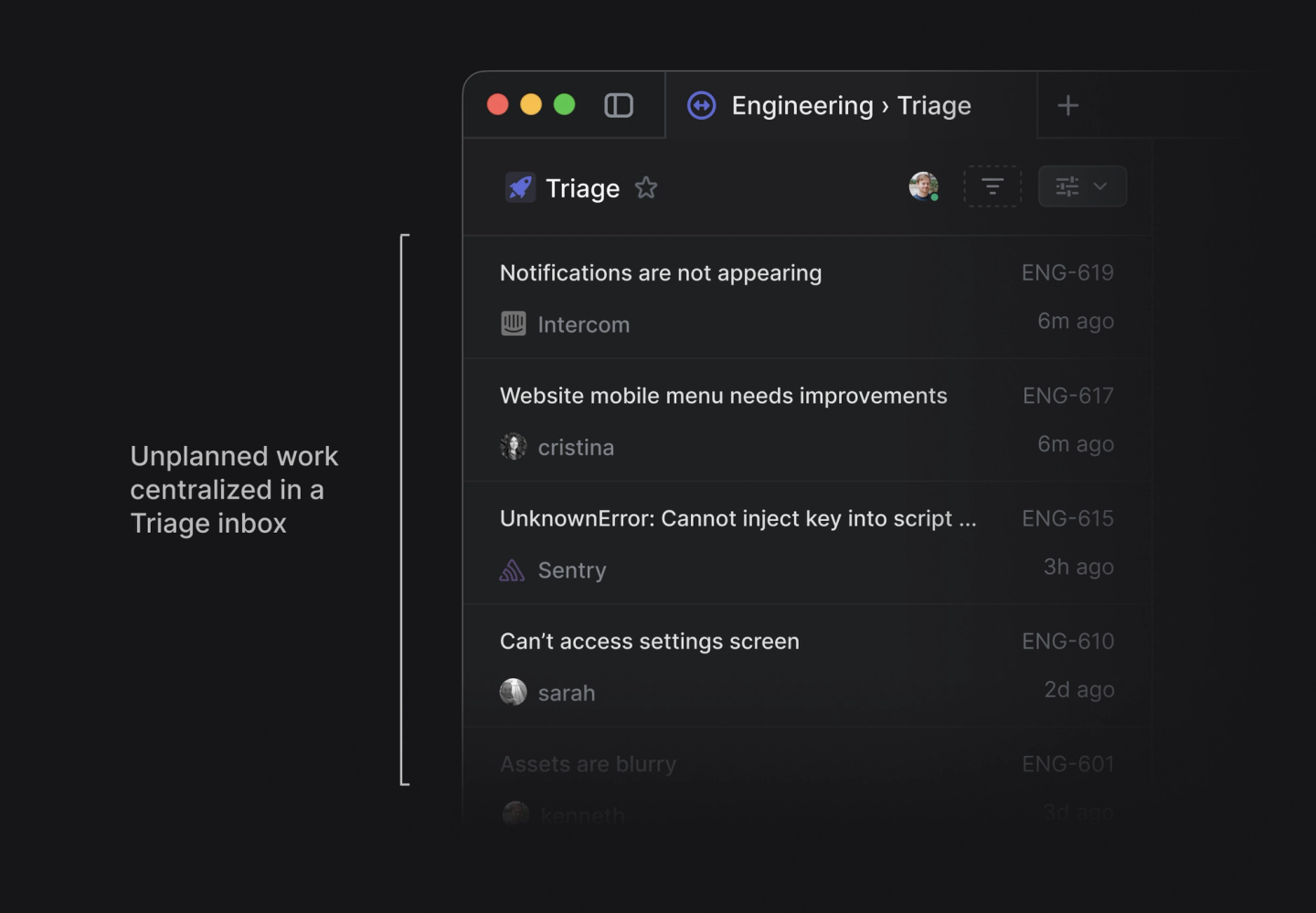
Triage is the other piece worth knowing. Bugs and requests from support tools land in one inbox, someone accepts or declines them, and only then do they reach a team’s cycle. Our Linear cycles guide covers how to set cycle length and cooldowns so triage doesn’t flood the sprint.
2026 pricing, side by side
Both vendors publish prices, and both quote annual billing up front.
| Smartsheet | Linear | |
|---|---|---|
| Free tier | No free plan; free trial | Free: unlimited members, 2 teams, 250 issues |
| Entry paid plan | Pro: $9 per Member/month billed yearly ($12 monthly), 1 to 10 Members | Basic: $10 per user/month billed yearly, 5 teams, unlimited issues |
| Main paid plan | Business: $19 per Member/month billed yearly ($24 monthly), 3+ Members | Business: $16 per user/month billed yearly, unlimited teams, private teams and guests |
| Free collaborators | Unlimited Contributors (view and comment); unlimited Guests on Business | Guest accounts on Business |
| Automation | 250 automations/month on Pro, unlimited on Business | Workflow automation from GitHub and GitLab built in |
| Enterprise | Custom; SAML SSO, portfolios, scenario planning | Custom; SAML and SCIM, audit log, advanced org modeling |
Prices from Smartsheet and Linear, checked October 1, 2026.
Two things in that table catch people out. First, Smartsheet Contributors are free but they can only view and comment. They can’t edit a sheet, so an engineer who needs to update status still needs a paid Member seat or has to be invited as a Guest on Business. Second, Linear’s free plan is generous on people and stingy on volume. 250 issues disappears fast once a real team starts filing bugs.
For full breakdowns, see our Smartsheet pricing guide and Linear pricing guide.
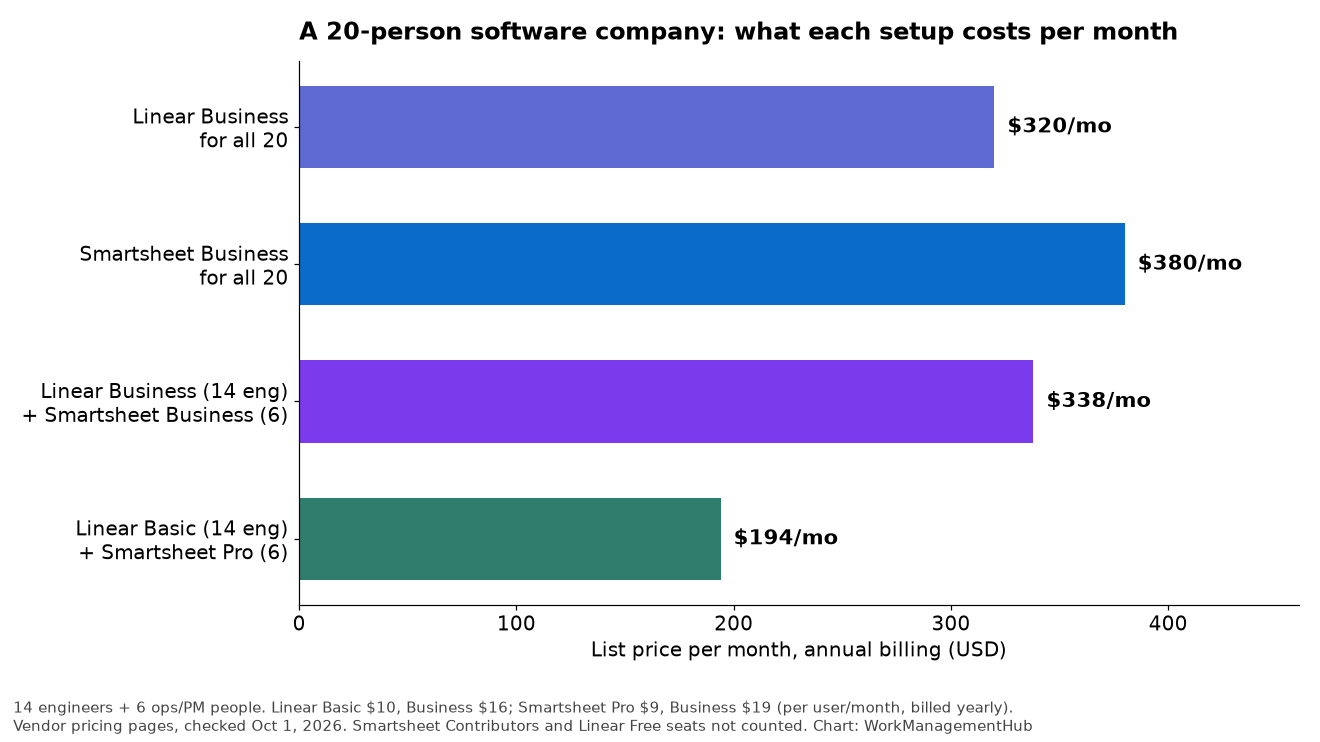
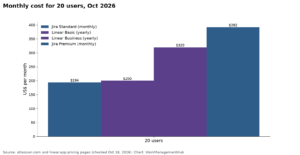
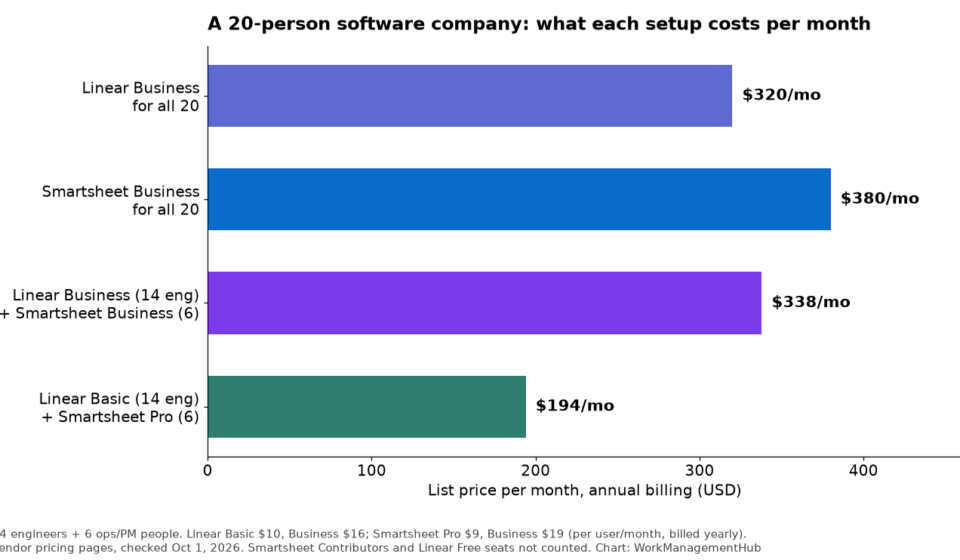
Here’s the math behind that chart. Take a 20-person company with 14 engineers and 6 people in ops, product and leadership. Linear Business for everyone runs $320 a month. Smartsheet Business for everyone runs $380. Engineers on Linear Business plus ops on Smartsheet Business is $338. If you can live on Linear Basic and Smartsheet Pro, the split drops to $194.
So the “consolidate to save money” argument is weaker than it looks. Forcing one tool on everyone rarely saves much, and it always costs adoption.
Where each tool breaks
Smartsheet in engineering
Engineers tolerate Smartsheet when they don’t have to live in it. Ask them to update rows after every commit and they’ll stop updating, and then your Gantt chart is fiction. There’s no native PR linking, no branch-name convention and no cycle concept. You can build a sprint sheet, but you’re rebuilding Linear out of formulas and the result is slower than either tool alone.
Linear outside engineering
Linear breaks the other way. Try to run a marketing launch, a vendor onboarding or a budget cycle in it and you’ll miss:
- Dependencies with a real critical path
- Workload and capacity views across teams
- Cell-level formulas and rollups across many projects
- Forms that non-technical requesters will happily fill in
- Approval workflows with an audit trail
Linear Projects and Initiatives give leadership a decent roadmap view of engineering work. They don’t give an operations lead a program plan.
What I’d set up for a mixed company
If I were setting this up for a software company of 20 to 100 people, here’s how I’d split it:
- Linear owns engineering work. Issues, cycles, triage and the GitHub link. Engineers never have to open Smartsheet.
- Smartsheet owns the program layer. Launch plans, cross-team milestones, vendor work, budgets and anything with dependencies across departments.
- One milestone row per Linear project. The Smartsheet program plan carries a row for each engineering project, with target date, status and a link to the Linear project. Someone updates it weekly, by hand or with a light automation.
- Leadership reads one dashboard. A Smartsheet dashboard rolls up program status. For engineering detail, it links out to Linear Insights rather than copying data across.
Resist building a full two-way sync. It sounds tidy, but field mapping between a grid and an issue tracker is fragile, and the people who built the integration usually leave before it breaks. If your engineering team runs on Jira instead, the native Smartsheet and Jira connector is the better-supported path, and our Jira vs Linear comparison can help you choose the tracker first.

Who should pick which
Pick Smartsheet alone if your company does little or no software development, your work is structured and repeatable (construction, events, marketing operations, IT portfolio), and you need dependencies, approvals and portfolio rollups.
Pick Linear alone if you’re a product-led startup where nearly everyone touches the product, and ops work is light enough to live in Linear projects or a doc.
Run both if you have a real engineering team and a real operations or PMO function. That describes most software companies past roughly 30 people.
FAQ
Can Smartsheet replace Linear for a dev team?
It can track the work, but it won’t link to pull requests, move issues when code merges, or run cycles the way engineers expect. You’d be trading developer experience for one fewer license, and in my experience status updates are the first thing to go.
Can Linear replace Smartsheet for operations?
Only for light operations work. Linear has no Gantt dependencies, no resource management and no spreadsheet formulas. If your ops plan needs a critical path or a budget rollup, Linear isn’t the right home for it.
Is there a native Smartsheet and Linear integration?
Not on the level of Smartsheet’s Jira connector. Most teams connect them through an automation platform or keep a manual weekly milestone update. For a milestone-level link, manual is often more reliable than it sounds.
Which is cheaper?
Per seat, Linear Business ($16 billed yearly) is cheaper than Smartsheet Business ($19). For a mixed company, though, splitting seats between the two tools usually beats putting everyone on either one.
Does Smartsheet charge for people who only need to look?
No. Contributors can view and comment for free on every paid plan. They can’t edit, so anyone who updates data needs a Member seat, or Guest access on Business if they’re outside your company.
Sponsored