Atlassian Cloud Changes Fall 2026: Oct 13 List Prices and Dec 3 Automation Steps & Rovo Credits

If you run Jira Cloud, fall 2026 has two separate cost events. They are easy to blur into one “Atlassian is getting more expensive” complaint. They are not the same lever, and they need different prep work.
I implement work-management platforms for a living (my firm, SSPM, partners on Smartsheet and spends a lot of time next to Jira admins). Below is the admin version: dates, what Atlassian has published, what it costs when you go over, and a checklist you can finish before the meters start billing. Sources are linked throughout and were checked October 2, 2026.
The two dates
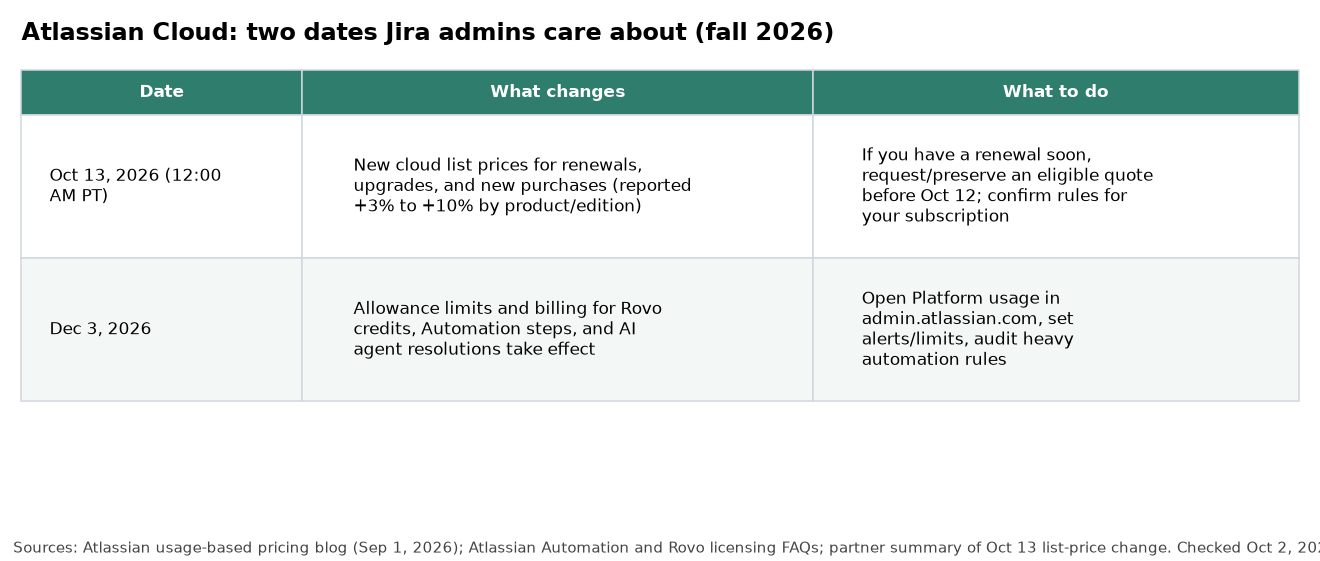
October 13, 2026 — cloud list prices
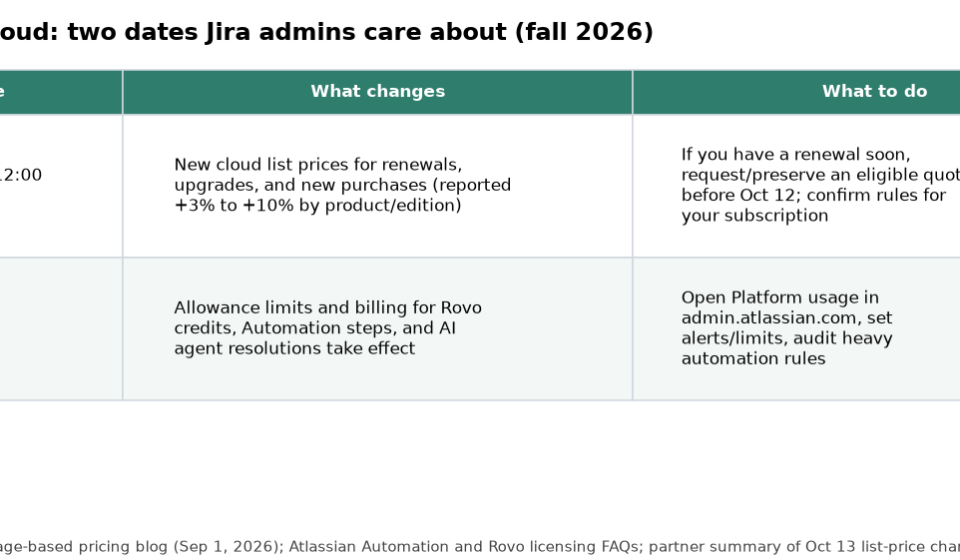
Atlassian is applying new cloud list prices on October 13, 2026 (12:00 AM PT) for renewals, upgrades and new purchases. Partner summaries of Atlassian’s customer notice put most increases in the 3% to 10% range by product and edition, with Jira Standard and Premium often cited at +7% under 5,000 seats and +10% at 5,000 and above, and Jira Enterprise around +8%. Your quote is the source of truth for your site.
Practical moves before then:
- Ask your billing admin whether an eligible quote can still be generated or preserved at current pricing (partner guidance often flags October 12 as the last day to generate a quote at old list rates; confirm Atlassian’s rules for your transaction type).
- Avoid casual mid-renewal experiments that void an open quote (activating or deactivating licenses can delete quotes on some billing paths).
- Re-check seat counts near the 5,000-user band if that is where your increase jumps.
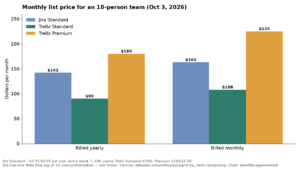
For current per-user list prices before or after the change, use Jira’s pricing page and our Jira pricing guide. As of early October 2026 checks, Jira Standard and Premium around the 11–100 user band were about $9.05 and $18.30 per user per month on monthly billing; confirm the calculator for your tier.
December 3, 2026 — usage meters start billing
On December 3, 2026, Atlassian’s expanded usage-based pricing takes effect for the meters it announced in its September 1, 2026 company blog:
- Rovo credits (chat, agents, enriched Teamwork Graph queries; in-line summaries, rewrites and Rovo Search stay free per Atlassian)
- Automation steps
- AI agent resolutions
Eligible paid plans already include allowances. Extra usage is available; admins control limits in Atlassian Administration.
Automation steps: what counts and what you get
Atlassian now measures automation in steps, not whole rule runs. From the Automation licensing FAQ:
- A step is a trigger, condition, action, branch or loop that executes
- Example: trigger → check priority → assign user → send notification = 4 steps
- Allowances are pooled at the organization across Jira, Confluence, Jira Service Management / Service Collection, Teamwork Collection and Jira Product Discovery
- Allowances refresh monthly
- Extra usage: $0.50 per 1,000 steps
- If extra usage is off and you hit the cap, new runs pause; events during the pause are not replayed
- Rovo-powered actions inside a rule spend Rovo credits, not Automation steps
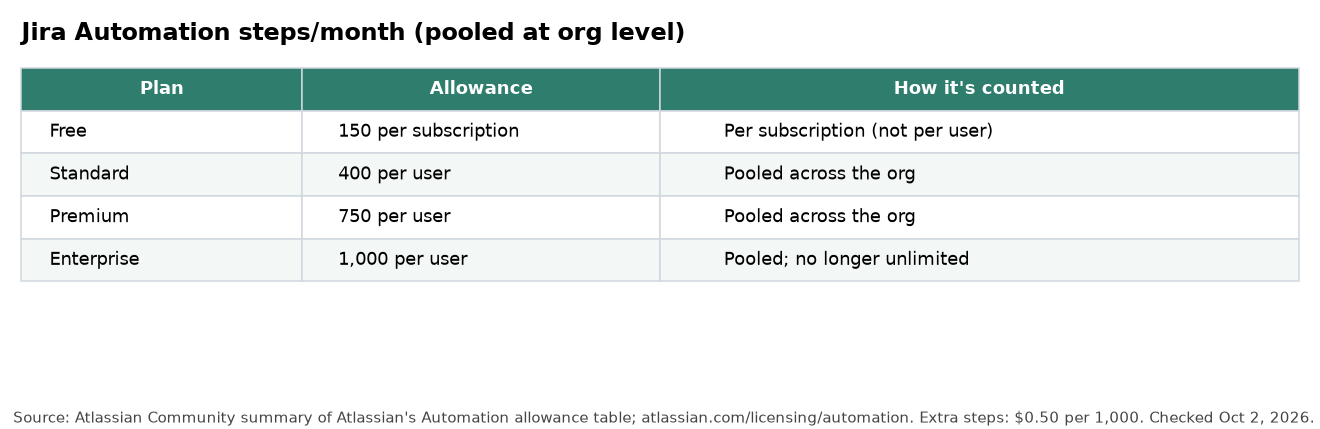
Published Jira Automation allowances (per user per month on paid plans; Free is per subscription):
| Plan | Jira Automation steps |
|---|---|
| Free | 150 per subscription |
| Standard | 400 per user |
| Premium | 750 per user |
| Enterprise | 1,000 per user |
Atlassian’s own mixed-product example: 100 Jira Premium users (75,000) plus 100 Confluence Standard users (10,000) → 85,000 pooled steps for the month.
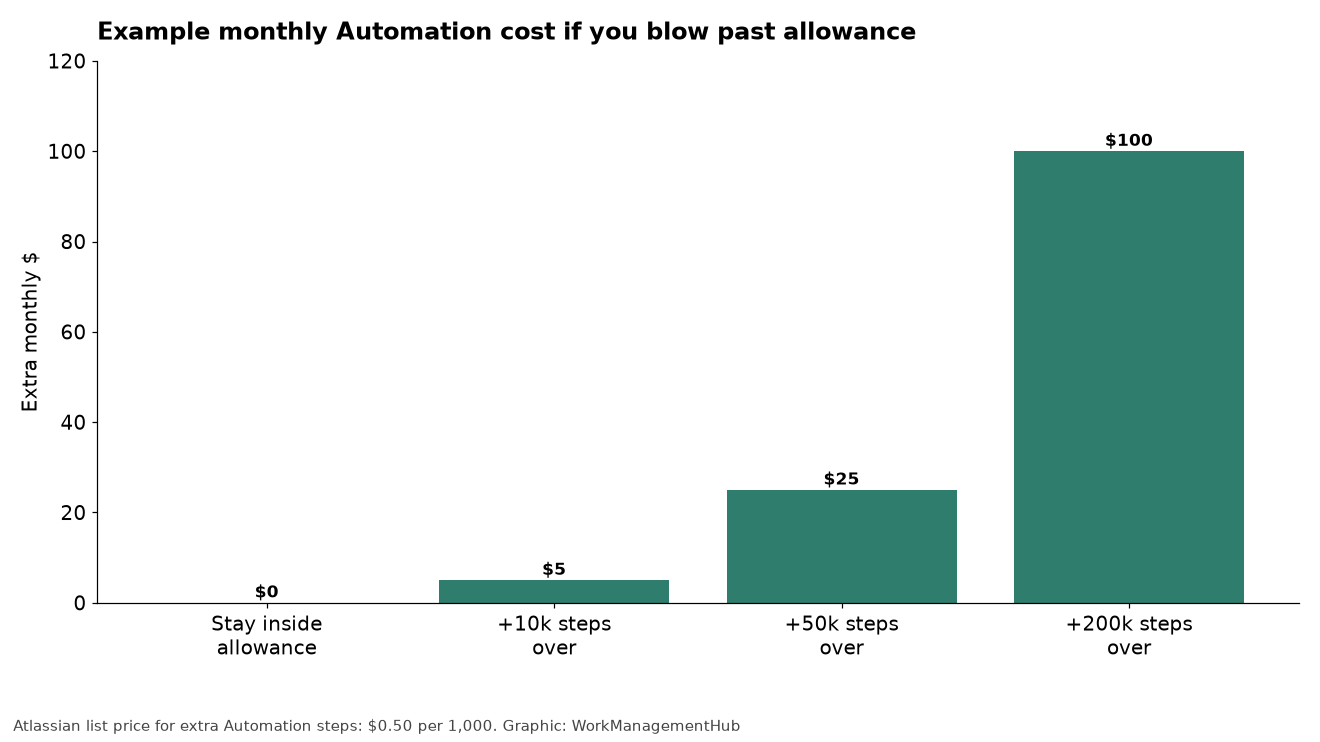
Math that matters more than the sticker:
- 10,000 steps over = $5
- A chatty “sync parent status” rule with 4 steps firing 60 times a workday uses about 5,280 steps in a 22-day month — most of an 18-user Standard pool (7,200) by itself
Audit loops and branches now. Our Jira automation rules guide is the place to trim waste. For how Jira compares when the seat and automation story gets heavy, see Airtable vs Jira and Jira vs Linear.
Rovo credits: separate meter, separate bill
From Atlassian’s Rovo licensing FAQ:
Included credits (per user per month, pooled at org):
- Jira or Confluence: 25 Standard / 70 Premium / 150 Enterprise
- Teamwork or Service Collection: 250 / 700 / 1,500
Credits stack when you pay for multiple apps. Example Atlassian gives: 100 Premium Jira + 100 Premium Confluence → 14,000 credits/month in one pool.
What burns credits: Rovo Chat modes, agents, and enriched Teamwork Graph / MCP context calls. Basic AI interactions are listed at 10 credits per billable event; premium interactions vary. Rovo Search, summaries, chart insights and definitions continue when credits are exhausted.
Extra usage list price: $0.01 per credit ($10 per 1,000), or prepaid packs. Admins get alerts around 80% and 100% usage.

Admin checklist (do this in October and November)
- Open Platform usage in admin.atlassian.com and screenshot current Automation and Rovo consumption for a normal month.
- Export or list your noisiest automation rules (highest execution counts). Collapse multi-branch rules that notify five channels for one event.
- Decide the failure mode: leave extra usage on (default) with a spending cap you can defend, or turn it off knowing rules will pause.
- Separate AI actions from classic actions in rules. AI steps pull Rovo credits; classic steps pull the Automation pool.
- For Oct 13: have billing confirm renewal dates, open quotes and seat counts near tier cliffs.
- Tell team leads that “unlimited Enterprise automation” is no longer the story; design reviews should include step cost.
- Revisit Marketplace apps that stampede automation or Rovo on every issue transition.
If AI auto-assignment experiments are part of your backlog, read them against real allowances: our Jira AI auto-assignments piece is the feature view; this post is the bill.
What I would tell a 40-person Jira Standard org
- Expect the list-price bump on the next renewal or upgrade after October 13; model ~7% on Jira seats unless your quote says otherwise.
- On Automation, 40 × 400 = 16,000 steps/month. That is comfortable for disciplined rules and tight for “notify everyone on every transition” cultures.
- On Rovo, 40 × 25 = 1,000 credits/month on standalone Jira Standard. That is not a company-wide Chat habit. Either keep Rovo for a small pilot group, buy credits, or move editions/collections if AI is the point.
- Keep extra usage on with a monthly cap while you learn. A paused automation on a Sev-1 workflow costs more than a $20 overage.
FAQ
Are Oct 13 and Dec 3 the same change?
No. October 13 is list price for seats/subscriptions. December 3 is when usage meters (Automation steps, Rovo credits, AI agent resolutions) enforce allowances and extra-usage billing.
Is Enterprise automation still unlimited?
No. Enterprise receives a per-user pooled allowance (1,000 Jira Automation steps per user per month in Atlassian’s published table), not unlimited runs.
What if we hit the Automation cap with extra usage off?
New automation runs stop until the monthly refresh or you add capacity. In-flight runs finish. Trigger events during the pause are not queued.
Do Rovo Search and issue summaries stop without credits?
Atlassian says Rovo Search, summaries, chart insights and definitions keep working. Credit-consuming Chat, agents and enriched graph calls pause if extra usage is off.
Where do I verify our numbers?
Atlassian Administration → Platform usage for live consumption; atlassian.com/licensing/automation and atlassian.com/licensing/rovo for meter rules; your renewal quote for October list prices.
Automation and Rovo meter details checked against Atlassian’s licensing FAQs and September 1, 2026 usage-based pricing blog on October 2, 2026. October 13 list-price percentages summarized from Atlassian partner reporting of the customer notice; confirm against your Atlassian quote before budgeting.
Sponsored