
Most teams asking “Airtable or Jira?” are really asking two questions at once. Who tracks the engineering work? And who tracks everything around it?
Jira is the better home for the first. Airtable is often the better home for the second. The trouble starts when one tool gets forced to do both jobs.
I implement work-management platforms for a living (my firm, SSPM, is a Smartsheet partner), so I don’t read these tools as feature lists. I read them as “what will this cost us, and where will it break in month three?” That’s the lens for this whole comparison. Every price below is what the vendors’ own pricing pages showed on October 1, 2026.
The short answer
- Pick Jira if your engineers live in sprints, backlogs, pull requests and releases. That’s what it was built for, and nothing in Airtable replaces it.
- Pick Airtable if your “product work” is mostly structured data that isn’t code: launch checklists, a feature-request database tied to customer accounts, a research repository, a partner catalog.
- Run both only if someone owns the connection between them and you’re on Airtable Business. More on why below.
And if you’re a 15-person software team with no ops-heavy side work? You don’t need Airtable. Jira plus a lightweight discovery tool will do the job for less money.
Airtable vs Jira at a glance
| Airtable | Jira | |
|---|---|---|
| Built for | Flexible relational database with views, forms and interfaces | Issue tracking and agile delivery for software teams |
| Free plan | Up to 5 editors, 1,000 records per base, 100 automation runs a month | Up to 10 users, 150 automation steps a month, 2 GB storage |
| Main paid tiers | Team $24, Business $54 per seat/month (monthly billing); $20 and $45 billed annually | Standard $9.05, Premium $18.30 per user/month at 11 to 100 users (monthly billing) |
| Who you pay for | Anyone with edit access. Read-only and commenters are free | Every internal user. Free guests are for external collaborators only |
| Automation allowance | 25,000 runs (Team) or 100,000 runs (Business) per workspace per month | 400 (Standard) or 750 (Premium) steps per user per month, pooled across the org |
| Dev toolchain | Light. GitHub issues sync on paid plans | Native boards, backlogs, sprints, releases and Git integrations |
| Best at | Data that has relationships | Work that moves through a workflow |
Sources: Airtable pricing and Jira pricing. Jira’s per-user price changes with team size. I checked 11, 26 and 101 users, and it only dropped once you passed 100.
What it actually costs a 26-person product org
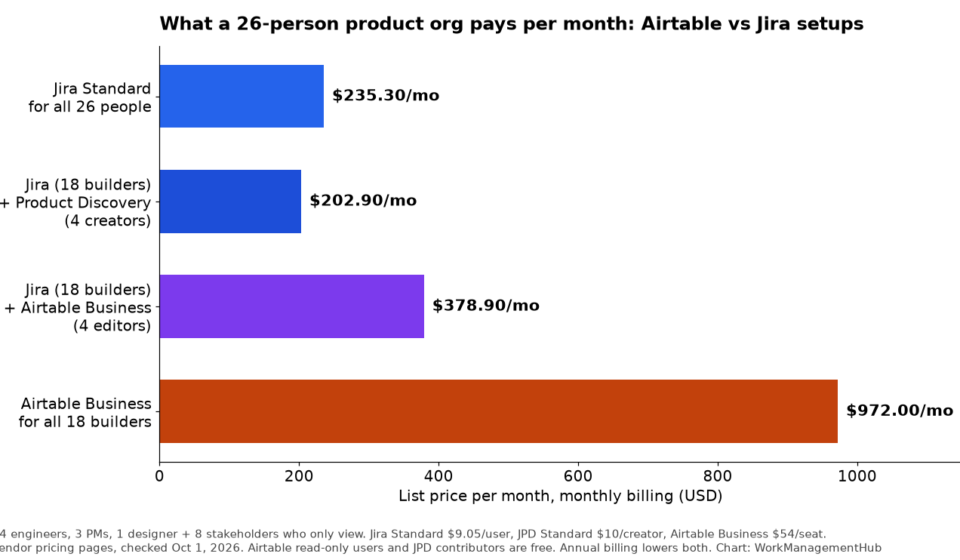
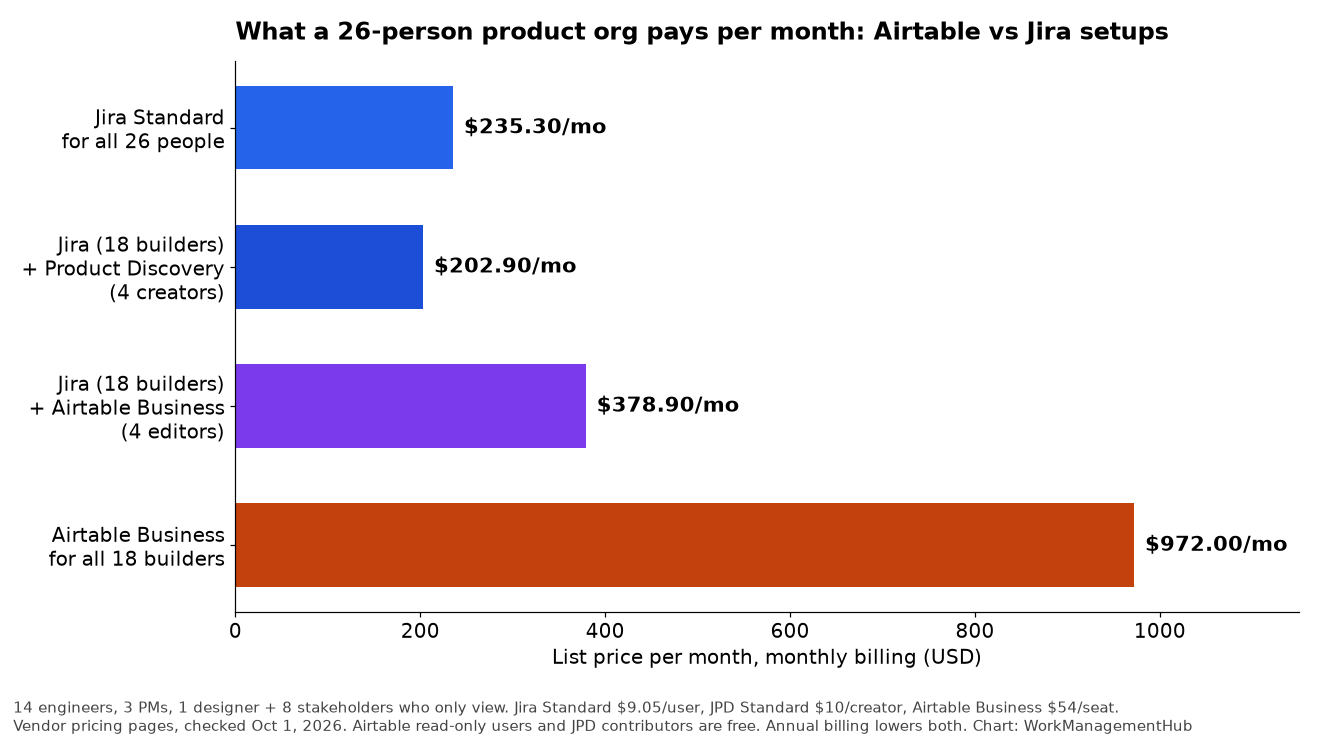
Per-seat prices don’t tell you much on their own. What matters is who needs a seat. So here’s a realistic setup: 14 engineers, 3 product managers, 1 designer, and 8 people from sales, support and leadership who mostly need to look at the roadmap and status.
That’s 18 people who build and 8 who watch. Here’s what four common setups cost at monthly list prices:
| Setup | Monthly list price | What you get |
|---|---|---|
| Jira Standard for all 26 | $235.30 | Everyone in one tool. Stakeholders pay full seats just to look |
| Jira for 18 builders + Jira Product Discovery for 4 PMs/design | $202.90 | Roadmap and idea tracking for PMs. Stakeholders join JPD as free contributors |
| Jira for 18 builders + Airtable Business for 4 editors | $378.90 | Engineering stays in Jira. PMs get a relational database. Stakeholders view Airtable interfaces for free |
| Airtable Business for all 18 builders | $972.00 | One tool, no real sprint tooling, and the most expensive option by far |
A few things jump out.
Jira’s weak spot is the viewer. Free guests exist, but Atlassian is explicit that they’re for people outside your organization. Your own VP of Sales still needs a paid seat to open a board.
Airtable’s weak spot is the editor. At $54 a month on monthly billing, every engineer you turn into an editor costs about six Jira seats. Putting a whole dev team in Airtable is the single most expensive mistake on this list.
The cheapest option is the one most teams overlook. Jira Product Discovery is $10 per creator a month on Standard, it’s free for up to 3 creators, and contributors don’t need a paid seat. For a pure software org, that usually beats bolting Airtable onto Jira.
Annual billing lowers all of these numbers. Airtable drops to $45 a seat on Business, and Atlassian advertises up to 17% off for annual plans. The ranking stays the same. For deeper per-plan breakdowns, see our Airtable pricing guide and Jira pricing guide.
Where Jira wins
Sprints, backlogs and the dev toolchain
This isn’t close. Jira gives you Scrum and Kanban boards, backlogs, sprint reports and releases out of the box, and it plugs into GitHub, GitLab and Bitbucket so commits and pull requests show up on the issue. You can fake sprints in Airtable with a “Sprint” field and a Kanban view. I wouldn’t. You lose burndown, velocity and the branch-to-ticket link that engineers actually rely on. If you’re wiring this up, our Jira and GitHub integration guide walks through it.
Workflows that hold their shape
Jira workflows let you lock down who can move an issue from “In review” to “Done,” require fields on transition, and keep an audit trail. That feels rigid to a marketing team. To an engineering manager who has to explain a release to compliance, it’s the whole point.
Scale without redesigning your data
A Jira site can hold up to 100,000 users on paid plans. Airtable caps records per base: 50,000 on Team, 125,000 on Business. Plenty for a feature database. Tight for every bug your company has ever filed.
Where Airtable wins
Your product data isn’t shaped like tickets
Here’s the setup I’d build for a product team that lives on customer input: a Features table linked to Requests, linked to Accounts, linked to Releases. Add a rollup on Features that sums the contract value of every account asking for it. Now your prioritization meeting starts with “these three features are requested by accounts worth X,” not with whoever argues loudest.
You can approximate that in Jira with custom fields and apps. In Airtable it’s an afternoon of work, and a PM can maintain it without filing a request with the Jira admin.
Read-only really is free
Airtable charges for people with edit access. Read-only collaborators, form submissions and share links don’t cost anything on Team or Business. Build an interface for leadership, share it, and your 8 stakeholders cost $0. That one rule is why the hybrid setup above is cheaper than it looks.
Non-engineers can build their own tools
Launch checklists, beta-tester tracking, a content calendar for release notes. These are perfect Airtable jobs, and they’re painful to model as Jira issue types. Our guide to building Airtable automations without wasting runs covers the patterns that hold up.
Automation limits: Jira’s are about to matter more
This is the change most comparison posts haven’t caught up with.
Atlassian moved Jira automation from counting rule runs to counting steps. Every trigger, condition, action, branch and loop is one step. A rule that fires, checks a priority, assigns someone and sends a notification uses 4 steps every time it runs. Allowances are pooled across your whole Atlassian org: 150 steps a month on Free (per subscription), then 400 per user on Standard, 750 on Premium and 1,000 on Enterprise. Enterprise is no longer unlimited.
The meter is already running. Extra-usage billing starts December 3, 2026, at $0.50 per 1,000 steps (Atlassian’s automation FAQ).
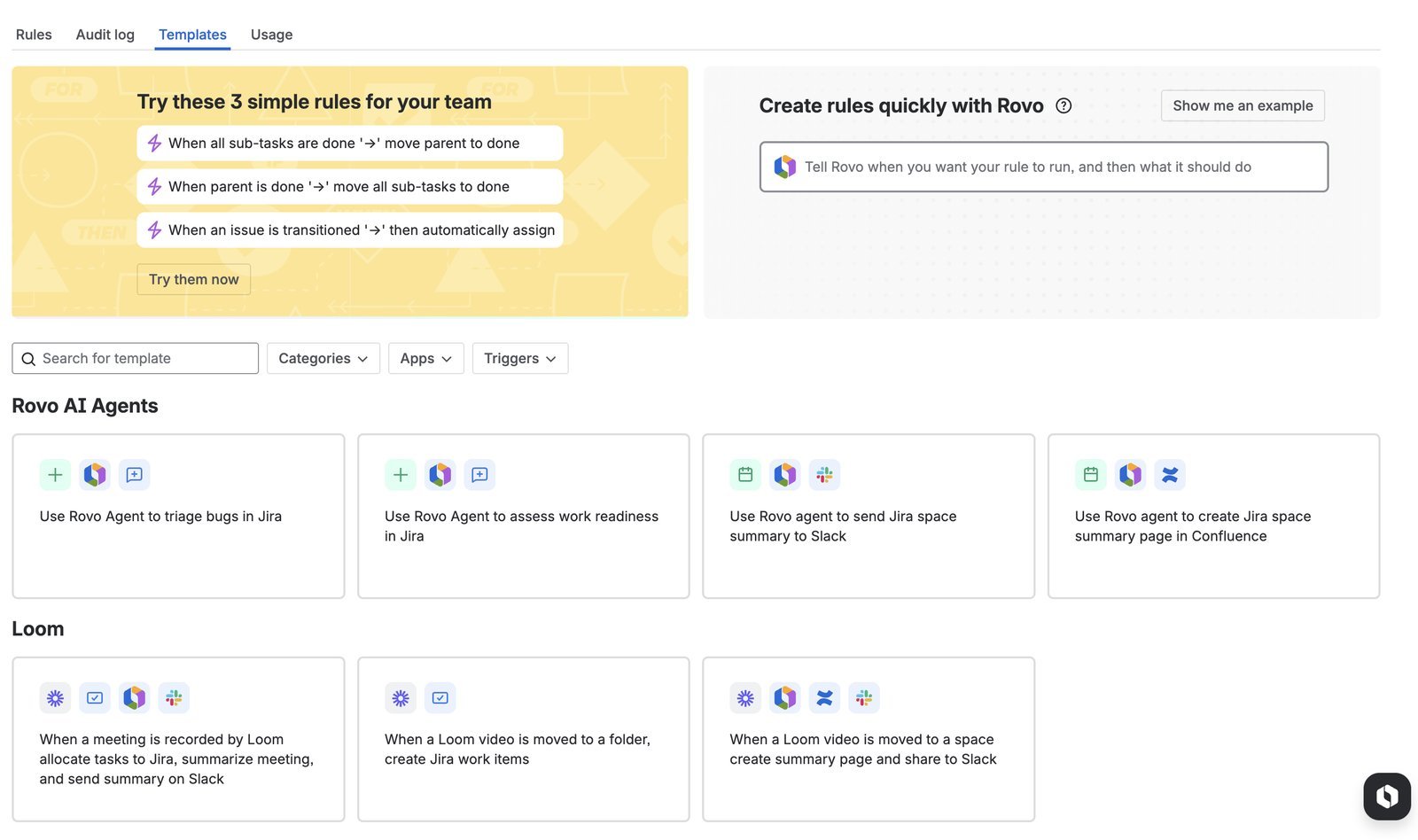
Let’s run the math for our 18 Jira users on Standard: 7,200 steps a month. A single “sync status to parent” rule with 4 steps that fires 60 times a workday uses about 5,300 steps in a 22-day month. One rule, most of your allowance.
The overage itself is cheap. Ten thousand extra steps is $5. The real risk is that if extra usage is switched off, your rules stop until the allowance resets, and Atlassian says the events that would have triggered them during the pause aren’t replayed. Audit loops and branches now, not in December. Our Jira automation rules guide shows where the waste usually hides.
Airtable counts differently: one run each time a trigger fires, per workspace, reset on the first of the month. Failed runs count too. On Business, 100,000 runs is a lot of headroom for most product teams. The catch is that the only standard way to get more is to move up a plan.
Running Airtable and Jira together (and the sync gotcha)
The hybrid setup works well, but only if you know these four rules before you build it.
1. You need Airtable Business. Jira Cloud is a “premium” sync source. Team plan workspaces can’t use it at all.
2. The sync only goes one way. Airtable pulls issues from Jira. Edits you make in Airtable don’t flow back. If you need to push changes into Jira, use Airtable’s Jira Cloud automation actions (Create issue and Update issue), which are also Business-and-up.
3. Pick a filter that won’t change. This is the one that bites. Airtable syncs whatever a saved Jira filter returns. When an issue drops out of that filter, Airtable deletes the record, along with any comments and fields your team added on the Airtable side (Airtable’s Jira Cloud sync docs). Sync “project = PROD,” not “status != Done.” Otherwise every closed bug quietly erases your notes.
4. Don’t tie the sync to a person. Airtable only sees what the connecting Jira user can see, and if that person leaves and their account is deactivated, the sync stops. Connect it with an integration account your IT team controls.
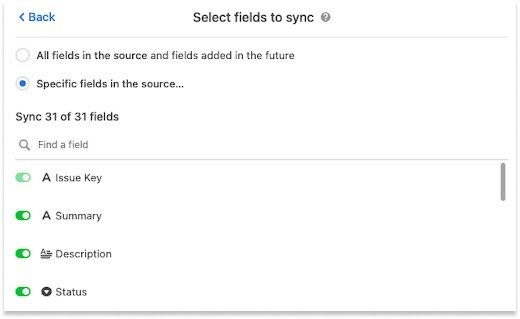
Automatic sync runs as often as every 5 minutes but can take longer. That’s fine for a roadmap. Don’t build anything time-critical on it. If a sync stalls, our Airtable sync troubleshooting guide covers the usual causes.
What I’d actually set up
A software startup with 8 to 20 people. Jira Free (up to 10 users) or Standard, plus Jira Product Discovery’s free tier for up to 3 PMs. No Airtable. Spend the savings on someone owning the backlog.
A product org with a heavy go-to-market side. Jira for engineering. Airtable Business for 3 to 5 editors running the request database, launch tracking and stakeholder interfaces. Jira issues synced one way, filtered by project. Read-only for everyone else. This is the $378.90 option above, and the extra money buys a real link between customer demand and what ships.
A product team that doesn’t ship software. Hardware, consumer goods, content, events. Airtable alone. Jira’s strengths are mostly wasted here. If what you really need is Gantt charts, resource loading and portfolio rollups, look at Smartsheet too. That’s my home turf, so weigh my bias accordingly.
FAQ
Can Airtable replace Jira for software development?
Not well. You can model sprints and bugs in Airtable, but you give up native sprint reports, velocity, releases and the Git integrations engineers depend on. Airtable is a great companion to Jira and a poor substitute for it.
Does Airtable integrate with Jira?
Yes. Airtable Business and Enterprise Scale can sync issues from a Jira Cloud filter into a table (one way, every 5 minutes or so) and create or update Jira issues from Airtable automations. Jira Server and Data Center sync is Enterprise Scale only.
Is Jira free?
For up to 10 users, yes. The Free plan includes boards, backlogs, timelines, 2 GB of storage and 150 automation steps a month for the whole subscription. Past 10 users you need Standard or higher.
Is Airtable cheaper than Jira?
Per seat, no. Airtable Business costs about six times a Jira Standard seat on monthly billing. Per organization, it can be cheaper when most of your people only need to view, because Airtable’s read-only access is free and Jira’s internal viewers need paid seats.
Pricing and limits checked against vendor pages on October 1, 2026. Both vendors change plans often, so confirm before you buy.
Sponsored