Wrike vs Airtable (2026): Project Management Platform or Build-Your-Own Database?

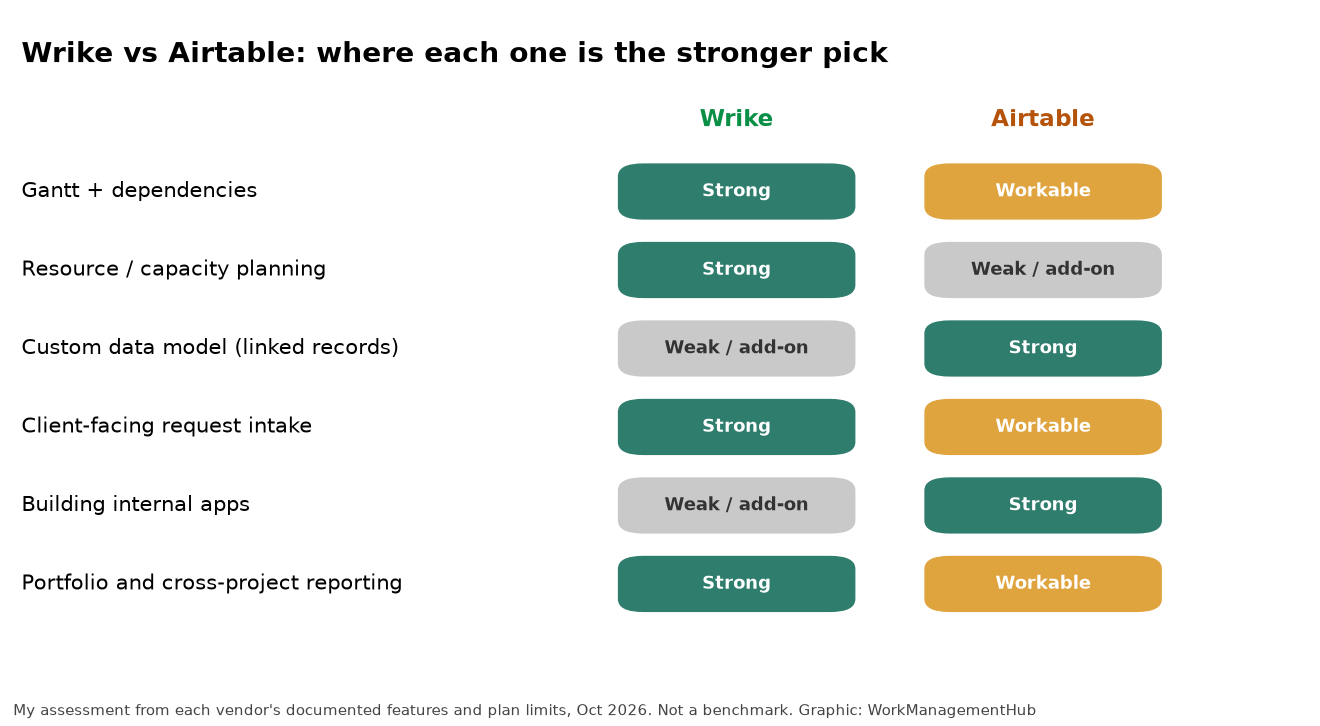
Wrike is a finished project management system. You get Gantt charts with dependencies, workload and capacity planning, request forms, approvals and portfolio reporting, all designed to work together. Airtable is a relational database with project views on top. You get flexible tables, linked records, interfaces and automations, and you build the system you want.
So the decision comes down to one question: do you want to adopt a process or design one? Agencies, PMOs and marketing operations teams running many similar projects usually do better with Wrike. Teams whose work is really about structured data (content pipelines, product catalogs, research tracking, operations inventories) usually do better with Airtable.
Quick verdict
- Pick Wrike if you run many projects at once, need to see who’s overloaded, take work requests from other teams or clients, and want approvals with an audit trail.
- Pick Airtable if the hard part of your work is the data model: things linked to other things, with views for different people, and simple apps built on top.
- Avoid forcing either into the other’s job. Airtable can show a Gantt chart, and Wrike has custom fields. Neither one replaces the other’s core.
What each tool is really for
Wrike: a project operations system
Wrike is built around folders, projects and tasks, with workflows you can customize per team. The parts that matter for project-driven teams:
- Interactive Gantt charts with dependencies, available from the Team plan.
- Resource and capacity planning from Business, with advanced versions on Pinnacle. Our Wrike resource management guide shows how to set up workload views without drowning in estimates.
- Request forms that turn intake into structured tasks, routed to the right team. See our Wrike request forms setup guide.
- Templates (Blueprints) so every new client project starts the same way.
- Budgeting, advanced reporting and SSO on Pinnacle.
In short, Wrike makes decisions for you. That’s a feature if you want consistency across 40 projects, and a cost if your work doesn’t fit its shape.
Airtable: a database you can turn into an app
Airtable starts from tables with typed fields and linked records. On top of that you get grid, kanban, calendar, timeline, Gantt and form views, Interface Designer for building simple apps, and automations. Its strength is modeling. Campaigns link to assets, assets link to channels, channels link to owners, and every team sees the slice it needs.
What Airtable doesn’t give you out of the box is project operations: no built-in resource leveling or capacity planning across projects, and no native timesheets. You can build approximations with fields and formulas, but you’re maintaining them yourself. Our Airtable Interface Designer guide shows how far interfaces can take you before that starts to hurt.
2026 pricing compared
| Wrike | Airtable | |
|---|---|---|
| Free | Yes, with active task limits | Yes, 1,000 records per base |
| Entry paid | Team: $10/user/month, 2 to 15 users | Team: $20/seat/month billed yearly, $24 monthly |
| Main paid | Business: $25/user/month, 5 to 200 users | Business: $45/seat/month billed yearly, $54 monthly |
| Top tiers | Pinnacle and Apex, quote only | Enterprise Scale, quote only |
| Data limits | Not record-based | 50,000 records per base (Team), 125,000 (Business) |
Wrike prices are billed annually and apply to new purchases from January 21, 2026, per Wrike’s pricing page. Airtable figures from Airtable’s plans documentation. Both checked October 1, 2026.
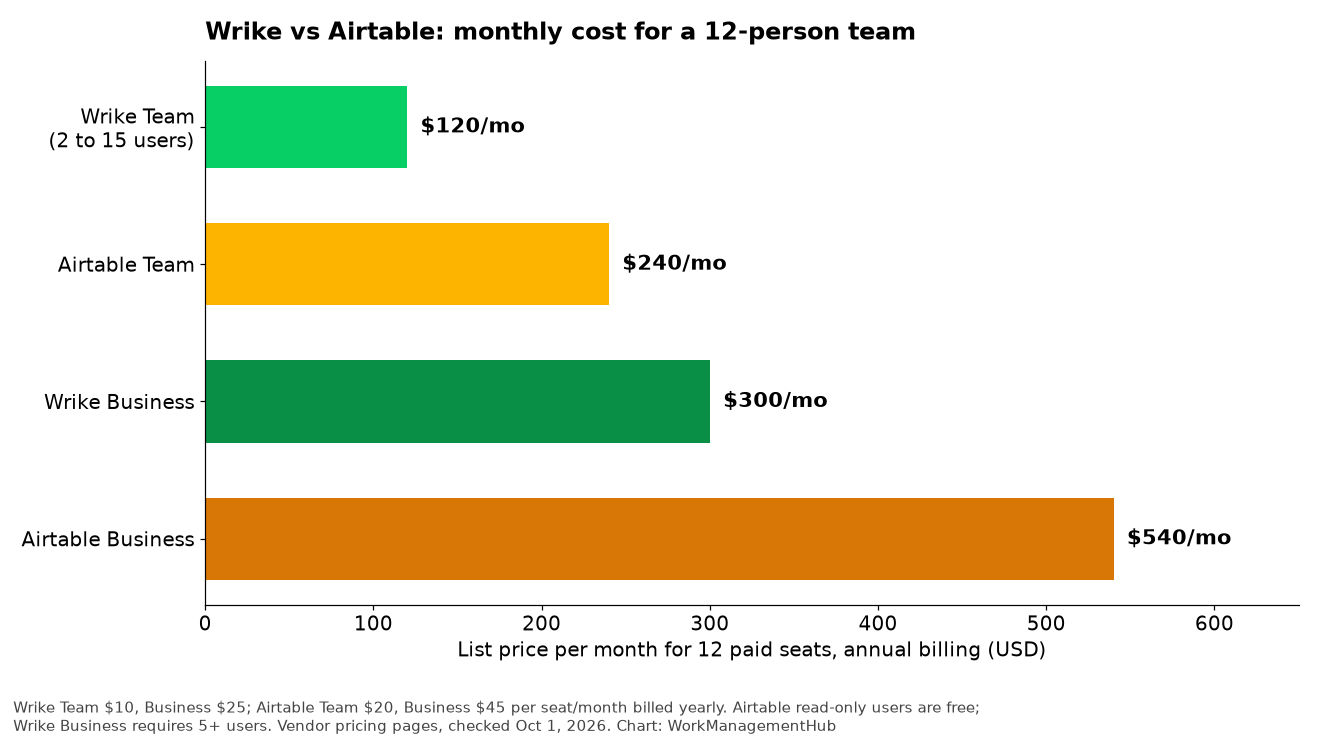
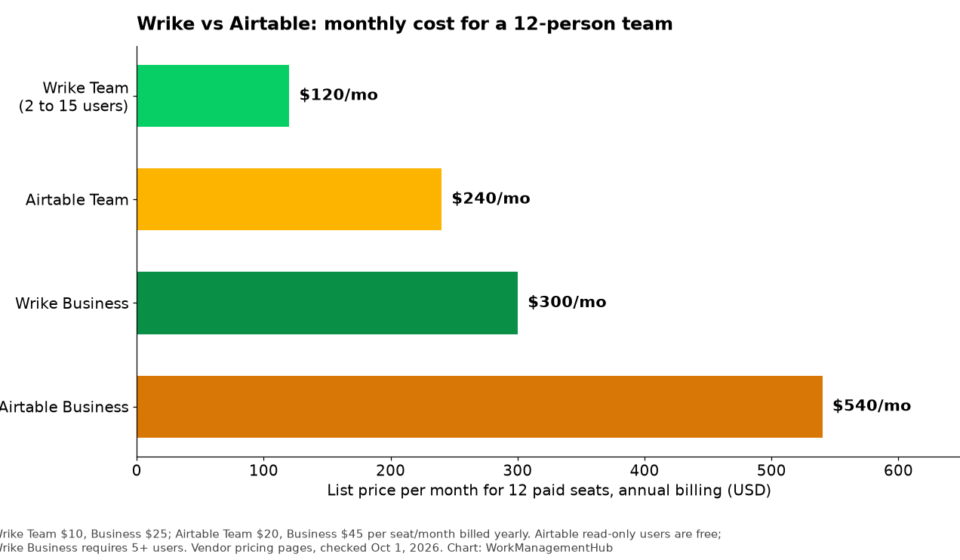
For a 12-person team on annual billing, that’s $120 a month on Wrike Team, $240 on Airtable Team, $300 on Wrike Business and $540 on Airtable Business. Two caveats change the picture. Wrike Team tops out at 15 users, so a growing agency hits a forced jump to Business. And Airtable only charges for people who edit, so if half your 12 people just need to view dashboards, the Airtable bill falls a lot.
More detail in our Wrike pricing guide and Airtable pricing guide.
Head to head
Scheduling and dependencies
Wrike is the stronger scheduler. Dependencies and rescheduling are designed in, and they connect to workload so you can see the effect of a slip on people, not just dates. Airtable’s Gantt view handles dependencies on a single table well. It’s less comfortable once a schedule spans many linked tables and teams.
Resource management
Wrike, clearly. Capacity planning is a core Business feature. In Airtable you’d build an assignments table, add hours fields and roll them up per person. That works for one team and gets fragile across ten.
Data modeling
Airtable, clearly. Linked records, lookups and rollups make it a real relational tool. Wrike’s custom fields and item types are useful, but you won’t model a product catalog or a research database in them.
Intake and approvals
Wrike has the edge. Request forms route into projects with assignees and due dates, and approvals sit on the tasks themselves. Airtable forms are excellent for collecting data, and automations can route records, but approvals are something you build.
Building internal tools
Airtable. Interface Designer lets a non-developer build a review queue, a lightweight CRM or a stakeholder dashboard on top of live data. Wrike’s dashboards are reporting views, not apps.
Integrations and automation
Both connect to the usual suspects (Slack, Microsoft Teams, Google Drive), but they’re built for different kinds of plumbing. On Wrike’s pricing page, standard integrations arrive with Business, while two-way syncing with third-party systems (Wrike Sync) and the Wrike Integrate automation platform sit on Apex, the top tier. If you need Wrike to stay in sync with Salesforce or Jira, budget for that conversation with sales.
Airtable’s limits are easier to read. Team includes 25,000 automation runs and 100,000 API calls per workspace each month. Business raises runs to 100,000 and removes the API cap. If you plan to push data in from forms, scripts or other tools all day, Business is the safer starting point.
Setup effort
This is the cost nobody puts in the pricing table. Wrike asks you to design folders, workflows, custom item types, request forms and Blueprints before most people log in. Expect a few weeks of configuration for a team of 20 or more, and a named admin afterward. The payoff is that day-to-day use is consistent.
Airtable asks you to design a data model. A good base for a content team can be built in a few days. A bad one gets built in an afternoon and haunts you for a year: duplicate tables, text fields where linked records should be, and automations nobody remembers writing. Either way, someone has to own it.
Mistakes I’d avoid
- Buying Wrike Team for a team that will pass 15 people within a year. Plan for Business from the start so you don’t rebuild permissions mid-project.
- Building resource planning in Airtable for more than one team. It works on a whiteboard and falls apart when three managers edit the same hours fields.
- Paying for Airtable editors who only read. Audit seats every quarter and move viewers to read-only access or shared interfaces.
- Running both tools on the same work. If a task lives in Wrike and a record about it lives in Airtable, one of them will be wrong by Friday. Give each tool a clear job.

What I’d set up
For a 25-person agency delivering client projects: Wrike Business. Build one Blueprint per service line, route all new work through a request form, and review capacity weekly. Resist adding Airtable unless there’s a genuine data problem, like a large asset library.
For a content or marketing operations team managing hundreds of assets across channels: Airtable Business. One base with linked tables for campaigns, assets, channels and owners, interfaces for reviewers, and automations for status changes. Only add a PM tool if you start running large cross-team launches.
For a product team comparing these two, step back. You probably want a dedicated tracker. Our Airtable vs Jira comparison covers that decision.
FAQ
Is Wrike or Airtable better for project management?
Wrike, for classic project management: schedules, dependencies, workload and approvals. Airtable is better when the project is really about organizing structured data.
Is Airtable cheaper than Wrike?
Not per seat. Wrike Team is $10 per user and Business $25, while Airtable Team is $20 and Business $45 on annual billing. Airtable can still come out cheaper if many of your people only need read-only access, since those seats are free.
Does Airtable have Gantt charts?
Yes. Airtable lists Timeline and Gantt views on its Team plan and above. They work well inside one table. For multi-team schedules with resource loading, a project tool like Wrike is easier.
Can Wrike replace a database like Airtable?
No. Wrike’s custom fields help with reporting, but it has no linked records or rollups across arbitrary tables. If your work depends on relationships between many kinds of records, use a database.
Which is easier to learn?
Airtable feels easier on day one because it looks like a spreadsheet. Wrike takes longer to set up, but once it’s configured, day-to-day use is simpler for people who just need to know what’s due.
Sponsored