Skip to content
-
Subscribe to our newsletter & never miss our best posts. Subscribe Now!
Work Management Hub Work Management Hub

Expert Reviews, Comparisons & Guides for Smartsheet, Monday.com, Asana, ClickUp & More

Work Management Hub Work Management Hub

Expert Reviews, Comparisons & Guides for Smartsheet, Monday.com, Asana, ClickUp & More

  • Airtable
  • Asana
  • ClickUp
  • Jira
  • Monday.com
  • Notion
  • Smartsheet
  • Wrike
  • About
  • Contact
  • Airtable
  • Asana
  • ClickUp
  • Jira
  • Monday.com
  • Notion
  • Smartsheet
  • Wrike
  • About
  • Contact
Close

Search

  • https://www.facebook.com/
  • https://twitter.com/
  • https://t.me/
  • https://www.instagram.com/
  • https://youtube.com/
How-To GuidesProject Management

Best Project Management Software 2026: Top 10 Tools Ranked by Real Teams

By Shaik KB
April 14, 2026 16 Min Read
0

With over 500 project management tools on the market, choosing the right one is genuinely difficult. Every platform claims to be the best — but the best for a 3-person startup is very different from the best for a 500-person enterprise. The best for a marketing team is different from the best for a software engineering team. This guide covers the best project management software 2026 — tested and ranked for real-world performance.

Quick Answer

Best project management software in 2026: Monday.com leads for visual team management, Jira for software development, Asana for cross-functional work, and Smartsheet for enterprise spreadsheet-power users. The right choice depends on your team size, technical depth, and primary use case — read on for the full ranked breakdown.

This guide cuts through the noise. We’ve tested all the major platforms, analyzed thousands of real user reviews, and ranked the top 10 project management tools for 2026 based on real-world performance — not marketing claims.

Quick Comparison: Top 10 Project Management Tools

ToolBest ForStarting PriceFree PlanG2 Rating
AsanaCross-functional teams, enterprises$10.99/user/moYes (15 users)4.4/5
Monday.comVisual workflows, marketing, ops$9/user/moYes (2 users)4.7/5
ClickUpAll-in-one, startups, agencies$7/user/moYes (unlimited)4.7/5
JiraSoftware development, Scrum$8.15/user/moYes (10 users)4.3/5
SmartsheetEnterprise, complex projects$9/user/moLimited4.4/5
NotionDocs + lightweight PM, wikis$10/user/moYes (10 users)4.7/5
WrikeProfessional services, enterprise$9.80/user/moYes (unlimited)4.2/5
AirtableDatabase-driven workflows, ops$20/user/moYes4.7/5
BasecampSmall teams, simple projects$15/user/moLimited4.1/5
TrelloSimple Kanban, individuals$5/user/moYes (unlimited)4.4/5

#1 Asana — Best for Cross-Functional Teams and Enterprise Organizations

Asana remains the gold standard for teams that need project management software to work across every department — from engineering to marketing to HR — without specialized training. Its clean interface, powerful goal-tracking, and enterprise-grade portfolio management make it the most balanced tool in the market for organizations of 50-5,000+ people.

Why Asana ranks #1: No other tool does cross-functional project coordination as well. Asana’s ability to connect individual tasks to company-level OKRs, give executives portfolio visibility, and be adopted by non-technical users within days of deployment is unmatched. The inclusion of AI in all paid plans adds meaningful value without extra cost.

Best for: Marketing teams, HR, operations, product management, enterprise organizations deploying to 50+ users

Pricing: Free (15 users), Starter $10.99/user/mo, Advanced $24.99/user/mo, Enterprise custom

Weakness: No native time tracking. Higher cost per user than ClickUp for smaller teams.

#2 Monday.com — Best for Visual Workflows and Team Adoption

Monday.com is the most visually polished project management platform available, and it shows in adoption rates. Internal data consistently shows 80-90% active usage within 30 days of deployment — a metric that makes Monday.com’s ROI argument compelling even compared to cheaper alternatives.

The platform’s board-centric interface, color-coded status columns, and intuitive automation builder make it accessible to everyone from the executive suite to the intern. Monday.com has also aggressively expanded into adjacent markets: Monday CRM replaces Salesforce for many SMBs, Monday Dev provides Jira-like sprint management, and Monday Service handles IT ticketing.

Best for: Marketing campaigns, client project management, operations, cross-departmental workflows, companies replacing multiple single-purpose tools

Pricing: Free (2 users), Basic $9/user/mo, Standard $12/user/mo, Pro $19/user/mo (3-seat minimum on all paid plans)

Weakness: 3-seat pricing minimum. Cross-board portfolio reporting is less robust than Smartsheet or Asana at enterprise scale.

#3 ClickUp — Best Value and Best Free Plan

ClickUp’s “one app to replace them all” philosophy has translated into the most feature-rich platform in the market at the lowest price point. The Free Forever plan supports unlimited team members — genuinely unique. The $7/user/month Unlimited plan delivers more than what competitors charge $12-15 for. For budget-conscious teams or startups trying to minimize SaaS overhead, ClickUp is the clear value leader.

The 15+ views (including unique Mind Map and Whiteboard views), deep custom fields, built-in time tracking, and powerful automation engine give power users extraordinary flexibility. The tradeoff: ClickUp requires 2-4 weeks of deliberate setup before it truly pays off.

Best for: Agencies, startups, engineering teams, operations teams, anyone prioritizing maximum features per dollar

Pricing: Free (unlimited users), Unlimited $7/user/mo, Business $12/user/mo, Business Plus $19/user/mo

Weakness: Steep learning curve. Performance lag on large workspaces. AI is an add-on (+$7/user/mo).

#4 Jira — Best for Software Development Teams

Jira has been the de facto standard for software development project management since 2002. For engineering teams running Scrum or Kanban, no tool matches Jira’s depth: native sprint management with story point tracking, velocity charts, burndown reports, release tracking, and bi-directional integration with GitHub, GitLab, Bitbucket, and every major CI/CD pipeline.

Jira’s custom issue types (Epic, Story, Bug, Task, Sub-task) map directly to how development teams think about work. Its JQL (Jira Query Language) allows power users to build precise filters and reports that no visual interface can replicate. And the Atlassian ecosystem — Confluence for documentation, Bitbucket for code, OpsGenie for incident management — creates an integrated development platform.

Best for: Software engineering teams, product managers working in agile environments, DevOps teams, organizations standardized on the Atlassian ecosystem

Pricing: Free (10 users), Standard $8.15/user/mo, Premium $16/user/mo, Enterprise custom

Weakness: Steep learning curve for non-technical users. Not suitable for non-engineering teams. Complex admin setup.

#5 Smartsheet — Best for Enterprise Project Portfolio Management

Smartsheet occupies a unique market position: the bridge between familiar spreadsheet-based project tracking and enterprise-grade project portfolio management. For operations teams, PMOs, construction managers, and IT departments that think in Excel but need more than Excel can provide, Smartsheet is the ideal upgrade path.

Critical path analysis, cross-sheet formulas and cell linking, enterprise dashboards pulling live data from hundreds of sheets, and compliance certifications (FedRAMP, HIPAA, ISO 27001) make Smartsheet the choice for regulated industries and complex program management at scale. Its weakness — a dated interface and no AI features — is real but doesn’t diminish its value for its target use cases.

Best for: Government contractors, healthcare organizations, construction/engineering firms, PMOs managing complex project portfolios

Pricing: Free (1 user + 2 editors), Pro $9/user/mo, Business $19/user/mo, Enterprise custom

Weakness: No AI features. Interface feels dated compared to modern alternatives. Mobile app is functional but not elegant.

#6 Notion — Best for Teams Combining Documentation and Lightweight Project Management

Notion is not primarily a project management tool — it’s a flexible workspace that many teams successfully use for lightweight project management alongside its core strength: documentation. If your team’s primary need is a central hub for wikis, SOPs, meeting notes, knowledge bases, and project briefs — with a secondary need for task tracking — Notion provides this combination better than any other platform.

Notion’s database views (Table, Board, Gallery, Calendar, List, Timeline) and linked database relationships allow for surprisingly sophisticated project structures. The AI features (Notion AI) are solid for writing assistance, summarization, and generating structured content. At $10/user/month, it’s competitively priced.

Best for: Knowledge-intensive teams, content teams, remote-first startups, organizations that want one hub for docs and project tracking without heavy workflow complexity

Pricing: Free (10 users, limited blocks), Plus $10/user/mo, Business $18/user/mo, Enterprise custom

Weakness: Not a purpose-built PM tool. No native Gantt chart. Reporting is limited. Can become disorganized without strong governance.

#7 Wrike — Best for Professional Services and Agencies

Wrike is a powerful enterprise work management platform that punches above its marketing profile. Its standout feature is the proof approval workflow — the ability to annotate and approve design files, videos, PDFs, and documents directly within the platform, with tracked revision history. For creative agencies and marketing organizations managing high volumes of deliverables that require client or stakeholder approval, this feature alone often justifies the choice.

Wrike’s custom item types and blueprint templates are also excellent for organizations running repeatable processes: proposals, campaign launches, client onboarding, product releases. Blueprint a process once, then deploy it consistently every time.

Best for: Marketing agencies, professional services firms, creative teams managing approval workflows, large enterprises with complex process requirements

Pricing: Free (unlimited users, limited), Team $9.80/user/mo, Business $24.80/user/mo, Enterprise custom

Weakness: Less intuitive than Monday.com or Asana for new users. Expensive at Business tier. Marketing is not as aggressive as competitors, leading to underestimation of its real capabilities.

#8 Airtable — Best for Database-Driven Operations

Airtable is in a category of its own: a relational database with spreadsheet-friendly UX and project management views layered on top. Its linked records, lookup fields, rollup formulas, and Interface Designer make it ideal for building custom business operations tools without code — a CRM, an inventory management system, a content production tracker, a vendor database.

At $20/user/month for the Team plan, Airtable is significantly more expensive than most competitors. But if your use case is fundamentally data-relational (you need to link records across tables and roll up metrics), the value proposition is strong. If you just need task management, there are cheaper alternatives.

Best for: Operations teams building custom internal tools, content production pipelines, CRM replacements, inventory management, any workflow where relational data is central

Pricing: Free (unlimited bases, limited records), Team $20/user/mo, Business $45/user/mo, Enterprise custom

Weakness: Expensive for pure project management. Steep learning curve for complex database structures. Limited native reporting.

#9 Basecamp — Best for Simple, No-Fuss Project Management

Basecamp has deliberately resisted feature bloat for 20+ years. Its philosophy: most teams don’t need 15 views and 200 automations — they need a simple place to share tasks, files, and messages with their team. Basecamp delivers that experience better than anyone.

Each project in Basecamp has the same six tools: to-do lists, message board, schedule, docs and files, group chat (Campfire), and automatic check-ins. That’s it. No customization, no custom views, no complex automation. For small business owners, consultants, and teams whose work doesn’t require project management complexity, Basecamp is refreshingly simple.

Best for: Small businesses, consultants, teams that have found complex PM tools overwhelming, client communication management

Pricing: Basecamp $15/user/mo (all-inclusive), Basecamp Pro Unlimited $299/month flat (unlimited users — excellent value for large teams)

Weakness: Very limited features compared to modern alternatives. No Gantt, no native time tracking, no advanced reporting. Not suitable for complex project management.

#10 Trello — Best for Simple Kanban and Individual Use

Trello was one of the original Kanban board tools and remains one of the most accessible project management apps available. Its drag-and-drop card-based interface is intuitive for anyone — no training, no setup guide needed. Cards have checklists, attachments, due dates, assignees, and labels; boards organize cards into columns; workspaces organize boards.

Trello’s biggest limitation is its Kanban-only foundation. While Power-Ups (integrations and view additions) add some flexibility, Trello doesn’t scale well to complex projects with dependencies, reporting needs, or cross-team visibility. It’s the right tool for simple, visual workflow tracking — not for enterprise project management.

Best for: Individuals, very small teams, simple personal productivity, teams new to Kanban methodology

Pricing: Free (unlimited), Standard $5/user/mo, Premium $10/user/mo, Enterprise $17.50+/user/mo

Weakness: Limited scalability. No native Gantt or timeline. Weak reporting. Not suitable as a team’s primary PM tool beyond basic workflows.

How to Choose the Right Project Management Software

With the rankings in mind, use these criteria to make your final decision:

  • Team size and technical skill: Large non-technical teams → Asana or Monday.com. Technical teams willing to configure → ClickUp. Developers → Jira.
  • Budget: Smallest budget → ClickUp Free or ClickUp Unlimited ($7). Best value with AI → Asana Starter. Large team flat fee → Basecamp Pro Unlimited ($299/month).
  • Primary use case: Complex project scheduling → Smartsheet. Knowledge management + light PM → Notion. Database-driven ops → Airtable. Visual collaboration → Monday.com.
  • Industry requirements: Government/healthcare compliance → Smartsheet (FedRAMP, HIPAA). Software development → Jira. Creative/agency → Wrike.
  • Adoption speed priority: Need the whole team using it in days → Monday.com or Asana. Willing to invest weeks for long-term power → ClickUp.

Emerging Project Management Tools Worth Watching in 2026

The top 10 tools above cover 95% of team needs, but three challenger tools are gaining serious traction in 2026 — especially in specific niches where the big players fall short.

Linear: The Best PM Tool for Modern Engineering Teams

Linear has become the go-to project management tool for high-velocity software teams that find Jira too slow and Asana too business-focused. It is built around speed — the interface is keyboard-first, the sync engine is near-instantaneous, and the workflow is opinionated in a way that forces teams to follow healthy agile practices. Linear’s cycle management (their term for sprints) and automatic issue prioritization are genuinely superior to Jira for teams that move fast and value a clean interface over maximum configurability. Pricing starts at $8/user/month. For engineering teams of 5-50, Linear deserves a serious evaluation before defaulting to Jira.

Basecamp: The Anti-Complexity Choice for Small Teams

Basecamp takes a radically different philosophy from every other tool on this list: it refuses to add features. Everything lives in flat project pages with message boards, to-do lists, file folders, schedules, and group chat — nothing more. This simplicity is its superpower for small teams (under 20) who are drowning in notification noise from more complex tools. Basecamp’s flat $299/month pricing (unlimited users) also makes it exceptionally cost-effective for growing teams. The trade-off: no time tracking, no Gantt charts, no custom fields, no reporting. If those absences feel like relief rather than loss, Basecamp might be perfect for you.

Zoho Projects: The Best Budget PM Tool

Zoho Projects is the most underrated project management tool in 2026 for budget-conscious teams. At $5/user/month (Premium plan), it offers Gantt charts, time tracking, resource management, and deep integration with the rest of the Zoho ecosystem — features that cost $15-25/user/month on Asana or Monday.com. If your organization already uses Zoho CRM, Zoho Books, or Zoho Desk, the integration value is exceptional. The downsides: the UI is dated compared to Monday.com or Asana, the mobile app lags behind competitors, and the learning resources are not as polished. But for teams where budget is the primary constraint and Zoho ecosystem fit matters, it is the best value in the market.

ToolBest ForStarting PriceFree Plan
LinearEngineering teams who want speed$8/user/monthYes (up to 250 issues)
BasecampSmall teams who want simplicity$299/month flatNo (30-day trial)
Zoho ProjectsBudget-conscious teams & Zoho users$5/user/monthYes (up to 3 users)
📚 Related Guides

  • Best Project Management Software for Remote Teams in 2026
  • Trello Review 2026: Is It Still Worth It? (Complete Expert Analysis)
  • Microsoft Project Online Is Retiring in 2026: 8 Best Alternatives to Migrate To
  • Trello Pricing 2026: Every Plan Explained (And Is It Worth It or Time to Switch?)

Frequently Asked Questions

Which project management tool is easiest to learn?

Monday.com and Trello are consistently rated the easiest to learn. Monday.com’s visual boards and intuitive interface enable teams to get productive within a day. Asana is a close second — most users feel comfortable within 1-3 days. ClickUp, Jira, and Smartsheet all have steeper learning curves but offer significantly more power once mastered.

What’s the best free project management software?

ClickUp’s Free Forever plan is the most generous in the industry — unlimited team members, unlimited tasks, and unlimited projects with no user cap. Asana’s free plan (15 users with solid features) is the best for teams specifically, and Notion’s free plan (10 users) is excellent if your team needs documentation alongside project management.

Is Microsoft Project still worth using in 2026?

For organizations deeply embedded in the Microsoft ecosystem and running very large-scale programs (construction, defense, aerospace), Microsoft Project Professional still has value for its Gantt depth and Microsoft 365 integration. However, for most modern teams, Microsoft Project’s high cost ($10-55/user/month), complex interface, and limited collaboration features make Smartsheet, ClickUp, or Asana better choices in 2026.

Can one project management tool work for an entire company?

Theoretically yes; in practice, often no. Companies commonly end up with 2-3 tools: a heavy-duty PM tool for engineering or operations, a lighter tool for marketing and HR, and a documentation tool like Confluence or Notion. Monday.com and ClickUp have the most realistic shots at true company-wide adoption due to their flexibility and multi-department templates.

Is Microsoft Project still worth using in 2026?

For large enterprises in construction, defense, or government that need deep Gantt and Microsoft 365 integration, Microsoft Project Professional still has value. However, Microsoft Project Online is retiring in 2026, and most modern teams get better results from Smartsheet, ClickUp, or Asana at a fraction of the complexity. If you are currently on Microsoft Project Online, migration planning should be a priority this year.

Which project management tools have the best AI in 2026?

Asana Intelligence leads for cross-functional teams — with goal progress AI, smart summaries, and automation rule generation in plain language. ClickUp Brain is the most feature-rich AI assistant, offering a chat interface for querying your entire workspace. Notion AI is best for teams who blend documentation and project management. Jira’s Atlassian Intelligence leads specifically for software engineering teams, with sprint planning AI and CI/CD pipeline context. All major platforms now include some form of AI, but it typically requires a paid plan ($15-25/user/month range).

What project management software works best for remote teams in 2026?

Monday.com, ClickUp, and Asana are consistently the top choices for remote teams. Monday.com wins on visibility — dashboards give distributed teams a real-time pulse on every project without a single status meeting. ClickUp wins on async communication — docs, comments, assigned comments, and clip recording are all built in. Asana wins on stakeholder reporting — its portfolio views and goal tracking are best-in-class for remote teams that need to keep executives aligned without constant calls. All three have strong mobile apps for team members working across time zones.

The Bottom Line

There is no single “best” project management software — only the best tool for your specific team, use case, budget, and technical maturity. The tools ranked here represent the genuine top tier of the market in 2026. Any of the top 5 would be a defensible choice for most organizations.

Start with a free trial of your top 1-2 candidates. Build a real project in each. See which one your team actually enjoys using — because adoption is the only metric that ultimately matters in project management software.

📚 Related Reading on WorkManagement Hub

  • → Best PM Software for Remote Teams 2026
  • → Jira vs Asana 2026: The Complete Comparison
  • → ClickUp Review 2026: The Honest Analysis
  • → Linear Review 2026: Is It Better Than Jira?
📋 Table of Contents

  1. Quick Comparison: Top 10 Project Management Tools
  2. #1 Asana — Best for Cross-Functional Teams and Enterprise Organizations
  3. #2 Monday.com — Best for Visual Workflows and Team Adoption
  4. #3 ClickUp — Best Value and Best Free Plan
  5. #4 Jira — Best for Software Development Teams
  6. #5 Smartsheet — Best for Enterprise Project Portfolio Management
  7. #6 Notion — Best for Teams Combining Documentation and Lightweight Project Management
  8. #7 Wrike — Best for Professional Services and Agencies
  9. #8 Airtable — Best for Database-Driven Operations
  10. #9 Basecamp — Best for Simple, No-Fuss Project Management
  11. #10 Trello — Best for Simple Kanban and Individual Use
  12. How to Choose the Right Project Management Software
  13. Emerging Project Management Tools Worth Watching in 2026
  14. Frequently Asked Questions
  15. The Bottom Line
  16. How to Choose the Right Project Management Software in 2026 (Decision Framework)
  17. Frequently Asked Questions: Best Project Management Software 2026

🔗 Official Resources & Further Reading

  • ↗ Gartner: Project Management Tools 2026
  • ↗ G2: Top Project Management Software
  • ↗ Forrester Wave: Work Management Tools

How to Choose the Right Project Management Software in 2026 (Decision Framework)

With 136+ project management tools on the market, “which one is best?” is the wrong question. The right question is: which one fits how your team actually works?

Here’s the decision framework used by operations leaders and consultants when evaluating tools at scale:

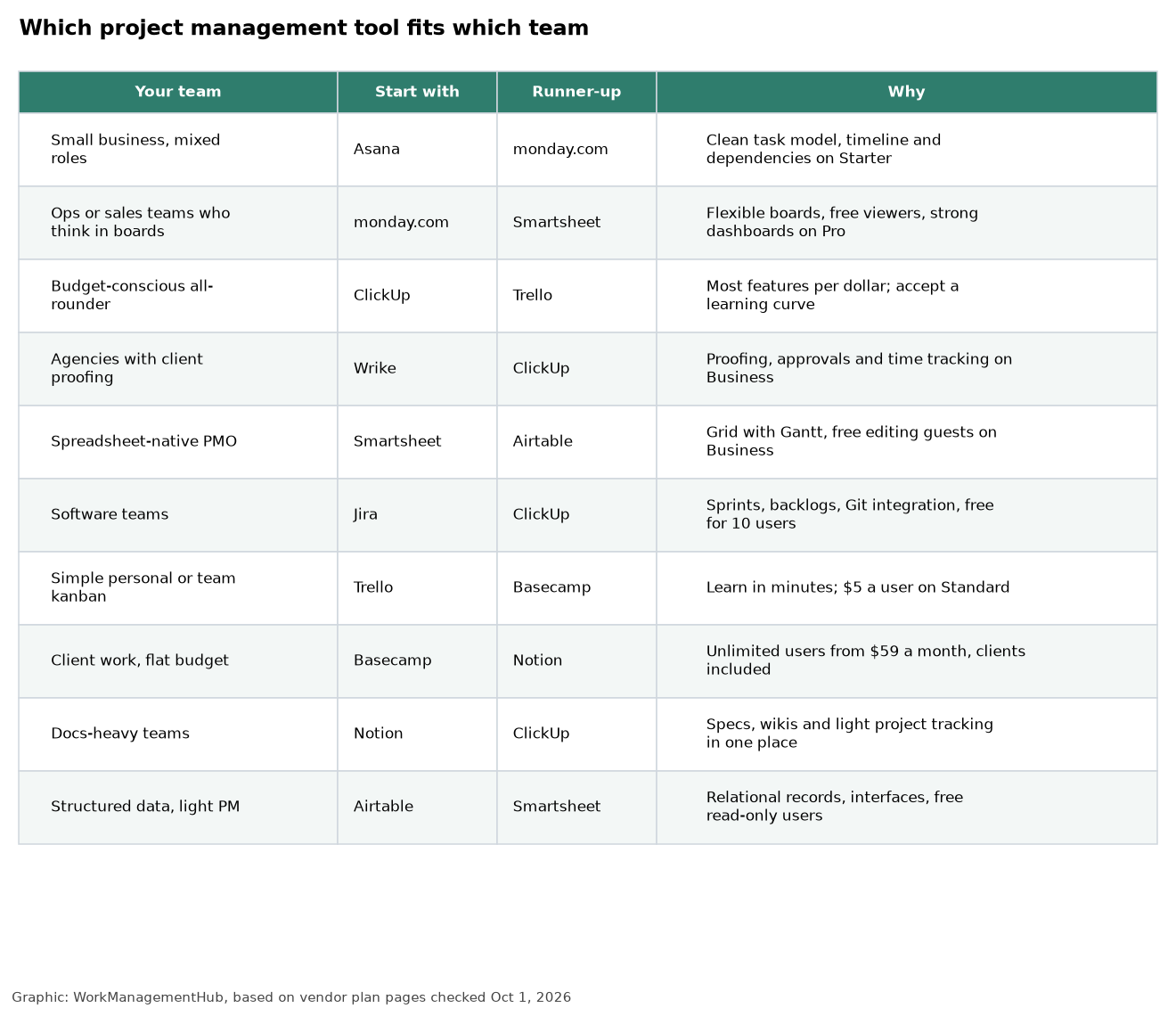
Step 1 — Define your primary workflow type: Is your team managing tasks and deadlines (any tool works), running agile sprints (Jira or ClickUp), building a knowledge base alongside projects (Notion or Confluence), or managing complex multi-department initiatives (Smartsheet or Monday.com Work OS)? Your workflow type eliminates 80% of options immediately.

Step 2 — Count your integrations: Pull up a list of every tool your team uses daily — Slack, Google Workspace, Salesforce, GitHub, Figma, Zoom, etc. Run that list against each tool’s native integrations page. A tool with 90% native coverage beats one requiring Zapier for everything. Zapier adds latency, cost, and fragility.

Step 3 — Calculate total cost of ownership: Sticker price is almost never the real cost. Factor in: per-seat licensing × team size × annual commitment, implementation and training time (2 weeks for simple tools, 3–6 months for Jira/Smartsheet at scale), admin overhead (dedicated admin needed?), and add-on costs (storage, extra automations, SSO, SAML).

Step 4 — Run a 2-week pilot on a real project: Not a demo — a live project. Assign real tasks, have real people update statuses, generate a real report. This surfaces UX friction, missing features, and adoption resistance that no demo will reveal.

Team TypeBest ToolRunner-UpAvoid If…
Software developmentJiraLinearNo dedicated admin available
Marketing teamsAsanaClickUpNeed deep CRM integration
Enterprise / complex programsSmartsheetMonday.comTeams want a consumer-grade UX
Startups / small teamsClickUpNotionNeed simple onboarding in < 1 day
Knowledge-heavy teamsNotionConfluenceNeed advanced task dependencies
Client-facing agenciesMonday.comTeamworkDon’t need client portals

Frequently Asked Questions: Best Project Management Software 2026

What is the best free project management software in 2026?

Asana’s Free plan is the strongest free tier for task management — it supports unlimited users for core task tracking, though it limits dashboards and reporting. ClickUp’s Free plan is the most generous in raw features (unlimited tasks, 100MB storage, basic automations). For knowledge-heavy teams, Notion’s Free plan is unmatched. For development teams, Jira’s Free plan supports up to 10 users with full agile features.

Which project management tool is easiest to learn in 2026?

Trello has the gentlest learning curve — teams can be productive within an hour. Monday.com takes a day or two to configure well but feels intuitive. Asana and Notion require 1–2 weeks for teams to internalize properly. ClickUp is powerful but has a steep learning curve due to its feature density. Jira and Smartsheet both require dedicated setup time and ideally a certified admin for enterprise deployments.

Is Monday.com or Asana better for cross-functional teams?

Both excel here, but with different strengths. Asana is better when cross-functional teams need to align on goals and track OKRs alongside tasks — its Goals feature and Portfolio views are purpose-built for this. Monday.com is better when teams need highly visual dashboards, flexible workflows, and CRM-style contact management alongside project tracking. For pure project collaboration, it’s too close to call — run pilots of both.

What project management software does Microsoft use internally?

Microsoft uses its own tools — primarily Azure DevOps (for engineering teams), Microsoft Planner and Project for the Web (for business teams), and Teams as the collaboration backbone. Many Microsoft business units also use third-party tools like Jira for development workflows. For organizations standardized on Microsoft 365, the native Microsoft suite is often the lowest-friction choice, especially now that Microsoft Project Online is retiring in 2026.

How much should a company budget for project management software in 2026?

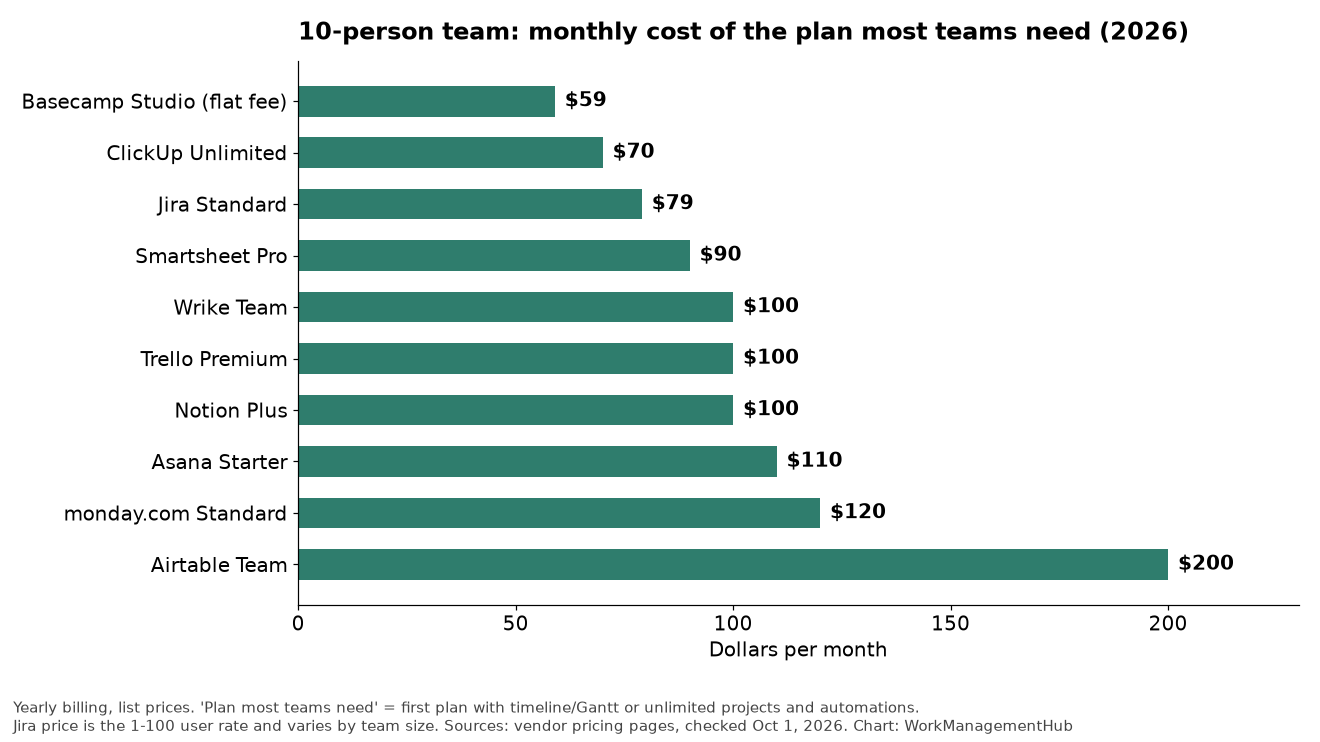
For a 50-person team on mid-tier plans, expect to pay: ClickUp ~$900/month, Asana ~$1,250/month, Monday.com ~$1,250/month, Smartsheet ~$1,000/month, Jira ~$400/month (their pricing advantage is significant at scale). Enterprise plans with SSO, advanced security, and dedicated support add 30–50% to these figures. Always negotiate annual contracts — discounts of 15–25% are standard when committing for 2+ years.

📚 Related Reading on WorkManagement Hub

  • → Best Free Project Management Tools 2026: 10 Tools Ranked
  • → Asana vs Monday.com vs ClickUp: AI Features Compared 2026
  • → Microsoft Project Online Retiring: 8 Best Alternatives

Author

Shaik KB

Follow Me
Other Articles
Previous

ClickUp Review 2026: The Most Honest Assessment You’ll Read This Year

Next

Jira vs Asana 2026: Which Project Management Tool Wins? (Honest Comparison)

No Comment! Be the first one.

    Leave a Reply Cancel reply

    Your email address will not be published. Required fields are marked *

    Sponsored Smartsheet Expert Services – Implementation, Automation, Training
    Sponsored Power BI & Tableau Analytics – Dashboards, Reporting, Insights
    Sponsored AI Agents for Work Management – Automate Tasks, Integrate Tools

    Categories

    • Airtable (16)
    • Alternatives (12)
    • Asana (36)
    • ClickUp (42)
    • How-To Guides (157)
    • Integrations (16)
    • Jira (31)
    • Monday.com (41)
    • Notion (29)
    • Pricing Guides (11)
    • Project Management (76)
    • Smartsheet (33)
    • Tool Comparisons (50)
    • Wrike (15)

    Recent Post

    • ClickUp Brain Not Working? 7 Fixes for Super Agent & AI Errors in 2026
    • Smartsheet vs Linear 2026: Which Is Better for Your Team?
    • Notion Workers for Agents 2026: Complete Setup Guide to Code-Powered Automations
    • How to Use the Smartsheet AI Dashboard Builder in 2026: Complete Step-by-Step Guide
    • How to Set Up Asana Timesheets and Budgets in 2026: Complete Add-On Setup Guide
    Work Management Hub

    Independent expert reviews & comparisons of work management tools — helping 50,000+ teams choose the right software.

    Tools We Cover

    • Smartsheet
    • Monday.com
    • ClickUp
    • Asana
    • Notion
    • Jira
    • Wrike
    • Airtable

    Company

    • About Us
    • Contact Us
    • Privacy Policy
    Copyright 2026 — Work Management Hub. All rights reserved. Blogsy WordPress Theme